
The fastest, most defensible way to track field employees is GPS-verified time clocks paired with geofencing and lightweight photo verification at clock-in. Heyhive builds these three layers into one workflow, so managers get accurate attendance without babysitting every job site. Your first move: run a two-week GPS-first pilot on one crew, publish a short tracking policy, and expand once the data proves clean.
TL;DR:
- GPS accuracy typically ranges from 10 to 50 meters outdoors, with better precision in open areas and more variability in urban or wooded sites.
- Geofences should be set with a moderate radius and check-in windows to avoid false positives or missed clock-ins, especially in dense urban environments.
- Incorporating photo or digital signature verification at clock-in effectively prevents buddy punching and GPS spoofing attempts.
- Offline logging with automatic synchronization is essential for remote or poor coverage areas, ensuring accurate attendance records.
- Transparency, consent, and clear policy communication are more critical for trust and compliance than the specific technical features of the tracking system.
Table of Contents
- Why Tracking Field Employees Matters for Managers
- Core Methods to Track and Verify Field Attendance
- What to Look for in Field Tracking Software
- Privacy, Consent, and Legal Checklist for Employee GPS Tracking
- Implementation Checklist: Pilot, Rollout, and ROI Metrics
- Heyhive's Approach: GPS-First Tracking Meets AI Scheduling
- The Real Lesson on Tracking Field Employees
- Try Heyhive: What to Ask for in a Demo
- Sources
Why Tracking Field Employees Matters for Managers
Field teams cost money when nobody can prove where they were or when they got there. Every disputed timesheet, every "I was on site" claim you can't verify, every dispatcher guessing which technician is closest, all of it traces back to the same gap: no reliable record of location and time.
GPS-verified attendance closes that gap in three concrete ways. Payroll gets cleaner because clock-in and clock-out times come from the device, not a memory or a paper sheet filled out at the end of the week. Dispatching gets faster because you know which crew is actually near the next job, not which crew said they'd be there. And attendance disputes mostly disappear, because the record isn't a debate, it's a timestamp with coordinates attached.
Reviewers on platforms like G2 consistently flag reliability and clean payroll integration as the top reasons managers pick one tracking tool over another. That tracks with what shows up in the field: the value isn't the tracking itself, it's what the tracking lets you stop doing manually.
That said, set expectations honestly before you roll anything out:
- GPS accuracy varies. Expect a working range of roughly 10 to 50 meters outdoors, worse near tall buildings or dense tree cover.
- Battery drain is real. Continuous high-frequency GPS pinging burns phone battery faster than periodic location checks.
- Trust risk exists. Employees who feel watched around the clock disengage faster than ones told exactly what's tracked and why.
None of these limits are reasons to skip tracking. They're reasons to design it carefully, which is exactly what the next few sections cover.
Core Methods to Track and Verify Field Attendance
Most field tracking systems combine a handful of proven methods. Knowing how each one works, and where it breaks down, is what separates a smooth rollout from a frustrating one.
1. GPS time clocks
A GPS time clock captures the device's coordinates the moment an employee punches in or out, stamping that location alongside the time. App listings for tracking software, including one Microsoft Store product page, describe this as standard behavior: coordinates logged at clock-in, paired with geofencing and offline sync for crews working outside cell coverage.
Accuracy depends on the phone's GPS chip and surrounding terrain. Open parking lots and job sites usually deliver tight readings. Urban cores and heavily wooded sites push accuracy toward the wider end of that 10 to 50 meter range. Build that variance into your policy from day one instead of treating every outlier as a red flag.
2. Geofencing
A geofence is a virtual boundary drawn around a job site, warehouse, or client property. When an employee's device crosses into that boundary, the app can automatically prompt a clock-in or log an arrival. When they leave, it does the reverse.
The setup detail managers get wrong most often is radius size. Draw the fence too tight and legitimate clock-ins fail because the GPS reading landed just outside the line. Draw it too loose and you're not really verifying site presence anymore. A moderate fence radius works for most standalone job sites; tighter for dense urban blocks where multiple client addresses sit close together. Pair the fence with a check-in window (say, 15 minutes before and after scheduled start) to cut down false positives from employees driving past a site without stopping.
3. Photo and digital signature verification
GPS alone can be spoofed or gamed. A phone can be handed to a coworker who clocks in on someone else's behalf, a practice known as buddy punching. Layering in a selfie photo or digital signature at clock-in closes that loophole, because it ties the punch to a face, not just a device.

Several field-tracking platforms now combine GPS with photo checks and device ID verification specifically to catch mock-location spoofing, where an employee fakes their GPS signal using developer tools. It's a small extra step for the employee, and a strong deterrent against attendance fraud.
4. Offline logging and sync
Field crews frequently work where cell signal doesn't reach: rural sites, basements, remote infrastructure. A tracking app that requires live connectivity to log a punch is useless in those conditions. Offline-first design solves this: the app caches the clock-in event locally, then syncs it automatically once the device reconnects, as demonstrated by the Stable Manager offline-capable field app with scheduling and offline mobile features.
Vendor documentation for GPS tracking apps like Jibble treats offline caching as a baseline requirement, not a premium feature. If you manage any crew that works outside solid coverage, offline sync isn't optional. Confirm it before you commit to any platform.
5. Manual and supervisor verification
Automated tracking doesn't replace judgment entirely. A supervisor's visual confirmation still matters for edge cases: an employee whose phone died mid shift, a new site not yet geofenced, or a dispute that needs a human to resolve. Keep a lightweight manual override in your workflow so exceptions don't turn into payroll headaches.
Pro Tip: Set your geofence check-in window slightly wider than you think you need. A five-minute buffer that's too tight generates more support tickets than it prevents fraud.
What to Look for in Field Tracking Software
Not every tracking tool covers the same ground, and the gaps tend to show up only after you've already committed. Run any candidate through this checklist before you sign anything.
Must-have features:
- GPS-verified clock-ins tied to timestamp and coordinates
- Geofencing with adjustable radius and check-in windows
- Offline mode with automatic sync once connectivity returns
- Audit logs that record every edit, override, and manual adjustment
- Direct payroll export in a format your accounting system accepts
Operational extras worth comparing:
- Built-in scheduling that respects availability and certifications
- Route or dispatch optimization based on real-time crew location
- Photo proof or digital signature at clock-in
- Custom alerts for late arrivals, missed geofences, or overtime thresholds
- Integration options with existing HR or payroll platforms
Security and compliance deserve equal weight. Look for encryption of location data in transit and at rest, role-based access so only the people who need location data can see it, and retention controls that let you delete old records on a defined schedule rather than keeping them indefinitely.
Usability matters more than feature count. A system that drains an employee's battery by noon gets uninstalled quietly, and a manager dashboard that buries clock-in exceptions under three menus doesn't get checked daily. Buyer reviews on platforms like Capterra repeatedly point to admin simplicity and integration reliability as the deciding factors, ahead of raw feature count.
| Evaluation area | What to check | Why it matters |
|---|---|---|
| Core verification | GPS + geofence + photo proof | Prevents buddy punching and disputed hours |
| Offline behavior | Local caching, auto sync | Keeps remote crews logging accurately |
| Payroll fit | Export format, integration options | Cuts manual data entry and errors |
| Data controls | Encryption, retention limits, role access | Reduces privacy and compliance risk |
| Commercial terms | Transparent pricing, free trial or demo | Lets you validate fit before committing |
On the commercial side, insist on transparent pricing tied to headcount or feature tier, and never buy without a trial or live demo. A platform that hides its pricing structure until a sales call is usually asking you to commit before you've seen how the software behaves with your actual crew data.
Reviews for platforms like Timeero show the same pattern across the category: integrations and admin usability drive satisfaction far more than any single flashy feature.
Privacy, Consent, and Legal Checklist for Employee GPS Tracking
Tracking done right builds trust. Tracking done carelessly invites both legal exposure and a workforce that stops trusting management. Work through this checklist before you flip the switch on any system.
- Track only during scheduled work hours. Location logging should start at clock-in and stop at clock-out, never running in the background on personal time.
- Put it in writing. Document what's tracked, why, and for how long in a written policy every employee signs before their first tracked shift.
- Limit who can see the data. Restrict location access to the managers who actually need it for scheduling, dispatch, or payroll verification.
- Set a retention limit. Decide how long location logs stay in the system, then delete them on that schedule instead of keeping everything forever.
- Give employees access to their own logs. A simple way to view and dispute a flagged entry heads off most complaints before they escalate.
- Loop in HR and payroll early. Location data should feed legitimate work verification, not become a side channel for unrelated performance judgments.
- Check state-specific rules before rollout. Employee monitoring laws vary, and some states require advance written notice or specific disclosure language.
Privacy research on employee location tracking makes the same core recommendation: keep tracking consent-based, limited to work hours, and transparent about what's collected and why. That guidance holds regardless of which software you pick.
Pro Tip: Run your draft tracking policy past a small group of employees before company-wide rollout. Their questions will tell you exactly what your written policy leaves unclear.
If your workforce spans multiple states, or if you're dealing with any union agreements, get employment counsel to review the policy language before publishing it company-wide. A ten-minute legal review upfront is cheaper than a dispute six months in.
Implementation Checklist: Pilot, Rollout, and ROI Metrics
Rolling out tracking software to your entire field team on day one is how pilots turn into rebellions. Stage it instead.
- Pick a pilot team. Choose one crew or department, ideally 5 to 15 people, and set a defined pilot window of two to four weeks.
- Define success metrics before you start. Decide what "working" looks like: clock-in compliance rate, payroll error reduction, or faster time-to-dispatch.
- Configure geofences and rules. Set boundaries, check-in windows, and any photo verification requirements for the pilot sites specifically.
- Publish the policy and run training. Walk the pilot team through what's tracked, why, and how to flag a dispute, then collect signed consent.
- Tune technical settings. Balance ping frequency against battery drain, and confirm offline sync works before crews leave coverage areas.
- Run payroll in parallel. Process two full payroll cycles using both the old method and the new system, then reconcile the differences line by line.
- Expand only after reconciliation clears. Roll out to additional teams once the parallel payroll run shows consistent, accurate numbers.
Track these metrics through the pilot and beyond:
- Clock-in compliance rate, the share of shifts with a verified GPS punch
- Payroll error reduction, comparing disputed hours before and after rollout
- Time-to-dispatch, how quickly a manager can assign the nearest available crew
- Overtime variance, whether tracked hours match what's actually being paid
A guide like Heyhive's construction-focused tracking playbook walks through pilot sequencing in more detail if your field team spans multiple job sites at once.
Heyhive's Approach: GPS-First Tracking Meets AI Scheduling
Heyhive builds GPS-verified clock-ins directly into the same platform that generates your weekly schedule, so location accuracy and shift planning aren't two disconnected systems fighting for the same data.
Here's what that looks like in practice:
- GPS-verified clock-ins capture location the moment a field employee punches in, cutting down disputed hours before they reach payroll.
- AI scheduling builds full weeks of shifts in seconds, respecting availability, certifications, and overtime limits automatically.
- Manager approval before publication keeps a human in the loop, so AI-generated schedules never go live without a quality check.
- Payroll-ready exports turn verified hours into a format your payroll system can process directly, cutting manual entry.
The combination shows up in fewer administrative hours spent chasing timesheets, faster coverage of open shifts when someone calls out, and payroll runs that don't require a week of cleanup. For a deeper look at how GPS time clocks handle secure attendance and payroll formatting, Heyhive's GPS time clock guide covers the setup details.
The Real Lesson on Tracking Field Employees
Most advice on this topic treats tracking as either a surveillance problem to apologize for or a technology problem to solve with more sensors. Both miss the point. The managers who get this right treat GPS verification as an accuracy tool, full stop, the same category as a barcode scanner or a signed delivery receipt.
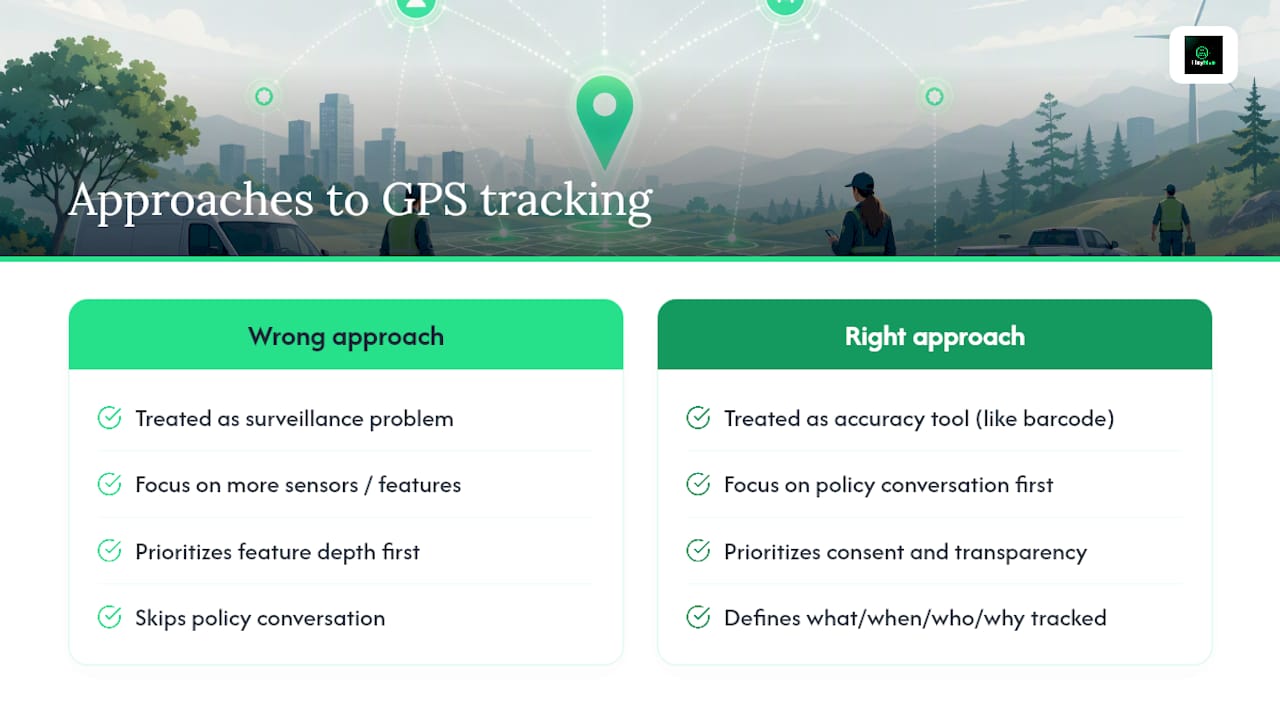
The conventional wisdom oversells geofence radius and ping frequency as the hard part. They're not. The hard part is the policy conversation you have before any app gets installed: what's tracked, when, why, and who sees it. Skip that step and even a flawless GPS setup will get read as surveillance, because nobody explained the difference.
If you're prioritizing one thing first, make it consent and transparency, not feature depth. A basic GPS clock with a clear written policy beats a feature-rich platform rolled out with no explanation. Get the trust layer right, and the technology layer becomes the easy part.
— Heyhive
Try Heyhive: What to Ask for in a Demo
If you're evaluating tracking software after reading this, put it to the test before you commit. Heyhive's free trial gives managers a way to see the full loop, GPS verification, AI scheduling, and payroll export, running against a real week of shifts instead of a sales deck.

When you book a demo, ask to see these specific pieces in action:
- The GPS verification flow from an employee's phone, start to finish
- How a geofence gets created and adjusted for a real job site
- What happens when a device goes offline and reconnects later
- A sample payroll export formatted for your actual pay cycle
Run your trial the same way you'd run the pilot described earlier: one team, two to four weeks, with a defined reconciliation step against your current payroll process before rolling it out further. Head to Heyhive's platform overview to start a free trial and see how GPS-verified attendance and AI scheduling work together on your own schedule data.
Sources
- Navigating employee privacy and compliance: PWCs new location-tracking vs EU's GDPR regulation
- Connecteam reviews on G2
- Employee tracking app listing on Microsoft Store