
For construction teams, the fastest path to accurate payroll and job costing is mobile-first, GPS-verified time tracking with automatic geofencing and payroll-ready exports. Heyhive delivers exactly that: GPS clock-ins, AI-generated schedules, manager approval controls, and direct payroll exports built for field crews. QuickBooks reports that better time tracking can increase billable time and cut payroll costs. Heyhive offers a free demo so you can verify the fit before you commit.
Table of Contents
- What should construction time-tracking software actually do?
- How does the workflow run from project setup to payroll?
- Why do construction firms get measurable results from dedicated time tracking?
- Mobile app, site kiosk, or rugged hardware: which deployment fits your crew?
- What payroll and accounting integrations should you expect?
- What are the 8 questions to ask every vendor?
- How long does rollout take, and when do you see ROI?
- Why Heyhive is a strong fit for construction teams
- Key Takeaways
- What contractors actually value in a time-tracking rollout
- Heyhive makes accurate field time tracking straightforward
- Useful sources for integration and vendor research
What should construction time-tracking software actually do?
Every construction site has the same core problem: hours get lost between the field and the payroll run. A solid jobsite time tracking solution closes that gap with a specific set of features.
Core features every construction tracker needs:
- Mobile GPS clock-in: Workers clock in from their phones; the system logs their GPS coordinates at the exact moment.
- Geofencing and auto clock-in: The app detects when a crew member enters a defined job site boundary and clocks them in automatically, eliminating missed punches.
- Offline mode: Crews capture hours even without cell service; the app syncs when connectivity returns.
- Timesheets and supervisor approvals: Foremen review and approve entries before they reach payroll.
- Job and cost code assignment: Workers tag hours to specific projects, phases, or equipment so job costing stays accurate.
- Payroll exports: One-click CSV, XLSX, or direct integration outputs that map to your payroll system.
- Scheduling: Assign crews to shifts and sites in advance so everyone knows where to be.
- Audit trails: Every edit, approval, and clock event is logged with a timestamp and user ID.
Those features map directly to construction scenarios. A foreman arriving at a highway project gets auto-clocked the moment the truck crosses the geofence. A concrete crew working a remote pour captures hours offline; the data syncs at lunch when they hit the site trailer's Wi-Fi. Equipment operators tag hours to a specific machine and cost code in one tap.
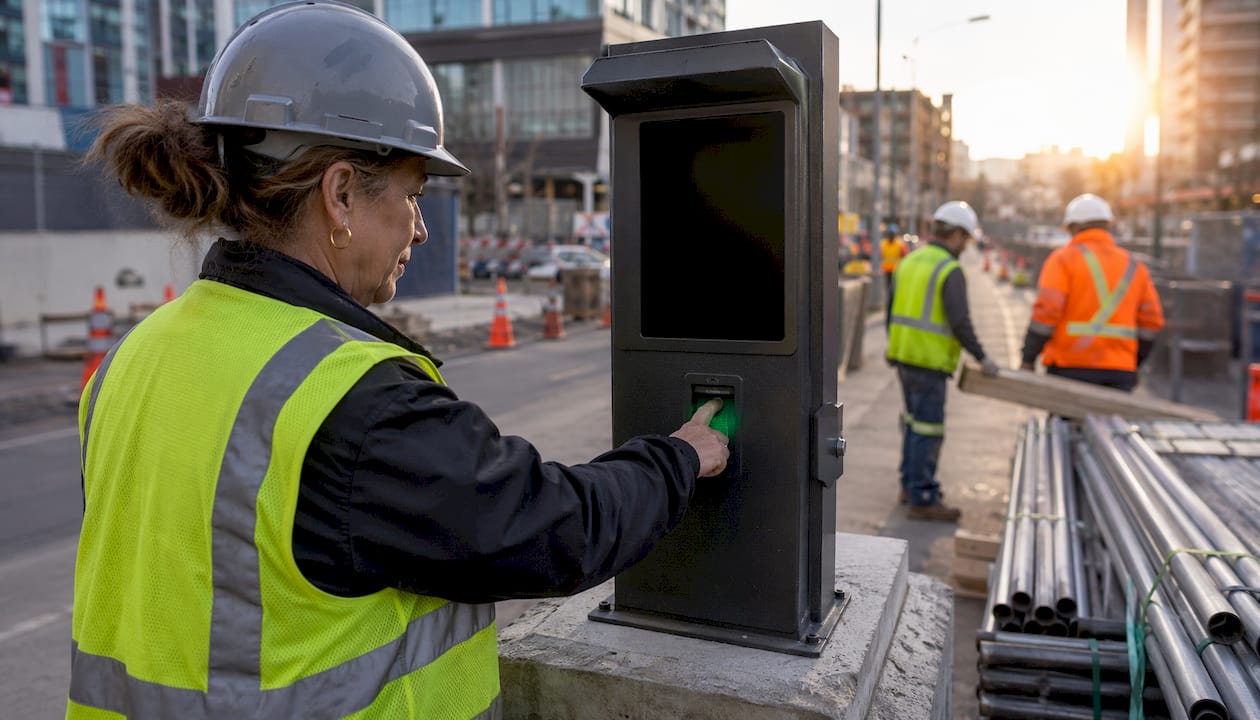
Anti-time-theft controls deserve a specific mention. Buddy-punching, where one worker clocks in for another, is a real cost on large crews. Photo verification, facial recognition, and PIN-based kiosks each address it differently. GPS and geofencing add a location layer that makes it much harder to fake a clock-in from off-site.
Pro Tip: Set geofence radii conservatively, around 300–500 feet for most sites. Too wide and you capture workers still in the parking lot; too tight and you generate false missed-punch alerts for crews working the site perimeter.
How does the workflow run from project setup to payroll?
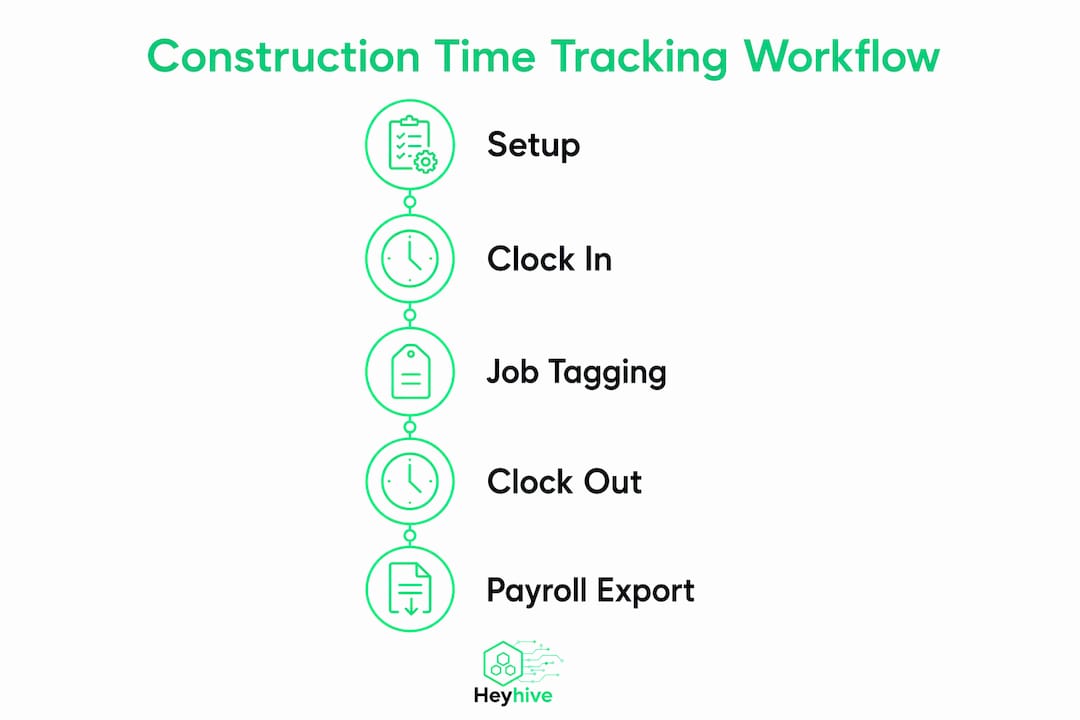
The real value of a construction time tracking app shows up in how it compresses a week of manual data entry into a few minutes of review. Here is the typical flow, from first setup to payroll export.
- Create the project and cost codes. The PM or payroll admin sets up the job in the system, adds cost codes (labor, equipment, subcontractor), and defines the geofence boundary.
- Assign the crew and publish the schedule. The foreman or PM assigns workers to shifts and sites. With AI scheduling, this step takes seconds rather than an hour.
- Crew clocks in via GPS or auto-geofence. Workers open the app, tap clock-in, or walk onto the site and get clocked in automatically. Offline captures queue locally and syncs when signal returns.
- Foreman reviews and approves timesheets. At the end of each day or week, the foreman checks entries, corrects any errors, and approves the batch.
- PM or payroll admin exports to payroll. Approved hours export directly to QuickBooks, Xero, or your payroll system with employee IDs, cost codes, pay rates, and overtime flags already mapped.
- Job-cost reconciliation. The accounting team matches exported hours against the project budget, flags variances, and updates the forecast for the next phase.
The field crew's job is simple: clock in, tag the cost code, clock out. The office's job is to review exceptions, not rebuild data. That division of labor is where offline-first mobile apps pay for themselves, because missing time entries from dead-zone sites never make it to payroll.
Pro Tip: Run a 15-minute crew training session on-site before the first day of live use. Show workers exactly what the clock-in screen looks like and how to tag a cost code. Resistance drops sharply when the process takes under 30 seconds.
Why do construction firms get measurable results from dedicated time tracking?
Paper timesheets and spreadsheets have a predictable failure mode: hours get rounded, forgotten, or inflated, and no one catches it until the job is over budget. Dedicated jobsite time tracking fixes that at the source.
The measurable benefits:
- Fewer payroll errors: GPS-verified entries eliminate manual transcription mistakes and rounding disputes.
- Reduced buddy-punching: Location verification and photo check-ins make it impractical to clock in for an absent coworker.
- Faster payroll runs: Approved timesheets export in minutes instead of hours of manual data entry.
- Better job costing: Cost-code tagging gives you real labor costs per phase, not estimates.
- Improved bid accuracy: Historical labor data from completed jobs makes future bids far more precise.
- Overtime control: Real-time hour totals let foremen catch overtime before it happens, not after the check is cut.
By the numbers: QuickBooks reports that construction firms using GPS-verified time tracking see billable time increase by over 10% and payroll costs drop by over 4%.
What success looks like in practice: payroll cycle time drops from two days to a few hours, labor cost variance against budget shrinks to under 5%, and overtime surprises become rare because foremen get alerts before the threshold is crossed. Those are the KPIs worth tracking in your first 60 days.
Mobile app, site kiosk, or rugged hardware: which deployment fits your crew?
There is no single right answer. The best deployment model depends on your crew's phone access, site connectivity, and how many workers share a single check-in point.
| Deployment model | Best for | Key advantage | Key limitation |
|---|---|---|---|
| Crew smartphones (app-only) | Crews with company or personal phones, multi-site operations | No hardware cost, GPS per individual, offline sync | Depends on crew phone availability and battery |
| Shared site kiosk (tablet/iPad) | Large crews at a single gate, workers without phones | One device covers many workers, anti-buddy-punch controls (PIN, facial recognition) | Requires anti-spoofing controls; single point of failure |
| Rugged LTE hardware | Remote sites with no Wi-Fi, extreme weather conditions | Durable, always-on connectivity, no reliance on crew devices | Higher upfront hardware cost |

For most mid-size construction firms, a hybrid approach works best: smartphones for supervisors and mobile crews, a shared kiosk at the site gate for large labor pools. Offline data capture is non-negotiable for remote pours, underground work, or any site where cell coverage is unreliable.
Pro Tip: If you go with a shared kiosk, add facial recognition or photo verification. A PIN alone does not prevent buddy-punching; a photo creates an audit record that deters it.
What payroll and accounting integrations should you expect?
A construction time tracking app that cannot talk to your payroll system is just a digital timesheet. The integration layer is where the real time savings live.
Integrations to confirm before you buy:
- QuickBooks Online and Desktop: Direct sync of hours, cost codes, and employee records.
- Xero: API or native connector for payroll-ready exports.
- Major payroll platforms: ADP, Gusto, Paychex, and similar systems via CSV/XLSX or direct API.
- ERP systems: Procore, Sage, Viewpoint, and similar construction ERPs via middleware or native connectors.
- CSV and XLSX exports: A fallback that every tool should offer, with configurable column mapping for employee IDs, cost codes, pay rates, and overtime rules.
Export format matters as much as the integration itself. Your payroll system needs employee IDs that match its own records, cost codes formatted to your chart of accounts, and overtime flags that reflect your state's rules. Confirm this mapping in a demo before you sign.
Reporting to look for: Payroll-ready timesheets, job-cost summaries by phase and cost code, crew productivity reports, and full audit logs with edit histories. These four report types cover 90% of what a payroll admin and a PM will ask for on any given week.
Accurate job costing depends on mapping time entries to job and cost codes and syncing those fields to your accounting system in payroll-ready formats. That mapping work happens once at setup; after that, it runs automatically on every export.
What are the 8 questions to ask every vendor?
Use this checklist on every demo call. A vendor who cannot answer these clearly is a vendor who has not deployed on real construction sites.
- Does the app work offline, and how does it sync? Ask for a live demo of offline capture and sync behavior. No offline mode is a hard disqualified for field crews.
- How does GPS verification work, and what happens if a worker is off-site? Understand the geofence logic, the alert workflow, and how supervisors handle exceptions.
- Which payroll systems do you integrate with natively? Get a list, then confirm your specific system is on it. "We support CSV export" is not the same as a native QuickBooks sync.
- Can you show me the cost-code mapping in a live export? Watch the actual export file. Confirm column names match your payroll system's import template.
- What anti-buddy-punch controls are included? GPS alone is not enough for shared kiosk deployments. Ask about facial recognition, photo verification, and PIN options.
- What does your data security and privacy compliance look like? Ask about data encryption, SOC 2 compliance, GPS data retention policies, and how you can delete employee data.
- What is the pricing model, and what triggers a tier upgrade? Understand per-user vs. per-device pricing, hardware fees, and what happens to your cost as you add crews.
- What does implementation look like, and what is your SLA for support? Get a realistic timeline and a named support contact, not just a help center link.
Red flags: No offline mode, no direct payroll export, pricing that is only available after a sales call, and a vendor who cannot demonstrate the app with a real crew scenario during the demo.
Pro Tip: Before your pilot, define exactly two or three KPIs you will measure: payroll cycle time, number of timesheet corrections, and labor cost variance vs. budget. Without pre-set metrics, pilots drift and decisions get delayed.
How long does rollout take, and when do you see ROI?
Most construction firms can go from contract to live payroll export in under 30 days. Here is a realistic timeline.
Phase 1: Setup and configuration (Week 1–2). Import your employee roster, configure cost codes, set up payroll integration, and define geofences for your first pilot site. This is mostly admin work; a well-documented vendor makes it fast.
Phase 2: Pilot with one crew (Weeks 3–6). Run one foreman and their crew on the new system alongside your existing process. Measure timesheet accuracy, missed punches, and payroll export time. A 30–60 day pilot gives you enough payroll cycles to spot patterns.
Phase 3: Full site rollout (Weeks 7–12). Expand to all sites, train remaining foremen, and retire the paper process.
Quick ROI example: If your firm runs 50 field workers at an average of $28/hour and buddy-punching or rounding adds just 15 minutes of unearned pay per worker per day, that is $175 in daily payroll leakage. GPS verification closes that gap from day one. Add the time saved on manual timesheet entry, and the subscription cost typically pays back within the first payroll cycle.
Cost buckets to plan for: subscription fees (per user or per device), optional kiosk hardware, a half-day of foreman training, and any integration work if your payroll system needs custom mapping. Free-tier tools can cover entry-level needs, but check export flexibility and API access before committing, since those determine whether the solution scales into your payroll and job-cost systems.
Pro Tip: Run your first payroll export in parallel with your existing process. Compare the two outputs line by line. Any discrepancy is a configuration issue you want to catch before you retire the old system.
Why Heyhive is a strong fit for construction teams
Heyhive was built for exactly the problems construction PMs deal with every day: crews spread across multiple sites, foremen who do not have time for paperwork, and payroll admins who need clean data on Friday afternoon.
| Dimension | Heyhive |
|---|---|
| GPS and auto clock-in | GPS-verified clock-ins with geofencing; location logged at every punch |
| Anti-buddy-punch accuracy | GPS location verification plus manager approval on every timesheet |
| Scheduling | AI generates full crew schedules in seconds; manager approves before publish |
| Payroll and ERP exports | Payroll-ready exports; QuickBooks and Xero integration |
| Hardware options | App-only (iOS and Android); no mandatory hardware purchase |
| Implementation time | Typically live within days; free demo to validate fit |
| Pricing model | Subscription SaaS; tiered by company size and features |
The GPS time clock features in Heyhive give field crews a clock-in experience that takes under 30 seconds, while managers get a real-time attendance dashboard and a one-click approval queue. The AI scheduling engine respects certifications, availability, and overtime limits automatically, so the schedule you publish is already compliant before anyone reviews it.
For a pilot scenario: pick your busiest site, assign one foreman, and run Heyhive alongside your current process for four weeks. Compare payroll cycle time and timesheet correction rates. That comparison is usually all the evidence a PM needs to expand to the full operation.
Key Takeaways
GPS-verified, mobile-first construction time tracking with payroll-ready exports and manager approval workflows is the fastest and most reliable way to eliminate payroll errors, reduce buddy-punching, and get accurate job costs on every project.
| Point | Details |
|---|---|
| GPS plus geofencing is the baseline | Every construction time tracking tool you evaluate must offer GPS clock-ins and geofencing as standard, not add-ons. |
| Offline mode is non-negotiable | Crews in dead zones need offline capture that syncs automatically; missing entries are the top source of payroll errors on remote sites. |
| Payroll export mapping decides ROI speed | Confirm cost-code and employee-ID mapping to your payroll system before you sign; a mismatched export erases the time savings. |
| Pilot before full rollout | A 30–60 day pilot on one site with pre-set KPIs (payroll cycle time, timesheet corrections, labor variance) validates the tool before you commit the whole operation. |
| Heyhive covers the full checklist | Heyhive delivers GPS clock-ins, AI scheduling, manager approvals, and payroll-ready exports in a single subscription with no mandatory hardware. |
What contractors actually value in a time-tracking rollout
The technology is rarely the hard part. The hard part is getting a 55-year-old foreman to trust that the app is not surveillance and a 25-year-old laborer to remember to tap clock-out before he drives off site.
Field-crew resistance almost always comes from one fear: "Is this how they're going to dock my pay?" The managers who roll out time tracking successfully address that fear directly, in the first training session, before anyone opens the app. Show the crew how the system protects them: GPS records prove they were on site, disputes get resolved with data instead of memory, and pay is calculated from verified hours, not a supervisor's estimate.
Practical tips from the field:
- Pilot with your most organized foreman first. Their crew will generate the cleanest data and the fewest support tickets. Use their experience to train the next wave.
- Train in 15-minute micro-sessions on-site. A 90-minute classroom session is forgotten by Friday. A 15-minute walkthrough at the tailgate, on the actual device, sticks.
- Align pay policies before you go live. If your overtime rules, break policies, or travel-time pay are ambiguous, the app will surface every inconsistency. Resolve those in HR before rollout, not after.
- Use geofencing as a reminder tool, not a punishment tool. Auto clock-in reduces missed punches; it should not be used to discipline workers for arriving 90 seconds late. Set that expectation with foremen early.
The most common adoption obstacle is the foreman who keeps a paper backup "just in case." The fix is not to ban paper; it is to make the digital process faster than paper for the foreman's own workflow. When approving 20 timesheets takes two taps instead of 20 minutes, the paper backup disappears on its own.
Heyhive makes accurate field time tracking straightforward
Payroll errors and missing job-cost data cost construction firms real money every week. Heyhive gives you GPS-verified clock-ins, AI-generated crew schedules, manager approval controls, and payroll-ready exports in one platform, with no hardware purchase required to get started.

Bring your payroll export template, a list of your active cost codes, and one pilot site to a Heyhive demo. The team will configure your geofences, map your cost codes, and show you exactly what your first payroll export will look like before you commit. You stay in control at every step: you approve the schedule, you approve the timesheets, and you own the data. Heyhive handles the work behind the work.
Your data is encrypted in transit and at rest, and GPS location data is used solely for attendance verification. Start your demo and see accurate field time tracking in action.
Useful sources for integration and vendor research
Use these resources during vendor calls, integration scoping, and procurement review.
- Heyhive GPS Time Clock and Payroll Features: Detailed overview of Heyhive's GPS clock-in, geofencing, and payroll export capabilities. Use this to map Heyhive's feature set against your construction checklist.
- Heyhive Product and Demo Page: Request a demo, review pricing tiers, and explore the full feature set. The primary starting point for procurement.
- QuickBooks Construction Time Tracking: QuickBooks' own resource on GPS reminders, geofencing, and payroll integration for field crews. Useful for understanding QuickBooks-side integration requirements.
- Trimble B2W Employee App: Product page for B2W's construction time tracking app, covering offline capture and mobile deployment. Reference this when evaluating offline sync behavior and Android/iOS compatibility.
- ConstructionClock: Automatic clock-in product page with details on geofence-triggered entries and QuickBooks/Xero export options. Useful for comparing auto-clocking implementations.
- Jibble Construction Time Clock: Free-tier construction time clock with GPS, facial recognition, and offline mode. Reference when evaluating entry-level pricing and export flexibility before scaling.