
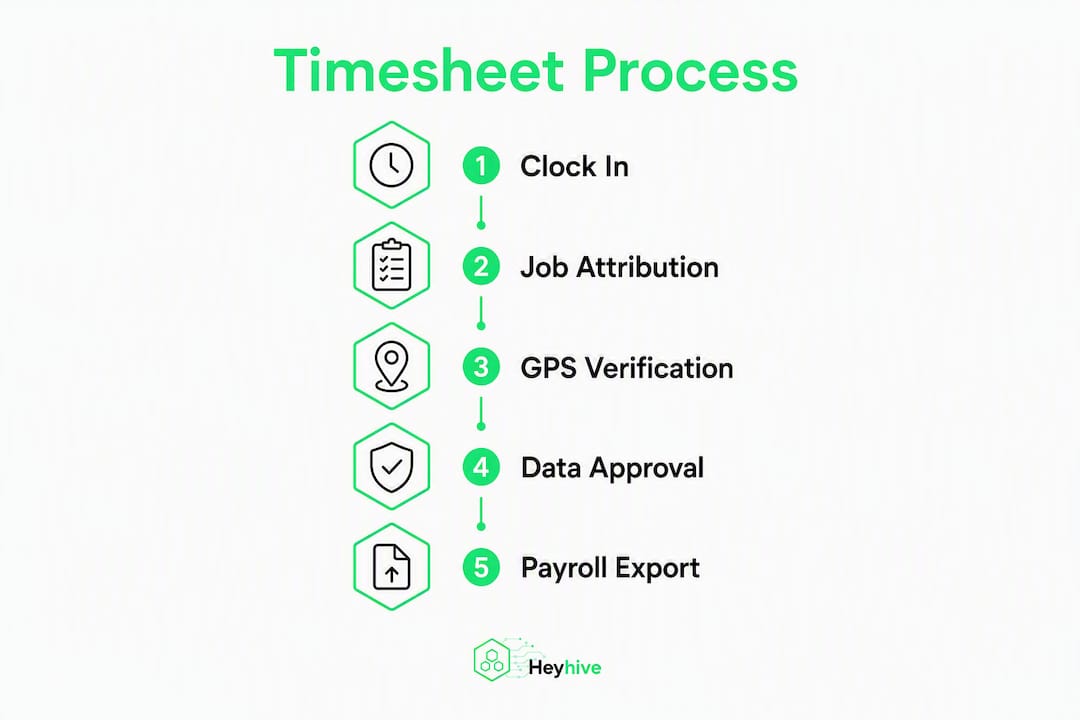
Replace manual spreadsheets with an AI-enabled workforce platform that forces job selection at clock-in, captures GPS-verified punches, and exports payroll-ready hours directly to your accounting system. That single operational shift eliminates buddy-punching, prevents unallocated time, and keeps your labor costs visible against estimates in real time, all without rekeying data. Under the Fair Labor Standards Act (FLSA), accurate workweek records are a legal requirement, not a preference, so the stakes for getting this right are higher than most managers realize. Platforms like Heyhive combine AI scheduling, GPS-verified clock-ins, and approval-gated exports to handle exactly this job.
Table of Contents
- What do contractor timesheets actually track for field teams?
- Why manual timesheets keep failing field crews
- How do you collect accurate contractor timesheets from field crews?
- What fields should a contractor timesheet include?
- How do you export timesheets for payroll and contractor invoicing?
- How do you roll out an AI-powered timesheet system without disrupting payroll?
- What privacy and consent rules apply to GPS time tracking in the U.S.?
- Why an AI-enabled platform is the practical answer for contractor timesheets
- Key Takeaways
- What Heyhive sees when teams make the switch
- Heyhive gives you GPS-verified timesheets without the admin overhead
- Useful sources and references
What do contractor timesheets actually track for field teams?
A contractor timesheet is the single source of truth for who worked, when, on which job, and whether that time is billable. That sounds simple. In practice, most teams need two distinct outputs from the same record: a contractor invoice showing billable hours by project, and a payroll file showing total hours worked within the FLSA workweek for overtime calculations. Mixing those totals in one column is where disputes start.
The operational scope also varies by worker type:
- Hourly employees on a job site need FLSA-compliant records with overtime flags and workweek boundaries.
- Independent contractors billing by the hour need project-level billable totals, rate confirmation, and itemized task notes.
- Subcontractors often need both: their own payroll records plus client-facing billable summaries.
Poor data quality across any of these categories produces disputed invoices, payroll errors, and hidden labor overruns that only surface at job close-out, when it is too late to recover margin.
Why manual timesheets keep failing field crews
The failure modes are predictable. Buddy punching, where one worker clocks in for another, is the most common. Late or retroactive entries, where workers fill in hours from memory at the end of the week, are nearly as damaging because they destroy the GPS timestamp that makes a record defensible. Unallocated time, hours logged without a job code, forces supervisors to reconcile spreadsheets after the fact instead of catching overruns while the job is still running.

Real-time job-level tracking lets managers catch budget overruns early, often within the first few days of a job, rather than waiting for post-period reconciliation. That window matters. By day three of a five-day job, you still have time to adjust crew size or scope. At close-out, you are just absorbing the loss.
Some integrated platforms that pair AI estimating with automated crew time tracking report about 20% cost savings from tighter labor-to-estimate visibility. That figure reflects what happens when every hour is attributed to a job in real time rather than reconstructed from memory.
Other common failure modes worth diagnosing before you pick a solution:
- Missed mid-shift job transfers, where a crew moves from one site to another but the clock-in stays on the original job
- Scope creep from untracked non-billable work that inflates apparent utilization without generating revenue
- Client disputes that slow payment because invoices lack GPS-verified timestamps
How do you collect accurate contractor timesheets from field crews?
Accurate collection starts with the app behavior, not the policy. GPS punch-in with geofencing restricts clock-ins to within a configured radius of the job site and captures location at every punch. Forcing job selection at clock-in means workers cannot punch without attributing time to a specific job code, eliminating the post-shift reconciliation problem entirely.
Required app behaviors:
- Native mobile app with offline-first capability that syncs automatically when connectivity returns, preventing data loss on remote sites
- Timestamped GPS capture at clock-in and clock-out
- Geofence configuration per job site, with alerts for out-of-zone punches
- Forced mid-shift transfer when a worker moves between jobs
Admin controls to enforce:
- Block clock-ins from unapproved devices
- Require short exception notes for any manual edit
- Lock approved pay periods to prevent back-dated changes
- Require supervisor approval before any export runs
Setup checklist:
- Define your job list and cost codes before go-live
- Configure a geofence radius for each active site
- Enable forced job selection at clock-in
- Set your offline sync policy and test it on a low-signal device
- Configure the approvals workflow with designated supervisors
Pro Tip: Set your geofence radius to match the actual site boundary, not a generous buffer. A tight radius catches out-of-zone punches; a loose one defeats the purpose of geofencing entirely.
What fields should a contractor timesheet include?
A well-structured timesheet keeps billable totals, payroll totals, and non-billable context in separate columns. Mixing those totals causes rework on both the invoice and the payroll side.
Required fields:
- Employee name and ID
- Date, start time, end time
- Unpaid break duration, paid break duration
- Job or project code, task or phase
- Billable flag (yes/no), rate if variable
- Overtime flag
- Notes for exceptions
- GPS coordinates and timestamp at punch-in
- Approver name and approval timestamp
Sample single-shift record:
| Field | Example Value |
|---|---|
| Employee | J. Rivera (ID: —) |
| Date | March 12, 2026 |
| Start / End | 7:00 AM / 3:40 PM |
| Job Code | PROJ-— / Phase 2 |
| Billable Hours | 7 hrs (flagged billable) |
| Overtime Flag | No |
| GPS Punch-In | [GPS coordinates] — 7:00 AM |
| Approved By | S. Park — March 12, 2026, 4:00 PM |
Keep non-billable hours in the record for operational context, but never roll them into the billable total. That separation is what prevents invoice disputes before they start.
How do you export timesheets for payroll and contractor invoicing?
Your export targets are different for payroll and invoicing, and treating them the same is a common source of errors. Payroll needs FLSA workweek totals, overtime flags, and employee IDs in a format your system accepts. Direct exports to ADP and similar payroll platforms eliminate manual re-entry and the transcription errors that come with it. Client invoices need project-level billable hours, task notes, and rates, not overtime calculations.
Pre-export checklist:
- Pay period is locked and no unapproved entries remain
- All supervisors have stamped approvals with timestamps
- FLSA workweek boundaries are validated (not calendar week unless they match)
- Billable and payroll totals are in separate columns
- Audit trail for edits is intact and visible in the export
Pitfalls to avoid:
- Exporting late entries that were added after the pay period closed without a supervisor note
- Sending a payroll file that includes contractor invoice rates, which can expose confidential billing information
- Missing GPS or approval metadata, which is the first thing a client challenges in a dispute
Pro Tip: Require an approval stamp showing the approver's name, timestamp, and any comment directly in the export file. Payroll and billing teams then see the same audit trail, and you have a defensible record if either side questions a figure.
How do you roll out an AI-powered timesheet system without disrupting payroll?
A phased rollout protects your first payroll cycle. The goal is to run the new system in parallel with your existing process for one period before you cut over.
Suggested timeline:
- Weeks 1–4 (Pilot): Select one or two crews, pre-configure jobs and geofences, train supervisors, and run shadow payroll alongside your current process.
- Weeks 5–6 (Iterate): Adjust geofence radii, refine the job selection list based on crew feedback, and fix any export mapping errors.
- Weeks 7–12 (Phased rollout): Expand by region or crew type, train remaining supervisors, and publish the enforcement date for mandatory job attribution.
- After first full pay period: Lock approved periods, audit overtime calculations, and measure labor-vs-estimate variance.
Shadow payroll means running your new platform's hours export through your payroll system in test mode for one full pay period, comparing the output to your existing payroll before anyone's check depends on it. This catches overtime edge cases and field-mapping errors before they become pay disputes.
Rollout checklist:
- Pilot crews selected and notified
- Job codes and cost codes pre-loaded
- Geofences configured and tested on-site
- Supervisors trained on approvals and edit workflow
- Shadow payroll completed and discrepancies resolved
- Enforcement date published to all crews
- Weekly reconciliation scheduled for the first two months
Pro Tip: Map your export fields to your payroll system before the pilot starts, not after. A mismatch between your platform's overtime field and your payroll system's column header is the most common cause of shadow-payroll failures.
What privacy and consent rules apply to GPS time tracking in the U.S.?
GPS tracking of employees during work hours is generally lawful in the United States when the purpose is job-related and workers receive clear written notice. The key is transparency and scope.
Privacy controls to implement:
- Provide written notice before enabling GPS tracking, stating when location is recorded and for what purpose
- Limit location capture to work hours only; disable continuous tracking outside the shift
- Document your data retention schedule and who has access to location records
- Use role-based access so only authorized supervisors and payroll staff can view raw GPS data
Security controls:
- Encrypt timesheet data in transit and at rest
- Lock audit logs for approved periods so records cannot be altered after sign-off
- Restrict export permissions to designated roles
Operational guidance:
- Set geofence radii to match actual work site boundaries rather than broad areas
- Use an offline-first app for crews in low-connectivity areas to prevent data gaps that look like missing punches
- Maintain a documented correction workflow so workers know how to dispute an incorrect entry
Pro Tip: Publish a one-page employee FAQ that explains when location is recorded, how long data is kept, and how to request a correction. Crews who understand the system push back less and submit more accurate records.
Why an AI-enabled platform is the practical answer for contractor timesheets
The operational design that solves the problems above has four non-negotiable components: forced job attribution at clock-in, GPS verification with geofencing, a locked approval workflow, and payroll-ready exports with a visible audit trail. Manual spreadsheets cannot enforce any of these. A basic time clock app enforces some but rarely all four together.
An AI-enabled platform like Heyhive adds a fifth layer: AI scheduling that respects certifications, availability, and overtime limits, then routes shifts through manager approval before publication. That means the schedule feeding your timesheets is already compliant before the first punch happens.
Why this combination works:
- GPS-verified clock-ins prevent buddy-punching and create a defensible record for client invoices
- Forced job selection eliminates unallocated hours and surfaces overruns early
- Payroll-ready exports with approval stamps remove rekeying and reduce payroll errors
- Real-time labor-vs-estimate dashboards let you act on overruns during the job, not after
Integrated platforms that pair AI estimating with crew tracking report significant cost savings from this kind of labor visibility. Providing itemized, GPS-verified logs alongside invoices also reduces billing disputes and clarifies exactly what clients are paying for.
Pro Tip: After your first two full payroll cycles on the new system, pull a labor-vs-estimate variance report by job. That single report will show you whether your job codes are granular enough and whether any crew is consistently running over before close-out.
Key Takeaways
Replacing manual contractor timesheets with an AI-enabled, GPS-verified platform that forces job attribution at clock-in is the single most effective way to protect margins, reduce payroll errors, and produce defensible client invoices.
| Point | Details |
|---|---|
| Force job selection at clock-in | Workers cannot punch without a job code, eliminating post-shift reconciliation and unallocated hours. |
| GPS verification prevents disputes | Timestamped location data at every punch creates an audit trail clients and payroll teams can verify. |
| Separate billable and payroll totals | Keep invoice hours and FLSA workweek hours in distinct columns to prevent rework on both outputs. |
| Run shadow payroll before cutover | Parallel-run the new system for one pay period to catch export mapping and overtime edge cases early. |
| Heyhive as the recommended platform | Heyhive combines AI scheduling, GPS clock-ins, approval workflows, and payroll-ready exports in one system. |
What Heyhive sees when teams make the switch
The pattern Heyhive observes most often is straightforward: teams that move from spreadsheets to enforced GPS clock-ins cut their timesheet cleanup hours significantly in the first month. The bigger gain, though, is earlier visibility on overruns. With manual entry, a job running over budget only shows up at close-out. With real-time job-level tracking, supervisors see it by day three and still have options.
The most common adjustment point is the geofence radius. Managers tend to set it too wide initially, which lets out-of-zone punches through and defeats the verification purpose. Tightening it to the actual site boundary, after one or two pay periods of data, is usually the fix.
Onboarding supervisors to the approval workflow takes a week or two of habit-building. Once they see that approving a timesheet also locks the record against back-dated edits, adoption tends to accelerate on its own.
Heyhive gives you GPS-verified timesheets without the admin overhead
Manual templates cost you more than time. Every disputed invoice, every retroactive edit, and every unallocated hour is margin you cannot recover. Heyhive replaces that friction with a system that works the way field operations actually run: workers clock in on mobile, GPS confirms their location, the job code is required before the punch goes through, and supervisors approve before anything reaches payroll.

The result is payroll-ready exports your accounting team can trust, real-time labor-vs-estimate dashboards you can act on mid-job, and an audit trail that holds up when a client questions an invoice. AI scheduling handles shift generation and respects overtime limits automatically, so the schedule feeding your timesheets is compliant before the first punch happens.
Start your free trial at Heyhive and see how fast you can move from manual spreadsheets to a fully verified, approval-gated timesheet workflow.
Useful sources and references
The sources below back the guidance in this guide and are worth bookmarking for templates, legal references, and vendor evaluation.
| Source | What it covers |
|---|---|
| TimeTrakGO — Job Tracking Time Clock | Forced job selection at clock-in, real-time job-level hours, and mid-shift transfer tracking |
| ClockCrew — Crew Time Tracking for Contractors | GPS geofencing, buddy-punch prevention, and AI estimating + crew tracking cost savings |
| WorkHour — MEP Contractor Time Clock | Offline-first mobile app, ADP export integration, and job costing for field crews |
| Everhour — Contractor Timesheet Template | Field definitions, billable vs. payroll separation, and sample template layouts |
| Jibble — Contractor Time Tracking App | Approval workflows, locked pay periods, and audit trail exports |
| Heyhive — AI Scheduling & GPS Time Clock | AI scheduling, GPS-verified clock-ins, payroll-ready exports, and manager approval workflows |
| Heyhive — Geofencing Time Tracking Guide | Geofence configuration, privacy controls, and site-boundary best practices |