
GPS clock-ins can produce legally defensible, location-verified attendance for mobile teams, but only when paired with documented employee notice, geofence or verified coordinate capture, tamper-evident timestamps, and exportable audit logs. If a vendor cannot hand HR an immutable CSV or XLS export with a visible edit history and configurable overtime and break rules, the system is a tracking gadget, not a compliance tool.
TL;DR:
- GPS clock-ins must be paired with documented employee notice, tamper-evident timestamps, and exportable audit logs to be legally defensible.
- Geofence radii should typically be set between 50 and 100 meters to account for GPS signal variance in urban and indoor environments.
- Offline punch storage and synchronization are essential to prevent gaps in attendance records caused by signal loss or dead zones.
- Export formats should include detailed, uneditable time and location data with a clear edit history, not just dashboard screenshots or summaries.
- Integrating GPS clock-ins with scheduling systems improves payroll accuracy and reduces manual reconciliation errors.
Table of Contents
- What Is a GPS Clock-In, and How Does It Become a Payroll Record?
- How Accurate Is GPS, and How Big Should a Geofence Be?
- What Are the Legal and Privacy Requirements for GPS Tracking?
- What Makes a GPS Clock-In Auditable and Payroll-Ready?
- How Do You Roll Out GPS Clock-Ins Without Creating Chaos?
- Why Integration Matters More Than Any Single GPS Feature
- See How Heyhive Handles GPS Compliance for Your Team
- Sources
- FAQ
What Is a GPS Clock-In, and How Does It Become a Payroll Record?
A GPS clock-in records four things the moment an employee punches in: a timestamp, a set of coordinates, device metadata, and usually a job or site tag. Some systems add an optional photo or selfie for identity verification, which matters most on sites where badge-sharing or buddy-punching is a real risk.
The data itself is only half the story. What turns a raw location ping into a payroll-ready record is what happens after capture.
- Single capture vs. continuous tracking. A geofenced single-point capture at clock-in and clock-out is far less invasive than continuous background tracking, and it holds up just as well in an audit because the coordinate proves presence at the moment that matters.
- Edit histories and approval workflows. Every correction to a punch should log who made it, when, and why, with the original entry preserved underneath.
- Export formats. Payroll and legal teams need event-level CSV or XLS exports, not a dashboard screenshot, so hours flow cleanly into payroll processing without manual re-entry.
- Offline caching. Crews working in basements, rural sites, or dead zones need the app to store the punch locally and sync it the moment signal returns, with the original timestamp intact rather than the sync time.
That last point separates a genuine GPS time clock from a consumer location app. If a system logs the sync time instead of the actual clock-in moment, you have a gap that a labor auditor or opposing counsel will find in minutes.
How Accurate Is GPS, and How Big Should a Geofence Be?
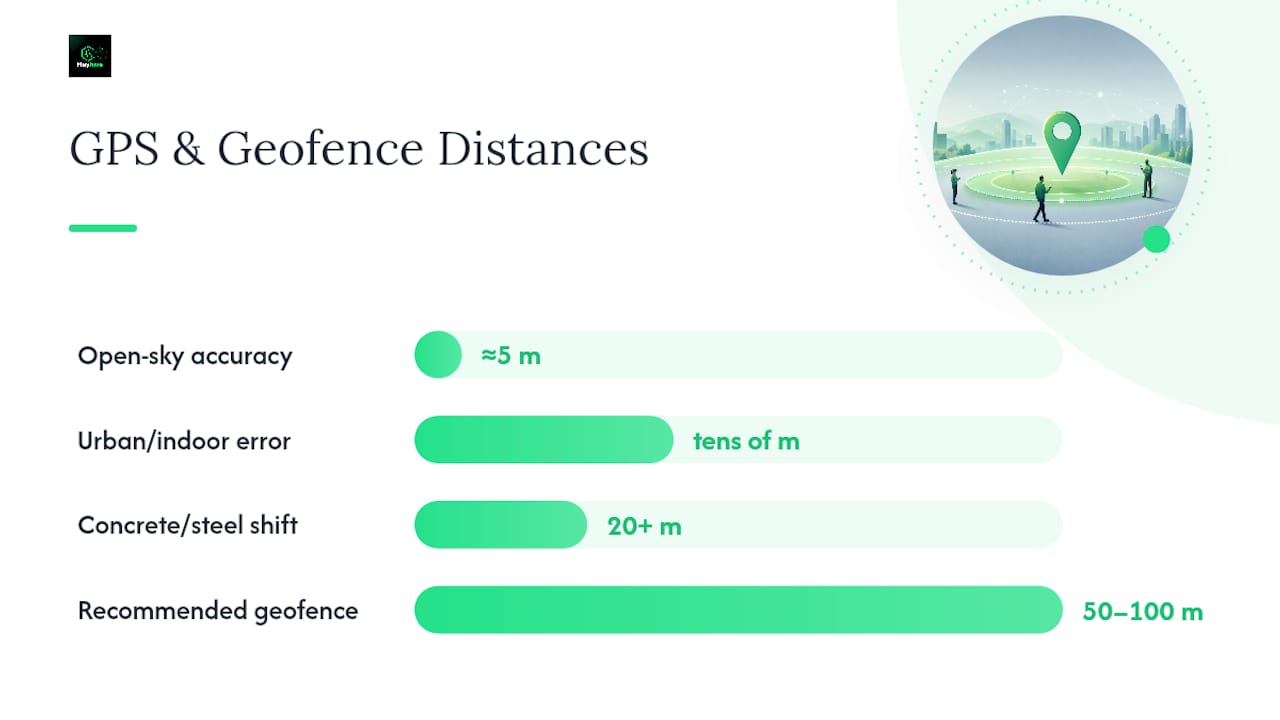
Consumer GPS accuracy in phones typically ranges from a few meters outdoors in open sky to tens of meters in urban or indoor environments, and HR teams need to plan around that variance rather than assume pinpoint precision. Urban canyons, older phone models, and steel-frame buildings all degrade the signal, sometimes badly.
That range is exactly why geofence sizing matters more than raw accuracy specs.
- Restrict clock-ins with geofence enforcement at fixed sites like warehouses, retail stores, or restaurants, where you want the app to physically block a punch outside the boundary.
- Use permissive coordinate capture with manual review for mobile crews, home health workers, or delivery drivers whose job sites change daily.
- Default to a 50 to 100 meter radius for most job types, which balances accuracy against false positives from signal drift.
- Widen the radius for multi-building campuses or large industrial yards, and narrow it for dense retail strips where two client locations sit close together.
Pro Tip: Test every geofence from inside the building, not the parking lot. Concrete and steel routinely shift a phone's reported position by 20 meters or more, and that's the difference between a valid punch and a rejected one on day one.
Low-signal job sites need a documented fallback, whether that's a manual override with supervisor approval or a photo-timestamp backup, so a dead zone never turns into a missed punch and an unpaid-wage complaint.
What Are the Legal and Privacy Requirements for GPS Tracking?
Location tracking crosses from "operational tool" into legal exposure fast if it isn't scoped correctly. The core principle is simple: track only during work hours, tell employees exactly what's being collected, and collect the minimum data needed to verify attendance.
Recordkeeping is where the Fair Labor Standards Act comes in directly. The Department of Labor's Wage and Hour Division requires employers to keep accurate records of hours worked and be able to produce them on demand, which means a GPS system's export function isn't a nice extra. It's the mechanism that satisfies a federal obligation.
HR's privacy checklist should include:
- A signed employee notice explaining what's tracked, when, and why.
- Role-based access controls limiting who inside the company can view raw location data.
- A written retention schedule stating how long logs are kept and when they're purged.
- A documented tracking window that turns location capture off outside scheduled shifts.
A written GPS policy that names these four elements does double duty: it satisfies the transparency principle courts expect and it gives HR a document to hand an auditor without scrambling.
One statistic worth sitting with: the DOL's own guidance treats "accurate records of hours worked" as a baseline wage compliance requirement, not an optional best practice, which means a vendor's export function is effectively a legal control, not a convenience feature.
What Makes a GPS Clock-In Auditable and Payroll-Ready?
An audit trail is only as strong as its weakest field. Timestamps, coordinates, and any edits made to either need to be locked or logged, with a visible record of who changed what and why.
Time-source traceability is the detail most HR teams overlook. High-integrity timestamps traceable to UTC through NIST reduce the risk of a clock discrepancy undermining an otherwise clean record, a control regulated industries already treat as standard for timestamp integrity.
What HR should require from any vendor:
- Event-level CSV or XLS exports for every clock-in and clock-out, not summarized totals.
- Map-based visual verification showing exactly where each punch occurred.
- Supervisor approval reports that show sign-off before hours hit payroll.
- Automated exception flags for punches outside a geofence, missed breaks, or overtime thresholds.
Automated rules matter because they cut down on the manual back-and-forth that eats a payroll administrator's week. A system that flags an exception the moment it happens, rather than at payroll close, gives supervisors time to resolve it before the numbers lock.
How Do You Roll Out GPS Clock-Ins Without Creating Chaos?
A rushed rollout is how good systems earn bad reputations. Follow this order and most disputes never happen.
- Draft and get signed employee notice and consent, then publish the written GPS policy alongside it.
- Map every site and define geofences, testing boundaries from both the employee's device and the supervisor's dashboard.
- Configure compliance rules for breaks, overtime, and rounding before a single employee clocks in for real.
- Run a two-week pilot at one site or with one crew, collecting supervisor feedback on false rejections and missed punches.
- Train staff on the app, verify the export and reporting flow works end to end, then expand site by site.
A two-week pilot surfaces the edge cases that a spec sheet never will, poor signal at one loading dock, a geofence that overlaps two client sites, a break rule that doesn't match a local ordinance.
Pro Tip: Run the pilot payroll export through your actual payroll system before go-live, not after. Format mismatches between a time clock's export and your payroll software show up in the first cycle, and it's far cheaper to catch that in a pilot than in a live payroll run affecting fifty employees.
Why Integration Matters More Than Any Single GPS Feature
Scheduling and time tracking that live in separate systems create mismatches between hours scheduled and hours recorded, and every mismatch is a manual investigation. Pairing scheduling rules with GPS clock-ins and shared approval workflows closes that gap and shortens dispute resolution. Heyhive's own attendance verification work reflects this: compliance improves when the record-keeping system and the scheduling system agree by design, not by reconciliation.
— Heyhive
See How Heyhive Handles GPS Compliance for Your Team
Heyhive is built around the same audit-grade requirements this guide walks through: geofenced or verified coordinate capture at clock-in, tamper-evident timestamps, and payroll-ready exports that keep an edit history intact.

The GPS Time Clock sits inside Heyhive's Workforce OS alongside AI Scheduling, so scheduled hours and recorded hours come from the same system instead of two systems that have to be reconciled after the fact. Field Ops Check-In extends the same geofence and audit-log logic to multi-site crews, and Payroll-Ready Hours exports the finished records straight into your payroll workflow.
If you're planning a rollout, start with a pilot the same way this guide recommends: pick one site, test geofence behavior at the edges of the boundary, confirm offline punches sync with the original timestamp intact, and run a full export through your payroll system before expanding. You can start that pilot directly on the Heyhive product page and request a demo to see the audit log and export formats firsthand.
FAQ
Is It Legal for Employers to Track Employees With GPS?
Yes, in most cases, as long as tracking is limited to work hours, employees receive clear notice, and the employer documents consent. The FLSA's recordkeeping rules actually support this practice by requiring accurate time records in the first place.
What Is the Accuracy of a GPS Time Clock?
GPS accuracy on phones typically ranges from a few meters outdoors to tens of meters in urban or indoor settings. That's why most job sites use a geofence radius of 50 to 100 meters rather than relying on pinpoint coordinates alone.
Can a Clock-In App Track Employee Location?
Yes, but a compliant app should only capture location at the moment of clock-in and clock-out, not continuously throughout the shift. Continuous background tracking raises privacy risk without adding meaningful compliance value over point-in-time capture.
What Is a GPS Clock?
A GPS clock is a digital time clock that records an employee's coordinates alongside the timestamp when they punch in or out, verifying that the punch happened at an approved job site. Some GPS Time Clock solutions add geofencing, offline sync, and payroll-ready exports on top of that basic capture.