
For most mobile and mixed field teams, the strongest field worker check in methods combine a mobile GPS punch with geofencing, offline sync, and a lightweight verification layer like a selfie or PIN. That mix cuts time theft, speeds up payroll, and makes shift coverage far easier to manage. Some workforce platforms build these capabilities into one system, so managers get GPS-verified clock-ins without micromanaging anyone.
TL;DR:
- Using GPS punch-ins layered with geofencing and a verification step like selfies or PINs provides a reliable balance of accuracy, cost, and worker acceptance.
- Setting geofence radii too tight initially causes false rejections, so start wider and gradually tighten based on real site data.
- Offline sync and Wi-Fi fallback prevent missed punches or delays during dead zones, maintaining accurate attendance records.
- A two-week pilot with a small trusted team helps tune geofence parameters, verify payroll integration, and assess adoption before full deployment.
- Verifying that payroll export formats, job coding, overtime rules, and time zone handling are correctly tested during the pilot minimizes future reconciliation issues.
Table of Contents
- What Are the Main Field Worker Check In Methods?
- How Do GPS and Geofencing Verify Attendance?
- How Do You Pilot a New Check-In System?
- Which Verification Layers Stop Buddy Punching?
- What Should You Require From a Payroll Integration?
- How Do You Get Field Staff to Actually Adopt It?
- What Changes in the First 30 Days?
- Bring GPS-Verified Check-Ins to Your Field Team
- Manager's Take: What the First Month Really Looks Like
- Sources
- FAQ
What Are the Main Field Worker Check In Methods?
Every field team eventually chooses from the same short list of options. The right pick depends on how mobile your crew is, how reliable your job-site connectivity is, and how much hardware you're willing to buy.
- Manual registers: paper or spreadsheet sign-ins. Cheap, but easy to falsify and painful to reconcile with payroll.
- Biometric or site terminals: fingerprint or badge scanners fixed at one location. Strong verification, but useless for crews that move between sites.
- Mobile GPS punch: employees clock in from a phone app, which captures a timestamp and coordinates. Flexible and scalable for distributed teams.
- Geofencing: a virtual boundary around a job site that only allows a punch when the device is inside it. Works best layered on top of GPS punches.
- Selfie or PIN verification: an added check that confirms the person clocking in is who they claim to be, not a coworker punching on their behalf.
- Hybrid setups: GPS plus geofencing plus a verification step, often the default for construction crews, home-service teams, and multi-site retail.
Manual registers score worst on verification strength but cost nothing upfront. Site terminals verify well but fail the moment a worker changes locations. Mobile GPS with geofencing and a verification layer hits the best balance of accuracy, cost, and adoption for teams that don't work from a single fixed address every day.
How Do GPS and Geofencing Verify Attendance?
A GPS punch works by recording a timestamp and a set of coordinates the moment an employee taps "clock in." GPS-verified timesheets check those coordinates against a defined boundary around the job site, known as a geofence, and either accept the punch or flag it for review. This is what makes remote or scattered crews reportable in a way paper sign-in sheets never could.
Geofence radius is where most managers get it wrong on their first setup. Start wider than you think you need. GPS time tracking guidance recommends beginning with a generous radius and tightening it later, because GPS signals drift near tall buildings, dense tree cover, and multi-story job sites. A radius that's too tight on day one just generates false rejections and angry calls from the field.
Statistic snapshot: Geofencing can automate the clock-in decision entirely and flag invalid punches automatically, removing the need for a supervisor to manually check every timestamp against a site address.
For dead zones, indoor job sites, and basements where GPS signal drops out, you need two fallbacks:
- Wi-Fi fallback: verify presence through a known network instead of satellite coordinates.
- Offline queue and sync: the app stores the punch locally, then syncs automatically once the device reconnects, so a bad signal never turns into a missed clock-in.
Test both scenarios during setup, not after a worker complains. Privacy matters here too: capture location only at the moment of a clock event, never continuously, and restrict tracking to scheduled work hours. That single policy choice does more for worker trust than any feature you could add.
How Do You Pilot a New Check-In System?
A two-week pilot is long enough to surface real problems and short enough that a bad configuration doesn't cost you a full payroll cycle. Heyhive's documented two-week GPS pilot shows that a small, trusted cohort is enough to validate settings before a full rollout.
Before the pilot starts:
- Audit devices, checking for GPS capability and app compatibility across your crew's phones.
- Test connectivity at each job site, including known dead zones.
- Confirm your payroll integration is ready to accept a test export.
- Draft a short tracking policy and consent form for employees to sign.
During the two weeks:
- Select a cohort of five to ten trusted employees across different sites.
- Map each job site and set an initial geofence radius, wider than your final target.
- Run a live demo so the cohort sees exactly how a punch works before day one.
- Collect feedback daily during week one, then every other day in week two.
Track adoption rate, GPS compliance rate, and manual correction rate weekly, alongside how cleanly your payroll export matches actual hours worked. Those four numbers tell you whether to expand the pilot or fix settings first.
Pro Tip: Run your payroll export test during the pilot, not after full rollout. A mapping error caught with ten employees is a quick fix. The same error caught with two hundred employees is a payroll crisis.
Which Verification Layers Stop Buddy Punching?
GPS alone confirms a device was in the right place. It doesn't confirm who was holding that device, which is why buddy punching, one employee clocking in for another, remains the most common form of time theft on distributed crews.
- Selfie or photo-on-punch: a quick photo attached to the clock-in event, reviewed only if a punch gets flagged.
- PIN codes: a personal code required at each punch, cheap to deploy but shareable if employees aren't careful.
- Device binding: locking an employee's account to their specific phone, so a punch from an unrecognized device gets rejected automatically.
- Biometric hardware: fingerprint or face scanners at fixed entry points, strongest verification but only practical for single-site operations.
Layering these factors with geofencing and routing flagged punches to a manager review queue closes most of the gap without demanding full-time monitoring. Keep an audit trail on every flagged punch. When payroll disputes come up, and they will, that trail is what settles them in minutes instead of a week of back-and-forth.
What Should You Require From a Payroll Integration?
Verified hours are only useful if they land in payroll without someone retyping them. Before signing with any vendor, confirm the integration handles:
- Export formats your payroll provider actually accepts, whether that's QuickBooks, ADP, or Gusto.
- Job or cost coding, so hours map to the right project or client automatically.
- Overtime rules, calculated correctly across state or company thresholds before the export ever reaches payroll.
- Time zone handling, especially for crews working across multiple regions.
GPS attendance systems paired with payroll integrations cut manual reconciliation dramatically, but only when the mapping is tested before go-live. Ask any vendor for a sample export and check every field against your existing payroll setup, well before the pilot ends. Heyhive's GPS time clock software builds this export step directly into the platform rather than treating it as an afterthought.
How Do You Get Field Staff to Actually Adopt It?
The technology is the easy part. Getting a crew to trust and use it consistently is where rollouts stall.
- Policy essentials: define exactly what's tracked, how long data is kept, and how disputes get resolved before you launch anything.
- Training plan: a short live demo, a two-minute video, and a one-page FAQ cover almost every question you'll get.
- Support window: commit to answering setup issues within one week, especially during the first pilot cycle.
- Common objections: battery drain, dead zones, and forgotten phones all need a documented fallback, such as a manual override a manager can approve.
Pro Tip: Roll out to one crew or site first, gather feedback, then expand. A staged rollout catches configuration problems while the stakes are still small.
Reviewing attendance tracking practices for hourly teams before you write your policy helps you avoid rules that sound reasonable on paper but create friction in the field.
What Changes in the First 30 Days?
Most managers see fewer manual timesheet corrections and clearer real-time visibility into who's on site within the first two weeks. Shift coverage gets faster because you can see gaps immediately instead of hearing about them after the fact.
Weeks two through four are for tuning: adjusting geofence radii that turned out too tight, refining exception-handling rules, and training managers on the review queue. By day 30, track improvements in GPS compliance rate and payroll export accuracy as your go/no-go signal for a wider rollout.
Bring GPS-Verified Check-Ins to Your Field Team
Some platforms give managers the exact toolkit this guide describes: AI-generated shift schedules, GPS-verified clock-ins, offline sync for dead zones, and payroll-ready exports, all with manager approval before anything publishes. You stay in control of every schedule and every flagged punch, while the platform handles the coordinate matching and export formatting behind the scenes.

If you've been running manual registers or a fixed site terminal and losing hours to time theft or payroll disputes, a two-week pilot is the fastest way to see the difference. Set up a small cohort, map your sites, and compare your compliance rate against your current process. Visit Heyhive to start a pilot and see GPS-verified check-ins running on your own crew within days.
Manager's Take: What the First Month Really Looks Like
Most managers expect the GPS punch itself to be the hard part. It isn't. The hard part is the geofence radius, and almost everyone sets it too tight the first time. You will get a handful of frustrated calls in week one from employees standing on the job site who still got rejected because a building or a line of trees threw off the signal. Widen the radius, don't panic, and tighten it gradually as you collect real punch data.
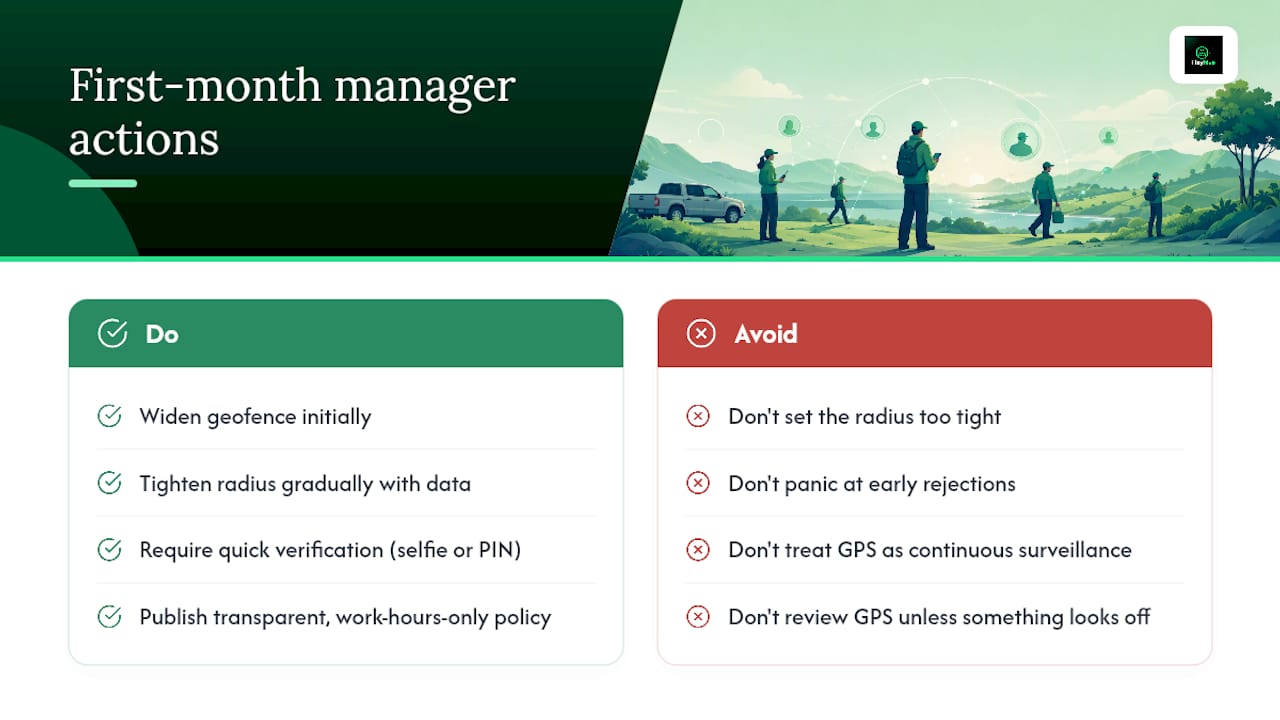
The bigger surprise is usually the verification layer. Managers assume workers will resent a selfie or PIN step. In practice, most crews forget it's even there within a few days, because it takes two seconds and it protects them, too. An honest worker doesn't want to be accused of a punch they didn't make, and a documented, transparent tracking policy that only runs during work hours removes that fear on both sides.
What Heyhive's approach gets right, in our view, is refusing to treat GPS data as a surveillance tool. It's a verification tool, used only at clock events, reviewed only when something looks off. That distinction is what separates a system your crew tolerates from one they actually trust.
— Heyhive
Sources
For geofencing and radius setup, see the GPS time tracking guide. For pilot design, consult Heyhive's two-week pilot case study. For privacy and compliance workflow, review this workforce compliance guide.
- Ultimate Guide to GPS Time Tracking for Job Sites - ABLEMKR
- A Guide to Mobile Timesheet Apps for Field-Based Workers | Relentify
- GPS Attendance System For Workforce Tracking
FAQ
What Is the Best Check-In Method for Field Workers?
A mobile GPS punch combined with geofencing, offline sync, and a verification layer like a selfie or PIN gives the strongest balance of accuracy and adoption for most mobile field teams. Heyhive builds all four into a single platform with manager approval built in.
How Does Geofencing Prevent Time Theft?
Geofencing checks a device's coordinates at clock-in against a defined boundary around the job site and rejects or flags punches that fall outside it, which automates the review most managers used to do by hand.
What Happens if a Field Worker Has No Signal?
An offline-capable app should queue the punch locally and sync it automatically once the device reconnects, so a dead zone never results in a missed or delayed clock-in.
How Long Should a GPS Check-In Pilot Run?
Two weeks is generally enough to validate geofence settings, test payroll export mapping, and gather feedback from a small trusted cohort before expanding to the full team.
Does GPS Tracking Violate Worker Privacy?
Not when tracking is limited to the moment of a clock event and restricted to scheduled work hours; workers generally accept location verification under those transparent conditions.