
An employee communication policy is a written document that defines which channels employees use for what, how fast people should respond, and what stays confidential. It sets rules that keep messages consistent and legally sound. Your first move: audit every channel your teams already use, then draft rules with an NLRA savings clause built in from the start, not added later.
TL;DR:
- Clear, specific communication channels and response times prevent operational confusion and reduce the risk of legal violations related to confidentiality and NLRA restrictions.
- Conducting a channel audit and involving legal, HR, operations, and IT ensures the policy reflects actual practices and remains compliant with monitoring and disclosure laws.
- Detailed authorization levels and a defined channel map minimize conflicting messages, especially for shift teams working outside traditional hours and in decentralized locations.
- Including an NLRA savings clause and explicit monitoring disclosure in the policy guards against employee rights violations and legal exposure.
- Regular review, acknowledgment tracking, and pilot testing are essential to maintain policy effectiveness and adapt to organizational changes over time.
Table of Contents
- What an Employee Communication Policy Actually Covers
- Why Vague Communication Rules Cost You
- The Core Components Every Policy Needs
- Building Your Channel Map (Which Tool for Which Message)
- Legal Guardrails: NLRA, Monitoring, and Records
- Step-by-Step: Building and Rolling Out Your Policy
- Templates and Sample Language You Can Use Today
- Who Can Send What: Authorization Levels
- Crisis Communication: What Happens When Things Go Wrong
- Tracking What's Working: KPIs and Feedback Loops
- Keeping the Policy Alive After Launch
- What Shift-Based Teams Get Wrong About Communication Policy
- A Different Route to Fewer Schedule Messages
- Sources
What an Employee Communication Policy Actually Covers
An internal communication policy tells employees where to find information, who can send it, and how quickly a response is expected. It is different from a communication strategy, which focuses on messaging goals and audience segmentation, and different from a playbook, which walks through step-by-step scripts for specific situations like a product recall or a shift shortage. A policy sets the rules; a strategy sets the direction; a playbook sets the moves.
Not every organization needs a standalone document. A five-person landscaping crew might get by with one paragraph in the employee handbook covering text message expectations and emergency contacts. A 200-person multi-site retailer needs a full policy with defined channel tiers, authorization levels, and a formal acknowledgment process.
Draft this with input from more than HR alone:
- HR leadership — sets tone, confidentiality language, and review cadence.
- Legal counsel — checks the document against NLRA and monitoring-disclosure requirements.
- Operations managers — confirm the channel map matches how frontline teams actually work.
- IT — verifies which tools are monitored, logged, or retained, and for how long.
Skip any one of these voices and you end up with rules that look tidy on paper but ignore how work actually gets done.
Why Vague Communication Rules Cost You
Clear communication rules reduce confusion, but the bigger payoff is what they prevent. A written policy gives frontline managers one source of truth during a shift shortage, a product recall, or a sudden schedule change, instead of five people improvising five different messages.
The risk side is where most organizations get burned. Vague or overly broad confidentiality language, especially anything that could be read as discouraging employees from discussing pay or working conditions, invites an unfair labor practice charge under the NLRA. A policy that never names its channels also creates operational drag: important shift notices get buried in a group text nobody checks, while trivial updates clog the email inbox everyone ignores.
The pattern shows up in three places consistently:
- Confidential HR matters get discussed in open chat channels because no one defined where they belong.
- Emergency alerts go out over whatever app the manager happens to have open, not a designated channel.
- Employees stop reading company announcements because the signal-to-noise ratio collapsed months ago.
Pro Tip: Run a two-week channel audit before you write a single policy line. Ask five employees where they'd look for a shift change versus a paycheck question. The gaps in their answers are your policy's table of contents.
The Core Components Every Policy Needs
Every effective policy builds around the same skeleton, regardless of company size. Structure it as purpose, scope, approved channels, response expectations, confidentiality, and review cycle, then adjust the depth of each section to your organization's complexity.
- Purpose and scope. State why the policy exists and who it covers, full-time, part-time, contractors, or all three. One paragraph is enough.
- Approved channels and their roles. Name every tool, email, chat app, text alerts, bulletin boards, and explain what each one is for. Nobody should have to guess whether a shift change belongs in Slack or a group text.
- Response-time expectations. Set separate norms for urgent versus routine messages, and for on-the-clock versus after-hours contact. Distributed and hybrid teams need this spelled out more than co-located ones, since nobody can rely on hallway context to fill the gaps.
- Confidentiality language, written narrowly. Cover trade secrets, customer data, and HR investigation details with concrete examples. Never write a blanket rule against discussing "workplace matters" or "internal business," language broad enough to sweep in wage discussions.
- Monitoring disclosure. State plainly whether company devices, email, and networks are monitored, and what gets logged.
- Retention and review cadence. Note how long messages and records are kept, and set a fixed date to revisit the whole document, annually at minimum.
- Acknowledgment requirement. Require a signed or digital acknowledgment on rollout and after any material update.
Miss the confidentiality or monitoring sections and you're exposed legally. Miss the channel and response-time sections and you're exposed operationally. Both cost you.
Building Your Channel Map (Which Tool for Which Message)
A channel map assigns every message type to a specific tool, so employees stop guessing and start knowing with the help of workflow management software. Without one, important notices get lost in the wrong channel simply because nobody defined where they belong.
Most organizations land on four tiers:
- System of record (email or an HR portal): official policies, pay changes, legal notices. Slow-moving, permanent, searchable.
- Team collaboration tools (project channels, shared docs): project updates, non-urgent coordination between departments.
- Real-time chat (group messaging, an app like Slack): daily operational chatter, quick questions, shift coordination.
- Emergency/broadcast channel: severe weather, safety incidents, last-minute closures. This one needs a backup, a phone tree or text alert system, in case the primary tool goes down.
For shift-based teams, response-time norms need to bend around the clock, not the calendar. A server on a Saturday dinner rush cannot check email. A warehouse lead on nights cannot join a 9 a.m. video call. Build response windows around when people are actually working, not when the office is open.
Pro Tip: Publish your channel map as a one-page chart, not a paragraph buried in section four of the policy. If a new hire can't find the answer to "where do I report a schedule conflict" in ten seconds, the map needs to be simpler.
Legal Guardrails: NLRA, Monitoring, and Records
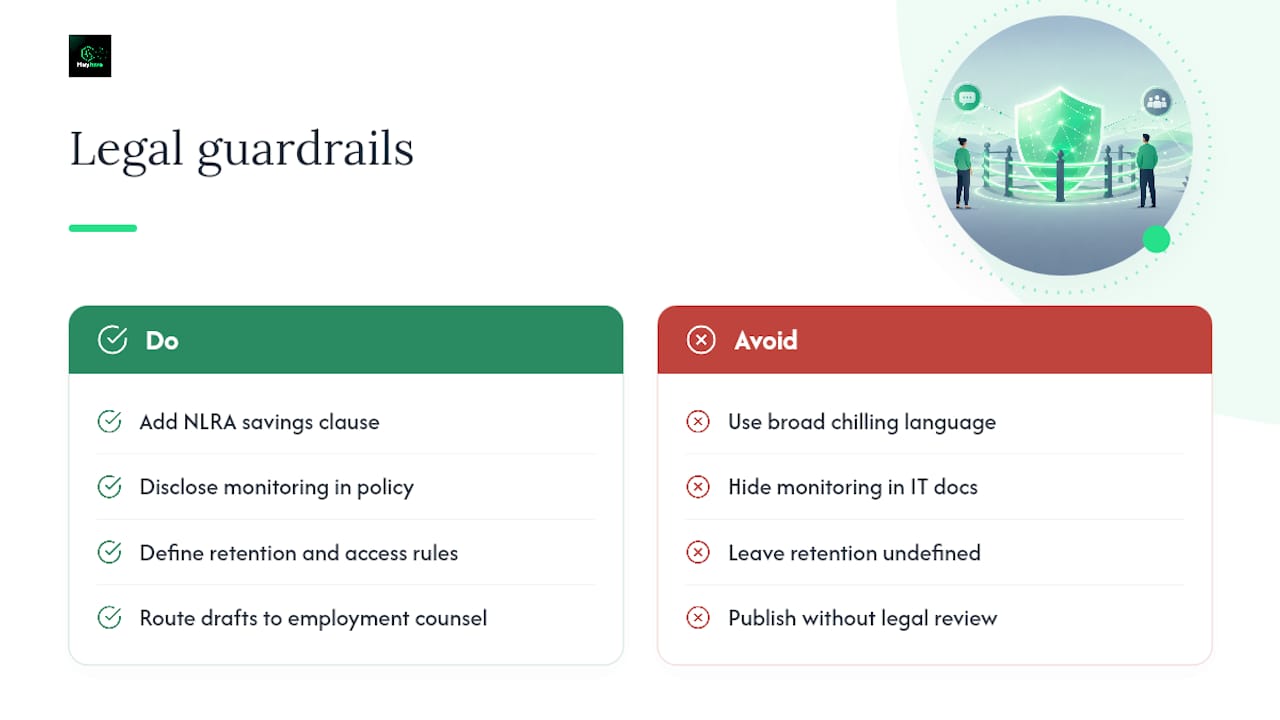
The single biggest legal trap in communication policies is language that, even unintentionally, discourages employees from discussing wages, hours, or working conditions. Under current NLRB guidance, rules broad enough to chill that kind of conversation are presumptively unlawful, regardless of whether you ever intended to enforce them that way.
An NLRA savings clause makes your intent explicit in plain language: "Nothing in this policy is intended to restrict employees' rights under Section 7 of the National Labor Relations Act, including the right to discuss wages, hours, and other terms and conditions of employment." That single paragraph, placed near your confidentiality section, closes off the most common source of NLRB challenges.
Beyond the NLRA, two other legal pieces belong in every policy. First, disclose monitoring plainly: if the company can read messages sent on company devices or networks, say so in the policy itself, not in a separate IT document nobody reads. Second, define retention: how long messages, chat logs, and email records stay accessible, and who can pull them.
None of this replaces legal review. Route every draft through employment counsel before publishing, especially the confidentiality and monitoring sections, where a single sentence can shift you from compliant to exposed.
Step-by-Step: Building and Rolling Out Your Policy
Writing the policy is the easy part. Getting it approved, understood, and actually followed is where most organizations stumble. Follow this sequence in order, don't skip the pilot step even when leadership wants to move fast.
- Audit existing tools and informal habits. Interview managers across departments about which channels they actually use, not the ones IT thinks they use. Most organizations discover three or four "shadow" channels, a personal group chat, a shared spreadsheet, that never showed up in any official inventory.
- Identify stakeholders and sign-off authority. Confirm who needs to approve the final draft: HR leadership, legal, and at least one operations manager who can flag unrealistic response-time expectations.
- Draft with narrow examples, not broad rules. Every confidentiality clause should name a concrete scenario (customer payment data, unreleased pricing) rather than a vague category (business information).
- Add the NLRA savings clause before legal review, not after. This saves a review cycle, since counsel will almost always ask for it if it's missing.
- Send the draft through legal review. Budget at least a week; employment counsel often catches confidentiality language that reads fine to HR but risky to a labor attorney.
- Pilot with a single team. Testing the policy on one department first surfaces edge cases, especially around response times for remote or overnight shift workers, that a desk-only review would never catch.
- Train managers before the org-wide rollout. Managers enforce the policy day to day; if they don't understand the channel map, neither will their teams.
- Publish, distribute, and collect acknowledgments. Require a digital signature within a reasonable timeframe and track who has and hasn't signed.
- Set a review date. Put a calendar reminder for 12 months out, sooner if you add new tools or expand into new states with different disclosure laws.
Pro Tip: Treat the pilot team's feedback as required input, not optional color. If your pilot team flags that the after-hours rule is unworkable for closers, fix it before rollout, not six months in when three departments have already started ignoring the policy.
Templates and Sample Language You Can Use Today
You don't need to write every clause from scratch. Below are starting points to adapt, not paste in verbatim, since your channel map and confidentiality examples need to match your actual tools and risks.
- One-paragraph handbook clause: "Employees are expected to check company email and the team scheduling app daily during scheduled shifts. Urgent operational matters should be directed to your shift supervisor via [designated channel]. This policy does not restrict any employee's right to discuss wages, hours, or working conditions with coworkers."
- Full policy outline: Purpose → Scope → Approved Channels (with tier descriptions) → Response-Time Expectations → Confidentiality (narrow, example-based) → Monitoring Disclosure → Retention Schedule → Review Cycle → Acknowledgment.
- NLRA savings clause sample: Use the language from the legal section above, placed directly after your confidentiality clause, not buried in an appendix.
- Acknowledgment form: A short digital form stating the employee has received, read, and understood the policy, with a date field and a link back to the full document. NLRA-aware template libraries build this acknowledgment tracking directly into the document.
Track every signed acknowledgment in your HR system, not a spreadsheet on someone's desktop. If a dispute arises later, you need proof of notice on file, not a memory of "I think everyone signed that."
Who Can Send What: Authorization Levels
Not every message should come from every manager. Without defined authorization levels, you get communication drift: three different supervisors sending three slightly different versions of the same closure notice, confusing everyone.
Set authorization tiers explicitly:
- Team-level messages (schedule swaps, daily tasks): shift supervisors and direct managers.
- Department-wide messages (policy reminders, process changes): department heads only.
- Company-wide alerts (closures, safety incidents, major announcements): a designated small group, usually two or three senior leaders, with one primary channel named for these messages.
- Crisis communications: one owner, named in advance, who has final say on wording and timing during an active incident.
Log every company-wide send, who authorized it, when it went out, and through which channel. That audit trail matters if you ever need to reconstruct a timeline during an incident review or a legal inquiry.
Crisis Communication: What Happens When Things Go Wrong
Your crisis protocol should answer one question before anything else: where does emergency information appear first? If employees don't know the answer cold, the protocol has already failed.
- Designate a crisis communications team in advance, not during the emergency. Two to three people, with clear backup coverage if the primary contact is unreachable.
- Name a primary and backup channel. A text alert system paired with a phone tree covers you if the primary platform goes down mid-incident.
- Set acknowledgment expectations. Require a quick confirm-receipt response, and follow up directly with anyone who hasn't acknowledged within a defined window, 30 minutes for safety incidents, longer for lower-urgency alerts.
- Run a post-incident review. Check how fast the message went out, how many employees acknowledged it, and where the process broke down. Fix the gap before the next incident, not after.
Tracking What's Working: KPIs and Feedback Loops
A policy without measurement is a guess dressed up as a document. Track acknowledgment rates first, what percentage of employees confirm receipt within your set window, and response times for urgent versus routine messages.
Pair the numbers with qualitative signals:
- Short pulse surveys, two or three questions, sent quarterly, asking whether employees feel informed and know where to find information.
- Occasional focus groups with frontline staff, who often surface channel confusion long before it shows up in any dashboard.
- Turnover and shift-coverage data, cross-referenced against communication gaps. Teams that miss schedule notices tend to also show higher no-show rates.
Report these metrics on a fixed cadence, quarterly works for most organizations, to HR leadership and operations. A policy reviewed once at launch and never again drifts out of sync with how your teams actually communicate within a year.
Keeping the Policy Alive After Launch
Rolling out a policy is a milestone, not a finish line. Build maintenance into the process from day one.
- Pilot and train before any full launch. Skip this step and you'll be fixing the policy in public instead of in draft.
- Track every acknowledgment and document exceptions. If a remote contractor can't sign within the standard window, log the reason and the extension, don't just let it go unresolved.
- Set a fixed review cadence. Annual reviews catch outdated tool references and channel changes before they cause confusion.
- Keep a changelog. Note what changed, when, and why, so managers aren't left guessing whether the version they're enforcing is current.
- Allow documented local adaptations. A multi-site retailer's warehouse team and its corporate office may need slightly different response-time norms; approve variations formally rather than letting them happen informally.
What Shift-Based Teams Get Wrong About Communication Policy
Most communication policies get written by people who sit at a desk all day, for teams that don't. That mismatch is why so many policies collapse the moment they meet a real shift schedule.
Authorization levels matter more for hourly and field teams than almost anywhere else, because the cost of a mixed message is immediate. If two supervisors send conflicting shift-change notices, someone shows up to a closed location or misses a shift they thought was covered. Timing compounds the problem: a policy that assumes 9-to-5 availability will quietly fail every team working nights, weekends, or split shifts.
One pattern worth naming: a large share of internal messaging in shift-driven businesses isn't really communication at all, it's scheduling friction wearing a communication costume. "Can someone cover Thursday?" and "What time do I start tomorrow?" are logistics questions, not policy questions, and they disappear almost entirely once scheduling runs on automation instead of group chat. Test every emergency alert channel during a non-peak hour before you ever need it in a real crisis. Finding out your text alert system has a delivery lag during an actual emergency is the worst possible time to learn it.
— Heyhive
A Different Route to Fewer Schedule Messages
A well-drafted policy tells people where messages belong. It won't stop the flood of one-off texts about who's covering Thursday's shift, that's a scheduling problem, not a communication one, and no amount of channel mapping fixes it at the source.

Heyhive takes a different approach: automate the schedule itself so there's less to communicate in the first place. Shift notifications go out automatically the moment a schedule publishes, so managers stop retyping the same update across three different group chats. GPS-verified clock-ins confirm who's actually on site without a single "did you make it in" text, and payroll-ready hour exports mean fewer end-of-week messages chasing down missing time. For teams built on hourly, field, or multi-site work, this isn't a replacement for your communication policy, it's what removes the shift-logistics noise your policy was never designed to solve. Start a free trial with Heyhive and see how many fewer messages your team sends in the first week.
Sources
For the legal foundation behind every confidentiality clause and savings clause recommendation in this guide, review the NLRB's official guidance on employee rights directly. For downloadable, NLRA-aware starting documents, FirstHR's template library offers plain-language savings clauses ready to adapt. For a deeper breakdown of what belongs in each policy section, LegalClarity's explainer walks through channel mapping in more detail, and PandaDoc's rollout guide covers acknowledgment tracking and review cycles worth borrowing wholesale.
- Internal Communication Policy: What to Include - LegalClarity
- Internal Communication Policy Guide for Workplace Efficiency | PandaDoc