
If your team is still building shifts in a spreadsheet, the fix is an AI-enabled auto-scheduler that enforces hard constraints (rest time, overtime caps, certifications) while keeping you in the approval loop. That combination is what separates a tool that actually works from one that creates new problems. The recommended next step: run a short pilot with your real staffing data, or start a free trial with a platform like Heyhive before you touch a full rollout.
What you get when you do this right:
- Hours back every week that used to go into building and rebuilding the roster
- Fewer compliance headaches, since rest and overtime rules get checked automatically
- Better coverage on your busiest shifts, with fewer last-minute scrambles
Automatic scheduling isn't about removing you from the process. It's about removing the busywork so you can focus on the calls that actually need a human.
Key Takeaways
Automatic shift scheduling saves managers time and reduces compliance risk when the tool enforces hard constraints first and keeps a manager approval step before publishing.
| Point | Details |
|---|---|
| Enforce hard constraints first | Configure rest periods, overtime limits, and certifications before any preference-based optimization runs. |
| Pilot before full rollout | Test rule priorities on one team or location for four to eight weeks before expanding. |
| Check compliance behavior, not claims | Verify the tool blocks violations automatically instead of just flagging them after publishing. |
| Watch retention signals | Fewer coverage gaps and respected availability tend to reduce turnover in high-churn roles. |
| Try Heyhive with real data | Heyhive generates AI schedule drafts in seconds while keeping manager approval and GPS-verified clock-ins in place. |
Table of Contents
- What Does Automatic Shift Scheduling Actually Do?
- How Does Auto-Scheduling Actually Build a Roster?
- What Should You Check Before Choosing a Tool?
- How Long Does It Take to Roll Out Automatic Scheduling?
- Which Industries Benefit Most From Auto-Scheduling?
- How Do You Keep Automated Schedules Compliant?
- What Do Automatic Scheduling Tools Typically Cost?
- Why Does Heyhive Fit Manager-First Scheduling Best?
- What's the One Rule Every Vendor Should Follow?
- Does Automatic Scheduling Actually Improve Retention?
- What Does a Successful Rollout Actually Look Like?
- How Do the Top Scheduling Approaches Compare?
- Try Automatic Shift Scheduling Without Losing Control
- Sources
What Does Automatic Shift Scheduling Actually Do?
Automatic shift scheduling is software that builds your team's roster by applying a set of rules to your staffing needs instead of you dragging names into boxes by hand. The rule engine handles availability, certifications, overtime limits, and shift swaps, then publishes the result to everyone's phone.
The feature set that matters most:
- Rule engine: encodes your labor rules (max hours, required rest, role requirements) so every draft respects them automatically
- Availability and certification matching: only schedules people who are actually free and qualified for the shift
- Overtime control: flags or blocks shifts that would push someone into costly overtime
- Shift swaps: lets employees trade shifts within rules you set, without a manager rebuilding the week
- Mobile publishing: pushes the finished schedule straight to employee phones
The payoff shows up in four places: time saved building schedules, lower labor costs from tighter overtime control, better shift coverage, and higher employee satisfaction because people get schedules that respect their availability. A restaurant uses it to stop over-staffing slow Tuesdays. A retail chain uses it to keep certified keyholders on every shift. A field service crew uses it to match licensed techs to the jobs that require them.
Statistic callout: Automated scheduling reduces labor costs and improves operational efficiency in restaurant operations, according to industry data on automated scheduling adoption.
How Does Auto-Scheduling Actually Build a Roster?
Every serious auto-scheduler works the same way: it satisfies mandatory rules first, then optimizes everything else. The layered solver approach used in workforce scheduling research enforces hard constraints, legal limits, safety rules, and certification requirements, before it even considers softer priorities like employee preferences or minimizing labor cost.
The process runs in stages:
- Shift generation: the system figures out what shifts need coverage based on demand windows and forecasted volume
- Shift assignment: it matches available, qualified people to those shifts
- Priority sorting: mandatory rules apply first, then preferences, then cost optimization
- Inputs required: demand windows, employee skills and certifications, availability, and your labor budget
Picture it as a pipeline: inputs flow into a solver, the solver produces a draft schedule, you review and adjust it, then it publishes. Some tools, including open-source projects like AutoShiftPlanner, show how rule-based engines generate detailed rosters from scratch using this same logic.
Pro Tip: Before you roll out to your whole team, test your rule priorities on one department or one week of data. You'll catch conflicts, like two "must-have" rules that contradict each other, while the stakes are still low.
What Should You Check Before Choosing a Tool?
Not every scheduling tool enforces the rules it claims to. Before you commit, run through this checklist with any vendor:
- Hard constraints: does it actually block violations of max hours and minimum rest, or just warn about them?
- Configurable rule engine: can you adjust rules per role, per location, or per union contract?
- Real-time eligibility: does it check certifications and licenses before assigning a shift, not after?
- Mobile publishing: can employees see, swap, and accept shifts from their phones?
- Integrations: does it connect to your payroll system, time clock, and HRIS without manual exports?
- Speed to build: how long does it take to generate a usable draft from a blank week?
- Manager approval workflow: can you review and adjust before anything goes live?
- Audit logs: is there a record of who changed what and when?
- Swap approvals and overtime alerts: do these route to you automatically, or do they slip through?
- Support and onboarding: is there a free trial, and does the vendor help you import existing schedule data?
A tool that scores well here saves you from the worst outcome: automation you can't trust enough to actually use.
How Long Does It Take to Roll Out Automatic Scheduling?
Most teams can run a working pilot in a few weeks, then expand gradually. Here's the sequence that tends to work:
- Gather your data (week 1): pull existing schedule templates, staffing rules, and certification lists.
- Set hard constraints (week 1 to 2): enter legal limits, rest requirements, and role rules into the system.
- Run draft schedules (week 2 to 3): generate a few weeks of drafts against real (not hypothetical) demand.
- Manager review and adjustments (ongoing): check drafts against what you know about your team before publishing.
- Publish a small-team pilot (week 4 to 6): roll out to one location or department first.
- Measure and iterate (week 6 to 8): track time saved, coverage gaps, and overtime before expanding company wide.
Involve payroll and HR early. They'll flag integration issues before they become publish-day problems.
Which Industries Benefit Most From Auto-Scheduling?
Automation pays off fastest where demand repeats in predictable patterns but staffing needs still shift week to week:
- Restaurants: variable weekday and weekend demand, plus certification needs for bartenders and managers
- Retail: seasonal peaks and the need for keyholders on every shift
- Healthcare support staff: strict certification requirements and mandatory coverage ratios
- Field service and contractors: licensed techs who must be matched to specific jobs, often across multiple sites
- Warehouses: shift patterns tied to fulfillment volume and safety-certified equipment operators
If your scheduling headaches come from repeating demand windows or certification-based coverage, this is where automatic scheduling earns its keep fastest.
How Do You Keep Automated Schedules Compliant?
Always enforce hard constraints, minimum rest periods, maximum weekly hours, mandatory breaks, before you let any tool optimize for cost or preference. Skipping this step is how automation creates legal exposure instead of removing it.
Configure and monitor these rules directly in your scheduling tool:
- Minimum rest between shifts (commonly 8 to 12 hours depending on your state and industry)
- Maximum weekly and daily hour thresholds
- Mandatory meal and rest break windows
- Role and license certification requirements
- Local predictive-scheduling or fair workweek rules, where they apply
Common pitfall: Managers who trust default settings without checking local predictive-scheduling laws often end up publishing schedules that violate rules they didn't know existed. Defaults are a starting point, not a guarantee.
After you publish, verify with a quick audit: check for any shift under the minimum rest window, confirm overtime alerts fired correctly, and spot-check that certified roles are actually covered by certified people.
What Do Automatic Scheduling Tools Typically Cost?
Expect subscription pricing, usually per user or per location, with tiered feature sets and a time-limited free trial or demo before you commit. Advanced AI features or premium support often sit behind an add-on tier rather than the base plan.
Common shapes to expect:
- Per-seat pricing: cost scales with the number of employees scheduled
- Per-location pricing: flat fee per site, useful for multi-location operators
- Add-on modules: advanced AI scheduling or priority support billed separately
During any trial, AI-assisted schedule drafts and real-time compliance flags are standard features to test, along with how the system handles your actual data import and manager approval flow, not a demo dataset the vendor built to look good.
Why Does Heyhive Fit Manager-First Scheduling Best?
Heyhive was built around a simple idea: AI should draft the schedule, but you should decide what goes live. That balance, automation plus configurable compliance guardrails, is exactly what the evaluation checklist above is designed to test for.
What you get with Heyhive:
- AI schedule drafts: generate a full week of shifts in seconds based on your rules and past schedules
- Manager approval workflows: review and adjust every draft before it publishes, so quality control never leaves your hands
- GPS-verified clock-ins: confirm field and multi-site employees are actually where they're supposed to be
- Payroll-ready hours export: cut the manual work of turning attendance data into payroll input
- Configurable guardrails: set your own overtime limits, rest requirements, and certification rules
If you're ready to see it against your own staffing data, a trial is the fastest way to know whether it fits your operation. Heyhive's AI-powered scheduling approach walks through exactly how the draft-to-publish workflow works in practice.
What's the One Rule Every Vendor Should Follow?
Hard constraints first, soft priorities second. That's the core rule behind every credible auto-scheduler, and it comes straight from how workforce scheduling solvers are designed: legal and safety limits get enforced before the system even considers preferences or cost.
Turn that rule into a vendor requirement during your pilot. Ask directly: does the tool block a violation of this rule, or just flag it after the fact? Build your acceptance test around real edge cases, someone requesting an impossible swap, or a certification that expired mid-week.
Pro Tip: Stage your test data to include a few deliberate rule violations before you run a draft. If the system lets them through, you've found a problem before your real employees did.
Prioritize violation reporting over convenience features. A tool that surfaces every constraint conflict clearly will save you more headaches than one with a prettier interface.
Does Automatic Scheduling Actually Improve Retention?
Employees don't quit because a schedule exists. They quit because the schedule ignores what they told you about their availability, or because last-minute changes wreck their week. Automatic scheduling addresses both problems directly, since the rule engine can't "forget" someone's availability the way a rushed manager might on a Friday afternoon.
The connection between scheduling and retention shows up most clearly in industries with high turnover already, restaurants and retail chief among them. When automated scheduling reduces labor costs and improves operational efficiency, part of that gain comes from fewer emergency shift swaps and fewer employees quietly job-hunting because their schedule feels chaotic.
Coverage gaps matter here too. Every time a shift goes unfilled, the employees who get called in to cover it absorb the strain. That's often invisible until someone finally quits over it. An auto-scheduler that respects certifications and availability from the start reduces how often that scramble happens.

None of this means automation replaces good management. It means your best managers stop spending their attention on the mechanics of building a roster and start spending it on the harder, more human parts of running a team: coaching, feedback, and actually noticing when someone's stretched too thin. The schedule becomes a tool that supports retention instead of quietly undermining it every time it goes out wrong.
If retention is your biggest operational cost right now, the schedule is one of the first places to look, not because it's flashy, but because it's the thing employees interact with every single week.
What Does a Successful Rollout Actually Look Like?
The pattern that shows up across successful rollouts is consistent: start small, prove the tool respects your constraints, then expand. A multi-location retail operation typically starts with one store, running the auto-scheduler alongside the existing manual process for two to three weeks before fully switching over. That overlap period is where managers catch rule conflicts they didn't know existed, like a certification requirement that was never formally documented but everyone "just knew" about.
Field service and contractor teams tend to see the fastest visible wins, since certification matching solves a problem that manual scheduling handles poorly by nature: a human scheduler can't instantly cross-reference twenty technicians' licenses against ten job requirements, but a rule engine does it without effort. Teams that pilot auto-scheduling in field operations often report the biggest early relief around this exact pain point, correctly matching the right licensed person to the right job without a manager manually checking credentials.
Restaurants running seasonal menus or extended hours see a different pattern: the win shows up in labor cost, not just time saved. Once the system enforces overtime limits automatically instead of relying on a manager to catch it mid-week, unplanned overtime spend tends to drop noticeably within the first month.
The common thread across every successful implementation isn't the industry. It's the discipline of testing rules on a small group first, fixing what breaks, and only then rolling out company-wide. Teams that skip the pilot and go straight to full deployment are the ones most likely to hit a compliance surprise in week one.
How Do the Top Scheduling Approaches Compare?
Different tools take different approaches to the same core problem, and the differences show up in five places: features, ease of use, compliance controls, integrations, and pricing.
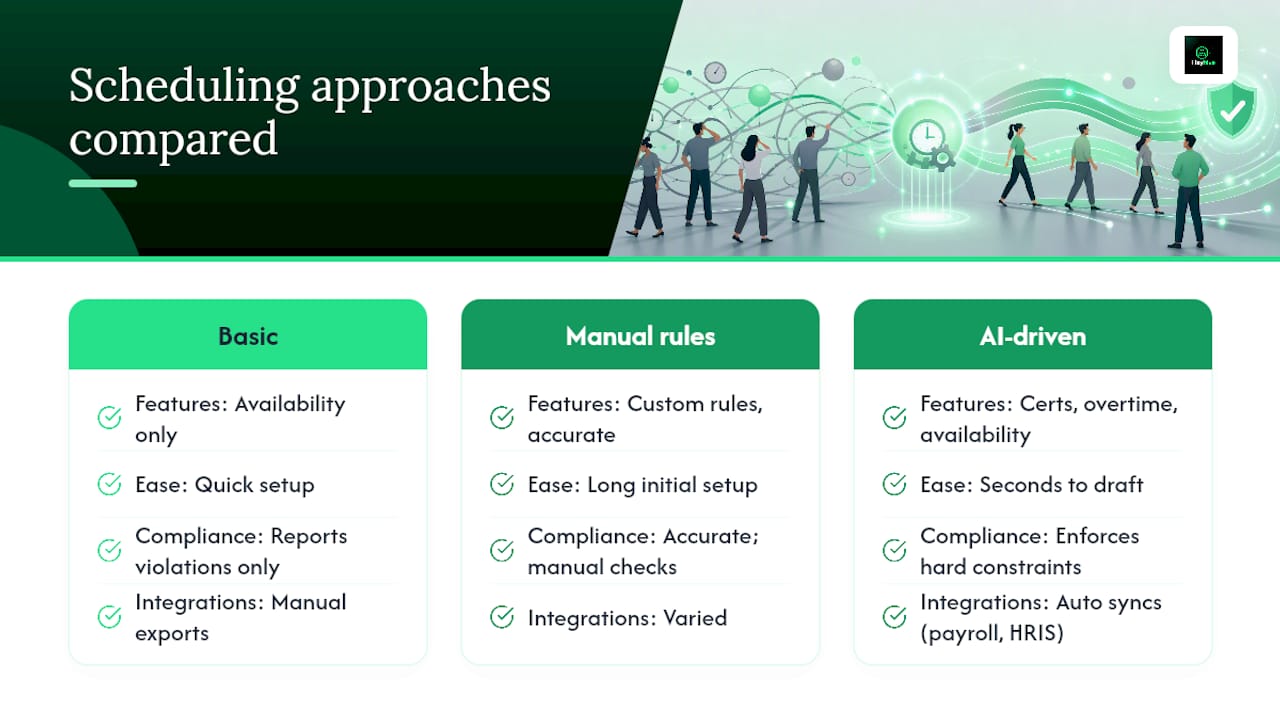
Rule engine and certifications: Basic tools handle availability but stop short of certification matching. More advanced platforms, including AI-driven ones like Heyhive, factor in certifications, overtime limits, and availability together in one draft. The tradeoff: simpler tools are faster to set up but require more manual checking later.
Ease of use and speed: Tools built around AI-generated drafts (from templates or prior weeks) tend to produce a usable schedule in seconds rather than hours. Tools that rely on manual rule building are more accurate long-term but take longer to configure initially.
Compliance controls: The strongest platforms enforce hard constraints automatically rather than just flagging violations after a manager publishes. This is the single biggest differentiator between tools that prevent problems and tools that just report them.
Integrations: Payroll, time clock, and HRIS connections vary widely. Some tools require manual data export; others sync automatically, which matters most for multi-location operators.
Pricing and trials: Per-seat and per-location models dominate, usually with a free trial to test rule enforcement against real data before committing.
The right fit depends on how much manual oversight your team can absorb versus how much automation you're ready to trust.
An Operations Manager's Take
I ran our pilot across two locations for six weeks, starting with real staffing data instead of a demo. Setting hard constraints up front took a few days longer than I expected, but once that was done, drafts came together in minutes instead of the hours I used to spend on Sunday nights. Coverage gaps dropped noticeably, and I still reviewed every schedule before it went live. That approval step mattered more than I thought it would.
Try Automatic Shift Scheduling Without Losing Control
Heyhive gives you what a spreadsheet and a good intern never could: a full week of shifts generated in seconds, built around the availability, certifications, and overtime limits you already set, with every draft waiting for your approval before it goes live.

That last part is the difference most managers care about most. You're not handing scheduling over to a black box. You're getting a draft you can trust faster, then approving it yourself, the same layered approach outlined earlier in this guide: hard constraints first, your judgment second. Add GPS-verified clock-ins for field teams and payroll-ready hours export, and the administrative load that used to eat your Sunday night disappears into a five-minute review instead.
The fastest way to know if it fits your team: import last week's actual schedule into a trial and see how closely the AI draft matches what you'd have built by hand. Start a free trial with Heyhive's scheduling platform and run it against a real week before you decide anything.
Sources
- Workforce Scheduling | Operations Research API | Google for Developers
- The 5 benefits of automated employee scheduling — Lightspeed
- AutoShiftPlanner · GitHub