
Good work chat etiquette comes down to five habits: open every message with context and a clear ask, choose the right channel for the message, acknowledge what you receive, keep group channels on-topic while saving sensitive talk for private threads, and match your tone to your audience. Skip any one of these and you get the thing every remote or hybrid team complains about: a chat app that generates more confusion than it solves.
Here's what to apply starting with your next message:
- Lead with context, then state the ask and a deadline if needed.
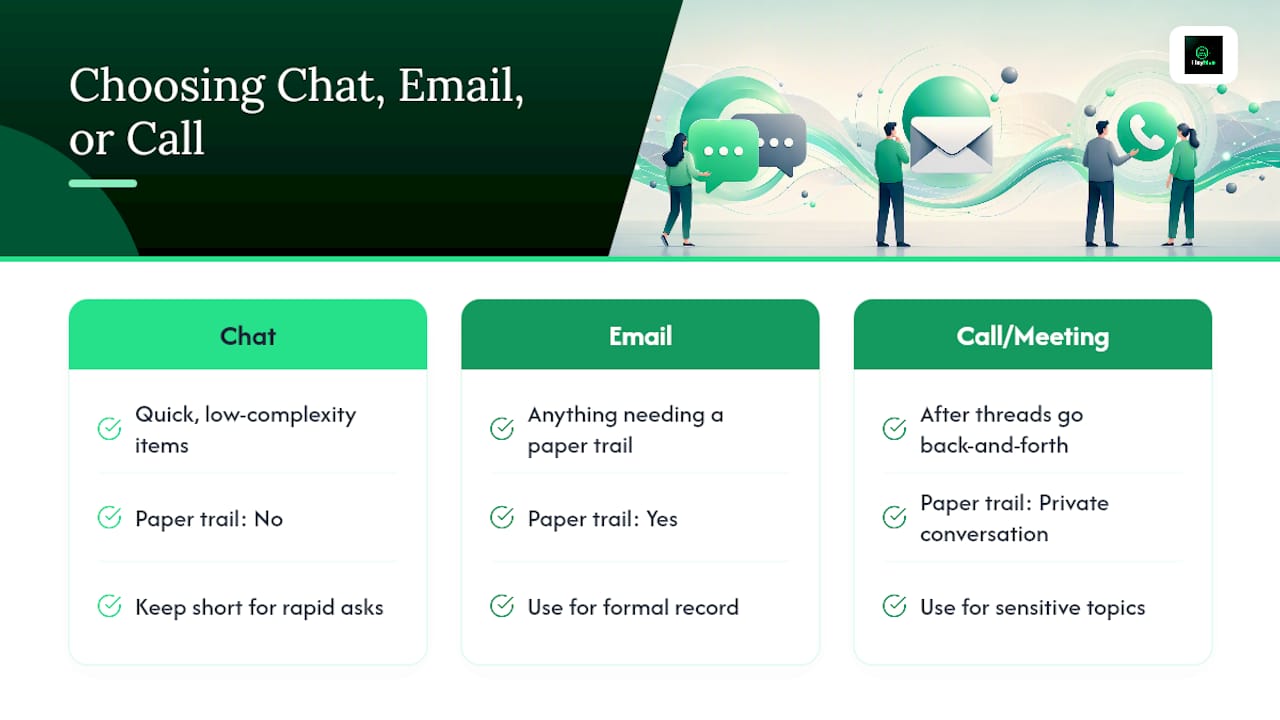
- Choose chat, email, or a call based on urgency and complexity.
- Set your status and honor others' status.
- Acknowledge messages promptly, even if the full answer comes later.
- Keep public channels focused and move sensitive topics to direct messages.
Key Takeaways
Clear, context-first messages and respected availability windows are what separate a productive work chat from a constant source of interruption.
| Point | Details |
|---|---|
| Lead with context | State the situation, the request, and a deadline in the first message, not the third. |
| Match channel to urgency | Use chat for quick items, calls for anything nuanced or emotionally loaded. |
| Treat channels as public | Keep group chats on-topic and move sensitive talk to private messages. |
| Set and honor status | Away or do-not-disturb signals should be respected, not overridden by habit. |
| Batch, don't scatter | Combine updates into one structured message instead of sending several one-liners. |
Table of Contents
- What Are the Basic Rules of Work Chat Etiquette?
- How Should You Open a Work Chat Message?
- What Are the Rules for Group Chat Channels?
- When Should You Use a Direct Message Instead?
- How Fast Should You Respond to Work Messages?
- How Do You Keep Tone Professional in Chat?
- When Should You Move a Conversation Off Chat?
- How Scheduling Tools Cut Down on Chat Overload
- Put These Chat Rules to Work With Heyhive
- What Most Advice on Chat Etiquette Gets Wrong
- Frequently Asked Questions
- Sources
What Are the Basic Rules of Work Chat Etiquette?
The most common mistake in workplace messaging is starting with "Hi" or "Quick question" and nothing else. It forces the other person to reply just to find out what you actually want, which doubles the back and forth for no reason. Microsoft's chat etiquette guidance recommends opening with context and a specific request instead, so the recipient can act on the first message they see.
- Do open with context and a clear ask. Avoid starting with vague greetings that require a reply just to clarify your message.
- Do acknowledge receipt quickly. Don't leave someone hanging after they can see you've read their message.
- Do use @mentions only when action is required. Don't tag an entire channel for something that affects three people.
- Do keep messages concise and formatted with line breaks or bullets. Don't send a wall of unformatted text that takes two reads to parse.
- Do move heated or complex discussions to a call or DM. Don't hash out disagreements in a channel everyone can see.
Pro Tip: Before sending three separate one-line messages, pair them into a single, structured note. Grammarly's guidance on professional chat writing points out that batching updates cuts down on notification noise and shows more respect for the other person's focus than a string of pings.
How Should You Open a Work Chat Message?
Structure beats length. A message that states context, then the request, then a deadline gets answered faster than one that rambles into the ask halfway through.
Use this micro-format:
- Context (one line): "The Denver client asked for revised pricing."
- Request (one line): "Can you review the attached sheet by end of day?"
- Next step or deadline (optional): "I need to send it back by 5 PM."
For multi-part requests, break them into numbered steps instead of one dense paragraph. Using a subject-like prefix such as "Request:" or "FYI:" in busy channels helps people triage messages effectively. Compare "Hey, quick question" with "Request: Need budget approval by Thursday for the Denver proposal." The second version tells the reader exactly what's needed and by when, before they even click in.
What Are the Rules for Group Chat Channels?
Treat a channel like a shared space where everyone present should care about the topic being discussed. Emily Post Institute's guidance on messaging channels frames chat channels as shared public spaces, and that framing changes how you should behave in them.
- Keep posts relevant to the channel's stated purpose; move tangents to a new thread or a DM.
- Tag people only when you need action from them specifically; use a channel-wide post for general updates instead.
- Pin key resources and name channels clearly. Microsoft notes that sharing chat history and pinning resources cuts down on repeated questions from new team members.
- Never air client complaints, HR issues, or performance feedback in a public channel. Those conversations belong in a private message or a formal meeting.
When Should You Use a Direct Message Instead?
Direct messages are appropriate for one-on-one clarification, mentoring, or feedback not intended for the wider audience. Private communication usually fosters more honest conversations and protects individual reputations.
- Use direct messages for private feedback, clarifications, or coaching.
- Reserve heavy social comments for dedicated social channels or established one-on-one chats.
- Do not use chat—public or private—for gossip or sensitive personnel discussions; document such matters via formal HR channels.
How Fast Should You Respond to Work Messages?
Response time expectations only work when they're explicit, not assumed. SHRM's research on remote collaboration found that teams communicate more effectively when they agree on response windows and respect working hours rather than treating every message as urgent.
- Use status indicators like away or do-not-disturb during focus times or outside working hours, and respect others' statuses.
- As a team, agree on expected response times, such as same-day replies for routine messages and quicker responses for urgent ones.
- Combine low-priority messages into one check-in rather than sending multiple scattered messages; use reactions like thumbs-up to acknowledge receipt.
Pro Tip: If your team keeps arguing about what counts as "urgent," write the definition down once. A one-line team agreement saves weeks of passive-aggressive read receipts.
How Do You Keep Tone Professional in Chat?
Chat strips out tone of voice and body language, which means a message that would sound neutral out loud can read as cold or annoyed on screen. Remote work research on how work shifts change organizational communication points out that losing those nonverbal cues makes intentional, explicit tone-setting more important, not less.
- Use a thumbs-up or similar reaction to close the loop on routine updates; save full sentences for anything that needs a real answer.
- Match emoji and GIF use to your specific team's norms, and dial it back in external-facing or large group channels.
- Never let a friendly emoji substitute for clear grammar and punctuation. A well-punctuated sentence reads as more professional than three exclamation points ever will.
When Should You Move a Conversation Off Chat?
Some conversations are simply the wrong shape for a chat window, and the longer they run in text, the worse they get.
- Watch for the signs: a thread that's gone back and forth more than four or five times, a misunderstanding that keeps repeating, or a topic that's sensitive or needs group consensus.
- Propose the switch directly: "This is getting long. Can we jump on a 15 minute call? I'll bring an agenda."
- Document the outcome afterward in an email or shared notes doc so the decision doesn't disappear into a scroll history nobody can find again.
How Scheduling Tools Cut Down on Chat Overload
A lot of chat overload isn't a messaging problem at all. It's an availability problem wearing a messaging disguise. When nobody can see who's working when, every question turns into a ping, and every ping turns into a guessing game about response time.
Automated scheduling and clear availability windows change that math directly:
- When shift schedules are visible and current, fewer people send after-hours messages just to check if someone's around.
- Syncing a team's schedule to their chat status removes the guesswork; a status showing "on shift until 6 PM" answers the question before it's asked.
- Managers who align shift schedules with agreed communication windows, the kind of setup Heyhive's AI scheduling platform is built around, see fewer interruptions because expectations are set by the tool, not by trial and error.
Pairing chat norms with real visibility into who's actually available is what turns etiquette rules from a document nobody reads into a habit that sticks.
Put These Chat Rules to Work With Heyhive
Rules only stick when the tools around them make the right behavior the easy behavior. If your team's chat chaos traces back to unclear shifts, unpredictable coverage, or nobody knowing who's on the clock, that's a scheduling problem showing up as a messaging problem.
Heyhive builds full weekly schedules in seconds, respecting availability, certifications, and overtime limits automatically, so your team always knows who's working and when. Managers still approve every shift before it publishes, keeping human oversight over the AI-generated plan. GPS-verified clock-ins confirm who's actually on-site, and open shifts get filled fast without a scramble of one-off DMs asking "can anyone cover tonight?"
When availability is visible and current, chat status means something again. Start a free trial with Heyhive and see how much quieter your team's chat gets once the schedule stops being a mystery.
What Most Advice on Chat Etiquette Gets Wrong
Most etiquette guides treat chat behavior as a personality problem: be nicer, be clearer, use fewer exclamation points. That's not wrong, but it misses the bigger lever. A huge share of chat friction traces back to structural gaps, nobody knowing who's working, what counts as urgent, or which channel a topic belongs in, not to bad manners.
The research backs this up: SHRM's work on remote collaboration and Microsoft's own chat guidance both point to the same root fix, which is agreeing on response windows and channel purposes before problems start, not after. Teams that treat etiquette as a one-time reminder in an onboarding doc see it decay within weeks. Teams that build it into visible systems, shared status, published schedules, clear channel names, keep the habit because the tool reinforces it every day.

If you take one thing from this guide, make it this: fix the visibility problem before you fix the tone problem. Clear availability solves more chat chaos than any amount of politeness ever will.
Frequently Asked Questions
What is the biggest work chat etiquette mistake people make? Opening a message with "Hi" or "Quick question" instead of stating the context and request right away. It forces an unnecessary reply just to get to the actual ask.
Should I use chat, email, or a call for a work request? Use chat for quick, low-complexity items; email for anything that needs a paper trail; and a call or meeting once a thread has gone back and forth several times or the topic is sensitive.
Is it rude to leave a work chat message unanswered for hours? Not if your team has agreed on response windows. Same-day turnaround for routine messages and one to two hours for flagged urgent items is a reasonable standard for most workplaces.
How many emojis are appropriate in work chat? Match your specific team's established norms, and scale back in external-facing channels or large group threads where tone can be easily misread.
Should performance feedback ever go in a group chat channel? No. Feedback, HR matters, and client complaints belong in a private message or a formal conversation, never in a channel other people can see.
Sources
- Your guide to chat etiquette in the workplace
- 10 Communication Practices That Improve Remote Collaboration
- Etiquette Today: Communicating Via Message Channels
- The Dos and Don’ts of Work Chat Etiquette