
Effective on call scheduling guarantees reliable coverage while keeping each team member's on-call load predictable and humane. Start this week with three moves: publish your rotation at least two weeks out, define response SLAs for each severity level, and confirm at least one backup per active shift. On call scheduling, formally called on-call rotation management, is the practice of assigning specific employees to be reachable and ready to respond outside normal hours so your operation never goes dark.
This week's immediate actions:
- Publish the next four weeks of your rotation so every team member knows their dates in advance.
- Set written SLAs: define how many minutes each severity tier has before a page escalates.
- Assign a named backup to every primary slot, not just the high-risk ones.
Table of Contents
- Step-by-step: build a predictable, fair rotation
- Tiers, SLAs, and escalation paths for pages
- What scheduling and incident tools must do for you
- U.S. legal basics and practical compensation approaches
- Manager checklist: best practices and common mistakes to avoid
- How Heyhive helps you run smarter on-call rotations
- Key Takeaways
- The trade-offs managers rarely talk about
- Heyhive makes your rotation run itself
- Useful sources and references
Step-by-step: build a predictable, fair rotation
Design the schedule before you buy the software. The rotation model and escalation pattern come first; automation encodes those rules, not the other way around.
Rotation design checklist:
- Talk to the team. Survey availability constraints, time zone preferences, and any medical or caregiving limitations. People who had input into the schedule are more likely to honor it.
- Define scope. List exactly which systems, queues, or services the on-call person owns. Ambiguity about scope is the leading cause of dropped pages.
- Decide rotation frequency. Datadog recommends rotations of six to eight engineers so each person serves no more than roughly once per month.
- Set shift lengths. Eight to twelve hours per shift is the practical range for most teams. Shorter shifts reduce fatigue but add handoff overhead; longer shifts simplify handoffs but increase burnout risk on noisy rotations.
- Assign backups. Every primary slot needs a named secondary. GitLab's on-call handbook recommends a minimum of four people per region to sustain a 1-in-4 pattern across three 8-hour coverage slots.
- Publish schedule windows. Publish at least two weeks ahead. EPI research on irregular work scheduling links unpredictable schedules to measurable negative outcomes for workers, including sleep disruption and increased stress. Advance notice is not a courtesy; it is a health measure.
- Set holiday rules. Decide in advance how holidays are handled: voluntary swap, mandatory rotation, or a separate holiday pool. Document the rule so it is not renegotiated every December.
Sample weekly rotation template (4-person team, single time zone):
Week 1: Alex (Primary), Jordan (Backup)
Week 2: Jordan (Primary), Sam (Backup)
Week 3: Sam (Primary), Casey (Backup)
Week 4: Casey (Primary), Alex (Backup)
Swap and override rules:
- Swaps must be requested at least 48 hours before the shift starts, except for genuine emergencies.
- Both parties confirm the swap in writing (chat, email, or scheduling tool) so there is an audit trail.
- The manager or team lead approves swaps that cross pay periods or affect overtime thresholds.
- Auto-override (system-initiated reassignment) should only trigger when a shift goes uncovered after a defined deadline, not as a default.
Tiers, SLAs, and escalation paths for pages
A page without a defined response window is just noise. Tiering your alerts and publishing SLAs turns an on-call rotation into a reliable incident management system.
Tier definitions:
- Tier 1 (Primary on-call): First responder. Receives the initial page, acknowledges, and begins triage. Expected to have full system access and runbook familiarity.
- Tier 2 (Secondary/Escalation): Receives the page if Tier 1 does not acknowledge within the SLA window. May be a more senior engineer, a team lead, or a specialist.
- Manager/Director fallback: Receives the page if Tier 2 also fails to acknowledge. This role should be a genuine last resort, not a routine stop on the escalation chain.
Sample SLA table by severity:
| Severity | Description | Acknowledge within | Resolve or escalate within |
|---|---|---|---|
| P1 — Critical | Full outage, data loss risk | 5 minutes | — |
| P2 — High | Significant degradation | 15 minutes | 2 hours |
| P3 — Medium | Partial impact, workaround exists | — | 8 hours |
| P4 — Low | Minor issue, no user impact | Next business day | Next business day |
Escalation flow:
- Page fires to Tier 1 primary.
- If no acknowledgment within 5 minutes, auto-escalate to secondary and then to manager if secondary also misses the window.
- Configure retries and loop-back rules so a page cannot silently drop if all responders miss it.
- After resolution, log the incident with response time, actions taken, and any follow-up items.
Pro Tip: Set a "no-ack loop" rule: if a P1 page completes a full escalation chain without acknowledgment, it re-pages from the top rather than going silent. One missed page on a critical system is a recoverable event; a silently dropped page is not.
What scheduling and incident tools must do for you
The right tool enforces your rotation rules automatically so you are not manually chasing coverage gaps. Before evaluating any platform, build a feature checklist based on your actual rotation design.
Must-have features:
- Automated rotation generation that respects availability, time zones, and frequency limits.
- Override and swap workflows with approval controls and an audit log.
- Multi-zone support for follow-the-sun or distributed teams.
- Integration with your alerting stack (monitoring tools, ticketing systems) so pages route correctly without manual intervention.
- Reporting on pages per engineer, mean time to acknowledge (MTTA), and alert volume by severity.
Decision criteria:
- Team size: Small teams (under 10) can use lighter tools; larger or distributed teams need multi-zone support and role-based permissions.
- Integration depth: The tool must connect to your existing monitoring and incident management workflow, not sit alongside it.
- Alert noise analytics: You need visibility into which alerts page most frequently so you can tune or demote noisy ones. Best practice is to page humans only for alerts that are actionable and have a runbook attached.
- Swap UX: If swapping a shift requires a manager to manually edit a spreadsheet, people will avoid requesting swaps and silently work shifts they cannot cover well.
- Approval controls: Managers should be able to review and approve schedule changes before they go live, especially when overtime thresholds are involved.
Metrics to track:
- Pages per engineer per week (target: low single digits for most teams).
- MTTA by severity tier.
- On-call frequency per person (flag anyone exceeding 33% of rotation slots).
- Swap request volume (a spike often signals schedule design problems).
Pro Tip: Track "noisy alert" counts separately from incident counts. An alert that fires repeatedly without a human action required is a tuning problem, not an on-call problem. Move it to a ticket queue and stop paging humans for it.
U.S. legal basics and practical compensation approaches
On-call pay is not optional, and the rules are more nuanced than most managers realize. The U.S. Department of Labor's FLSA guidance on hours worked draws a clear line:
An employee required to remain on the employer's premises while on call is working and must be paid. An employee who is on call at home is generally not working — unless restrictions on their freedom are significant enough that they cannot effectively use the time for personal activities. The more restrictions placed on the employee (geographic limits, short response windows, frequency of calls), the more likely that time is compensable.
Practical compensation models:
- On-call stipend: A flat weekly or daily payment for being available, regardless of whether incidents occur. Simple to administer and predictable for both parties. Best for rotations with low incident frequency.
- Hourly active pay: Pay only for hours actually spent working an incident, logged separately from the stipend. Appropriate when incident volume is unpredictable and some weeks are genuinely quiet.
- Compensatory time (comp time): For exempt employees, offering equivalent time off in exchange for on-call burden. Requires careful tracking and a written policy. Note that comp time for non-exempt employees is governed by strict FLSA rules; confirm with HR before implementing.
Compliance checklist (run this past HR and payroll):
- Confirm whether your on-call employees are exempt or non-exempt under the FLSA.
- Document all restrictions placed on on-call employees (response time, geographic limits, alcohol/substance rules) and assess whether those restrictions make the time compensable.
- Record all hours actually worked during on-call periods separately from regular hours.
- Review your written on-call policy to confirm it states compensation terms, escalation expectations, and response requirements explicitly.
- Audit overtime exposure quarterly, especially for non-exempt employees on high-incident rotations.
Manager checklist: best practices and common mistakes to avoid
Most rotation failures are predictable. They follow the same patterns: schedules published too late, no backup assigned, alert noise never addressed, and no feedback loop to catch problems early.
Do / don't list:
- Do publish schedules at least two weeks in advance. Unpredictable scheduling causes measurable harm to employee well-being.
- Do allow swaps with a simple, documented process. Friction-free swaps keep coverage intact without manager intervention on every change.
- Do limit frequency. No one should be on call more than roughly once per month on a healthy rotation.
- Do pay fairly and transparently. Ambiguous compensation is a fast path to resentment and attrition.
- Don't page people for low-priority alerts that have no immediate action required. Waking someone at 2 AM for a P4 issue destroys trust in the system.
- Don't use the manager as a routine fallback. If the manager is regularly receiving escalated pages, the rotation is either understaffed or the alert thresholds are misconfigured.
- Don't skip the post-incident review. A 15-minute debrief after a significant page catches noisy alerts and process gaps before they compound.
Weekly health check (for the rotation lead):
- Review page counts per engineer from the past week.
- Flag any engineer who was paged more than their share.
- Confirm all upcoming shifts have a named backup.
- Check for any unresolved swap requests.
Quarterly health check:
- Audit on-call frequency per person over the past 90 days.
- Review MTTA trends by severity tier.
- Survey the team on rotation fairness and alert quality.
- Identify the top three noisiest alerts and decide whether to tune, demote, or eliminate each.
Signals a rotation is failing:
- Multiple engineers declining or swapping out of the same week repeatedly.
- MTTA trending upward (people are slower to acknowledge, often a sign of fatigue or distrust in alert quality).
- Voluntary attrition among on-call staff.
- Manager receiving escalated pages more than once per month.
When you see these signals, act fast: reduce rotation frequency, audit alert noise, and have a direct conversation with the team before the next rotation cycle.
How Heyhive helps you run smarter on-call rotations
Designing a humane rotation is one challenge. Keeping it running without constant manual intervention is another. Heyhive's AI-powered scheduling platform automates the rules you just built into your rotation design so they are enforced every cycle, not just the first week.
What Heyhive does in plain terms:
- Generates full shift schedules in seconds, respecting each employee's availability, certifications, and overtime limits.
- Automates rotation patterns so frequency limits and backup assignments are applied consistently without manual spreadsheet work.
- Handles swap requests through a built-in workflow: employees request, managers approve, and the schedule updates automatically with a full audit trail.
- Gives managers approval control before any schedule goes live, so you review the rotation before your team sees it.
- Tracks GPS-verified clock-ins for field teams, giving you accurate records for payroll and compliance.
How automation enforces your rotation rules:
- Frequency caps prevent any single employee from being scheduled on call more often than your defined limit.
- Availability constraints block the system from scheduling someone during windows they have flagged as unavailable.
- Coverage gap alerts notify you when a shift has no backup assigned, before the gap becomes an incident.
- Payroll-ready exports capture on-call hours separately from regular hours, simplifying the compensation tracking your HR team needs.
Pro Tip: Pilot Heyhive on one rotation for 4–8 weeks before rolling it out team-wide. Pick your highest-volume or most complex rotation, configure the frequency rules and swap workflow, then measure MTTA and swap request volume at the end of the pilot. The data from that window will tell you exactly where to tune.
Rollout checklist for your pilot:
- Define the rotation rules (frequency, shift length, backup requirements) before configuring the platform.
- Import employee availability and any existing schedule constraints.
- Run one full rotation cycle with manager approval turned on.
- Collect feedback from on-call staff at the end of the cycle.
- Compare MTTA and page-per-engineer counts against your pre-pilot baseline.
Key Takeaways
Effective on call scheduling requires a predictable rotation, written SLAs, fair compensation, and a continuous feedback loop to catch problems before they burn out your team.
| Point | Details |
|---|---|
| Rotation sizing matters | Target 6–8 people per rotation so no one is on call more than roughly once per month. |
| Publish schedules early | Advance notice of at least two weeks reduces stress and improves coverage reliability. |
| Tier your alerts and SLAs | Define P1–P4 severity levels with explicit acknowledgment windows to prevent dropped pages. |
| Know your pay obligations | DOL guidance requires pay when on-call restrictions significantly limit employee freedom; confirm with HR. |
| Heyhive automates the rules | Heyhive enforces frequency limits, swap approvals, and coverage gap alerts so your rotation stays humane without manual oversight. |
The trade-offs managers rarely talk about
The conventional wisdom on on-call scheduling focuses almost entirely on tooling and rotation patterns. What gets less attention is the judgment calls that happen in the first 90 days after you publish a new rotation.
The most common mistake is treating the manager-as-backup role as a safety net rather than a warning signal. Datadog's guidance on on-call rotations is direct on this point: if the manager is routinely receiving escalated pages, the rotation is either understaffed or the alert thresholds are wrong. Using yourself as a habitual fallback feels responsible, but it masks the underlying problem and delays the fix.
The shorter-shift-versus-fewer-handoffs trade-off is real, and there is no universal answer. Eight-hour shifts reduce individual fatigue on high-volume rotations, but every handoff is a moment where context can drop. On low-volume rotations, a weekly shift with a strong handoff document is often cleaner. The right answer depends on your incident tempo, not on what another team's handbook says.
For the first 90 days with a new rotation, run a brief check-in after every on-call week, not just after incidents. Ask the person who just finished: what was the noisiest alert, what took longest to resolve, and what would have helped. That feedback loop, done consistently, will surface more actionable improvements than any quarterly audit. By day 90, you will have enough data to tune alert thresholds, adjust shift lengths, and identify whether your staffing level is actually sustainable.
Heyhive makes your rotation run itself
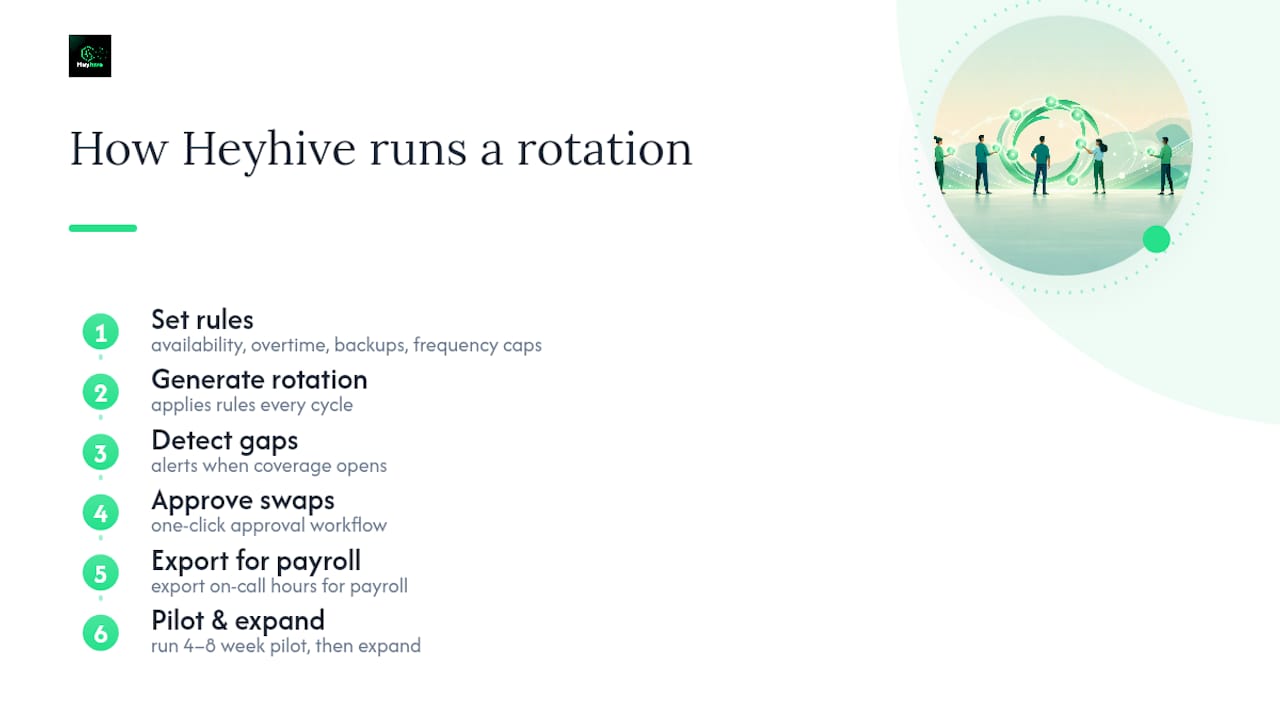
Manual scheduling eats hours you do not have. Heyhive gives you back that time by generating rotation schedules automatically, enforcing your frequency rules, and routing swap requests through an approval workflow that keeps you in control without requiring you to manage every change by hand.

You set the rules once: availability windows, overtime limits, backup requirements, and frequency caps. Heyhive applies them every cycle. When a gap opens, you get an alert. When an employee requests a swap, you approve it in one click. When payroll needs on-call hours, the export is ready. No spreadsheets, no last-minute scrambles, no missed backups.
Start with one rotation. Run a 4–8 week pilot, measure the results, and expand from there. Try Heyhive free and see how fast a well-designed rotation can run when the admin work is handled for you.
Useful sources and references
These are the primary sources used to build this guide. Each one is worth bookmarking for a specific use case.
- How we structure on-call rotations at Datadog | Datadog
- U.S. Department of Labor — Hours worked (FLSA) Fact Sheet
- On-call rotations and procedures — GitLab handbook
- How to Build an Effective On-Call Rotation and Escalation Policy | DevOps Daily
- [IT On-Call Policy Template [Free] — ToolkitCafe Blog](https://toolkitcafe.com/blog/it-on-call-policy-template)
- A better approach to on-call scheduling | Atlassian
- Irregular work scheduling and its consequences | EPI
This article provides general information about on-call scheduling practices and U.S. labor law basics. It is not legal or professional advice. Confirm your specific compensation obligations and compliance requirements with a qualified employment attorney or your HR team.