
Skill-based scheduling assigns shifts by matching required skills to employee proficiencies instead of just filling headcount, and it moves the KPIs that matter most: first-contact resolution, customer satisfaction, and utilization. The best implementations pair AI-generated schedules with manager approval before anything publishes. Some platforms build that pattern directly into the workflow.
TL;DR:
- Skill-based scheduling improves first-contact resolution and reduces escalations by ensuring employees with the correct skills handle complex tasks, which requires accurate proficiency data.
- Building a manageable skills matrix involves tracking 5 to 10 core competencies linked to safety or compliance, updated through event-driven verification methods rather than annual reviews.
- Implementing starts with a small pilot, linking workforce systems, and requiring manager approval for schedules, with continuous review and adjustments before scaling up.
- Integrations with learning management, QA, HR, and attendance systems are essential for maintaining current skill records and respecting certifications and overtime limits.
- Measuring success involves comparing KPIs like FCR, escalation rates, and utilization before and after deployment, using structured A/B or pre/post analyses over at least four weeks.
Table of Contents
- What Is Skill-Based Scheduling, and How Is It Different?
- What Benefits Does Skill-Based Scheduling Deliver?
- How Do You Build a Skills and Competency Matrix?
- How Do You Implement Skill-Based Scheduling Step by Step?
- Which Systems Should You Integrate for Accurate Skill Data?
- Which Metrics Prove Skill-Based Scheduling Is Working?
- What Pitfalls Should You Watch For?
- How Heyhive Supports Skill-Aware Scheduling
- How Should Managers Communicate Skill-Based Scheduling to Staff?
- What Legal and Compliance Issues Apply to Skill-Based Scheduling?
- When Is Skill-Based Scheduling Worth the Investment?
- Ready to Try AI-Assisted Skill Matching?
- Sources
- FAQ
What Is Skill-Based Scheduling, and How Is It Different?
Skill-based scheduling assigns employees to shifts based on their specific skills, certifications, and performance history rather than treating every staff member as interchangeable. Aspect's research frames the distinction clearly: demand-based scheduling answers "how many people do we need at 2 p.m.?" Skill-based scheduling answers "who, specifically, should be here at 2 p.m.?"
The difference matters most where task complexity varies by shift. A call center routing billing disputes to agents without dispute training creates rework and escalations. A hospital unit scheduling a nurse without a required certification creates compliance risk. A field service company sending an uncertified technician to a specialized repair creates callbacks.
Ask yourself these questions before you invest in a skill-based approach:
- Do your service outcomes vary noticeably depending on who staffs the shift?
- Do you track certifications, licenses, or specialized training that expire or require renewal?
- Have escalations or rework increased because of skill mismatches?
- Would customers or clients notice a difference between your best and least experienced staff?
If you answered yes two or more times, your operation is a strong candidate.
What Benefits Does Skill-Based Scheduling Deliver?
The operational case is straightforward: matching the right skill to the right task reduces the back-and-forth that eats into productive hours. Organizations using this approach report fewer escalations, less rework, and measurable gains in first-contact resolution because the person handling the task usually has the qualification to close it on the first pass.
The people side matters just as much. When schedules reflect actual skill levels instead of generic availability, employees see a clearer link between developing new competencies and getting better shifts. That visibility supports engagement and retention, particularly among staff who feel undifferentiated in a purely demand-based rotation.
Quick benefit-to-KPI map:
- Skill matching accuracy → higher FCR, lower AHT
- Reduced skill mismatches → fewer escalations, less rework
- Visible development paths → improved retention, higher engagement scores
- Better task fit → higher utilization without added headcount
Pro Tip: Set a 60- to 90-day baseline on your current FCR and escalation rate before you launch anything. Without a "before" number, you cannot prove the "after."
How Do You Build a Skills and Competency Matrix?
Start small. AG5's guidance on skills tracking is blunt about this: pick 5 to 10 core competencies tied directly to outcomes like safety, compliance, or throughput, not a sprawling list of every possible skill. A matrix with 40 tracked skills becomes unmaintainable within a quarter.
Build it in this order:
- Identify outcome-linked competencies. Choose skills that demonstrably affect safety, compliance, quality, or speed. Skip nice-to-haves.
- Choose proficiency capture methods. Combine formal assessments, QA scores, certification records, and recency of use. A skill practiced six months ago should not carry the same weight as one used last week.
- Define matrix fields. Include skill name, proficiency level, certification expiration, last-verified date, and source of verification.
- Set an update cadence. Skip the annual review model. Skills data decays fast when it is only refreshed once a year, so tie updates to events instead: a completed training, a QA score, a certification renewal, or a performance review.
Event-driven verification catches drift that a once-a-year audit misses entirely.
How Do You Implement Skill-Based Scheduling Step by Step?
Rolling out skill-based scheduling works best as a contained pilot before a full rollout. Rushing straight to enterprise-wide deployment is how most implementations stall.
- Design the pilot scope. Pick one team or shift type, define a 4 to 8 week duration, and set success metrics upfront (FCR, fill rate, escalation count).
- Build the skills matrix for that team. Use the 5 to 10 core competency framework from the previous section.
- Connect your systems. Link your workforce management (WFM) tool, learning management system (LMS), QA scoring, and time and attendance data so skill records stay current without manual entry.
- Set manager approval gates. AI-generated schedules should route through a manager before publication, with clear override rules for exceptions like personal conflicts or last-minute emergencies.
- Communicate before launch. Explain the "why" to staff, show them how their own skill profile factors into scheduling, and open a feedback channel.
- Review and scale. Compare pilot metrics to baseline, adjust the matrix and rules, then expand to additional teams.
Keep these guardrails active throughout:
- Never let automation publish a schedule without a human review step.
- Log every manager override so you can spot patterns (a skill category that's consistently wrong, for instance).
- Revisit the pilot's success metrics every two weeks, not just at the end.
A self-scheduling playbook built for hourly teams can give you a workable pilot structure if you're starting from scratch.
Which Systems Should You Integrate for Accurate Skill Data?
Skill-based scheduling only works if the skill data behind it is accurate, current, and available where the scheduling decision actually happens. Four integrations matter most:
- Learning management system (LMS): Connecting your LMS to scheduling turns completed training into scheduling eligibility automatically, rather than requiring manual updates.
- QA and performance systems: Feed quality scores and performance metrics directly into proficiency ratings.
- HRIS: Keeps role, certification, and employment status data in sync.
- Time and attendance: Confirms actual hours worked against scheduled skill assignments, useful for auditing.
Beyond the connections themselves, demand these features from any platform you evaluate: constraint-aware matching that respects certifications and overtime limits, audit logs for every schedule change, a manager override function that doesn't require a workaround, and payroll-ready hours export. Without a single source of truth for skill data, you end up with the same fragmented spreadsheets that skill-based scheduling was supposed to replace.
Which Metrics Prove Skill-Based Scheduling Is Working?
Track a focused set of KPIs rather than everything your systems can generate. The core group: CSAT, first-contact resolution, average handle time (AHT), fill rate, time-to-fill, utilization, and turnover.
To prove causation rather than coincidence, run a structured comparison:
- A/B pilot: Run skill-based scheduling on one team while a comparable team continues with standard scheduling.
- Pre/post comparison: Measure the same team's KPIs before and after rollout, using at least four weeks of baseline data.
- Cohort analysis: Track how new hires who onboard under skill-based scheduling perform against those onboarded under the old system.
Assign clear ownership. FCR and CSAT typically belong to operations leadership, fill rate and time-to-fill sit with the scheduling manager, and turnover tracking usually belongs to HR. Review the full set monthly. Aspect's research on skills-based scheduling recommends validating proficiency against QA scores and FCR data specifically, since those two metrics respond fastest to better skill matching.
What Pitfalls Should You Watch For?
Skill bloat is the most common failure. Once managers start tracking skills, the temptation is to track everything. Limit the framework to 5 to 10 core competencies per role and resist requests to add more without a clear outcome tied to the new skill.
Stale data is the second failure mode. A matrix updated once a year misrepresents reality by month three. Tie updates to events, not calendar dates.
Over-automation is the third risk. Letting AI publish schedules without a review step removes the judgment that catches interpersonal conflicts, personal emergencies, or client-specific nuances that no algorithm sees coming.
- Cap core competencies at 5 to 10 per role.
- Trigger skill updates on events: training completion, certification renewal, QA score change.
- Require manager approval before every schedule publishes.
- Publish your skill criteria openly so staff understand how assignments are made.
Pro Tip: If employees can't explain why they got (or didn't get) a particular shift, your criteria aren't transparent enough. Transparency prevents most morale complaints before they start.
How Heyhive Supports Skill-Aware Scheduling
Heyhive builds AI-generated weekly schedules that respect availability, certifications, and overtime limits, then routes them to managers for approval before publishing. That human-in-the-loop step keeps quality control in place while cutting the manual work of building schedules from scratch.
For managers running skill-dependent operations, Heyhive supports:
- AI-generated shift proposals that account for certifications and skill requirements
- Manager approval before any schedule goes live
- Fast coverage of open shifts when a skilled employee calls out
- GPS-verified clock-ins for field and multi-site teams
- Payroll-ready hours export to cut administrative time
How Should Managers Communicate Skill-Based Scheduling to Staff?
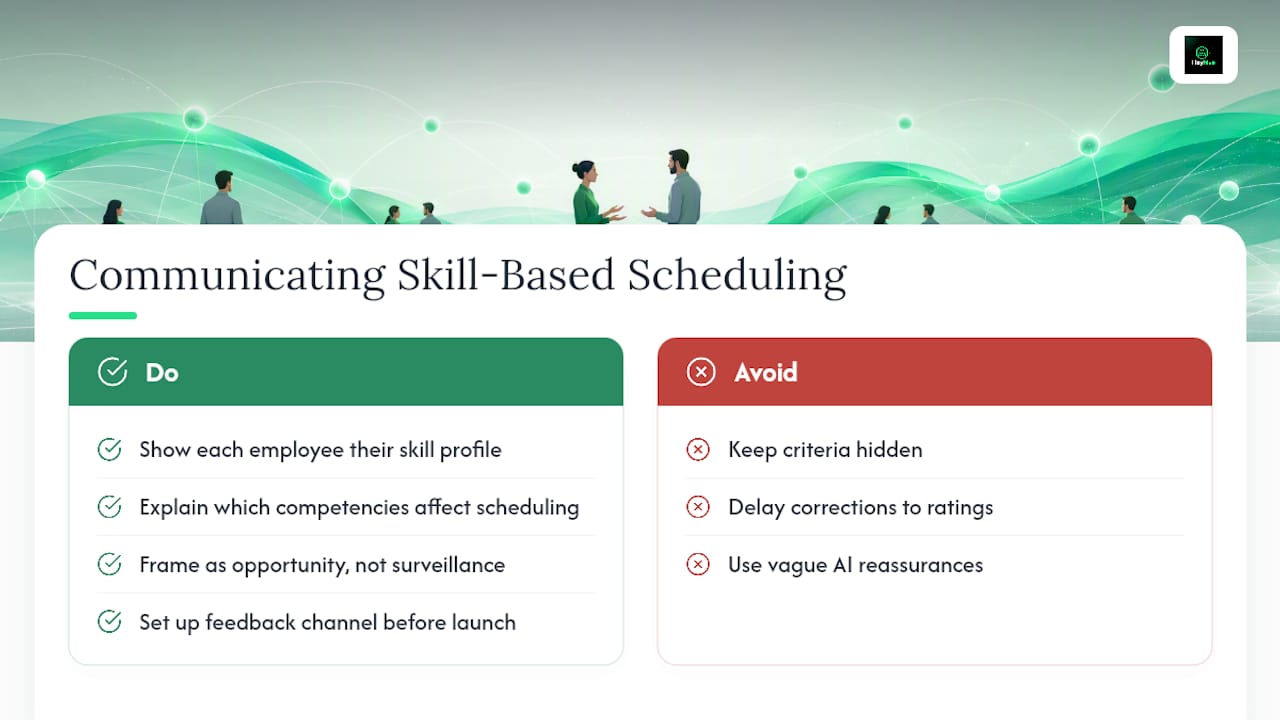
Employees often hear "skill-based scheduling" and assume it means favoritism dressed up in a system. That reaction is fair if the criteria stay hidden. The fix is transparency from day one: show each employee their own skill profile, explain exactly which competencies factor into scheduling, and let them see the path to qualifying for more shifts or better ones.
Frame the conversation around opportunity, not surveillance. A technician who knows that completing a specific certification opens up higher-priority shifts has a concrete incentive to develop. Without that visibility, the same technician just sees an opaque system handing better shifts to someone else for reasons nobody explained.
Set up a feedback channel before launch, not after complaints start. Weekly check-ins during a pilot phase catch confusion early. If someone's proficiency rating is based on an outdated QA score or a certification that already renewed, they need a fast way to flag it and get it corrected. Slow correction cycles are what erode trust in the whole system.
Managers should also be upfront about the AI component. Staff generally accept that a tool generates the first draft of a schedule; what they want confirmed is that a person reviews it before it's final. Saying so directly, and meaning it, does more for adoption than any feature explanation. Skip the vague reassurance and be specific: which skills are tracked, how often they're updated, and who approves the final schedule every week.
What Legal and Compliance Issues Apply to Skill-Based Scheduling?
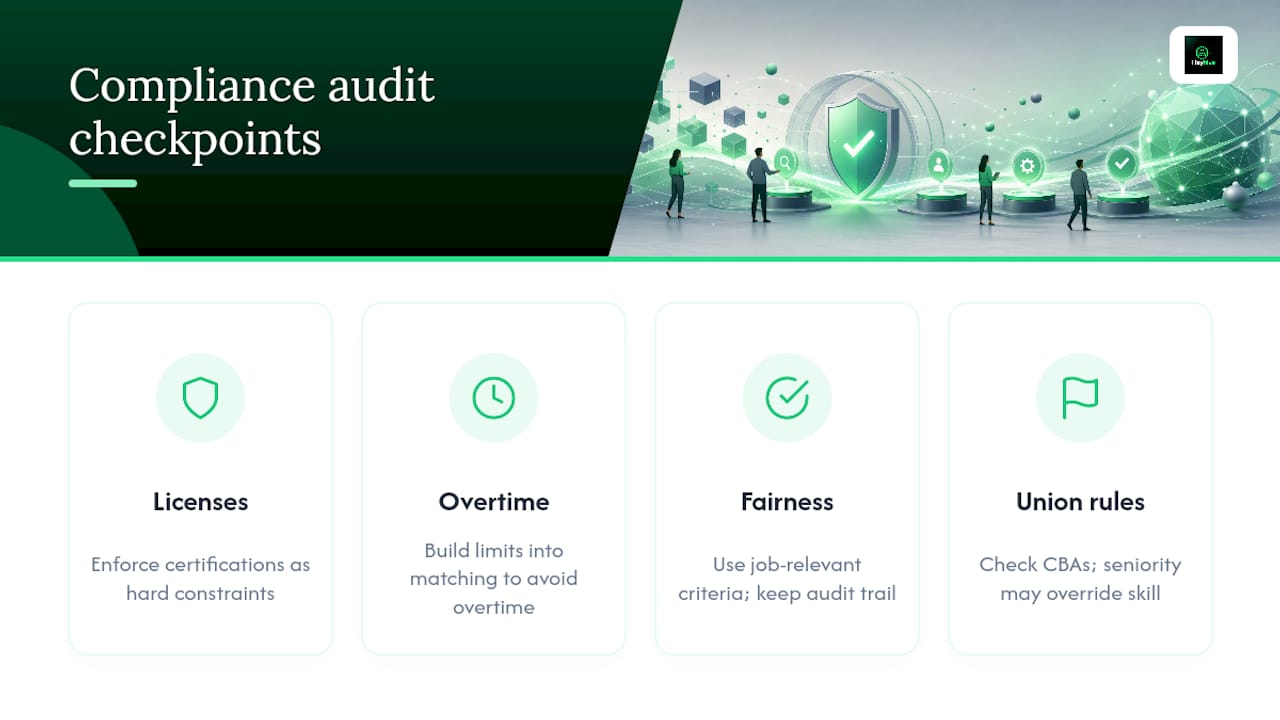
Skill-based scheduling touches several compliance areas that demand-based scheduling mostly avoids, starting with certification and licensing requirements. If a role requires a specific license or certification to legally perform a task, your matrix needs to enforce that as a hard constraint, not a preference. Scheduling an uncertified employee into a role that legally requires certification creates liability that goes well beyond a bad shift.
Overtime rules apply just as strictly under skill-based scheduling as under any other model. Because certain skills may be concentrated in a smaller pool of employees, there's a real risk of over-relying on your most qualified people and pushing them into overtime territory. Build overtime limits into your matching logic so the system won't route a shift to someone who's already near their cap just because they're the best-qualified option.
Fairness and anti-discrimination considerations deserve explicit attention. Skill criteria must be based on job-relevant competencies, documented consistently, and applied the same way across every employee. If two employees have comparable proficiency but one consistently gets preferred shifts, you need a defensible, skill-based reason on record. Keep an audit trail of how skill ratings were assigned and by whom.
Union environments often have specific rules about seniority versus skill-based assignment. Check your collective bargaining agreements before rolling out any skill-based model, since some agreements require seniority to take priority over proficiency in shift assignment. None of this replaces legal counsel for your specific jurisdiction and industry, but building transparent, documented, consistently applied criteria from the start makes any compliance review far easier.
When Is Skill-Based Scheduling Worth the Investment?
ROI is highest in specialized roles where errors directly hit customers: certified technicians, licensed clinical staff, tiered support agents. If your shifts are largely interchangeable and quality doesn't vary much by who's working, a simpler demand-based system may serve you better. Start with one measurable pilot before committing further.
Ready to Try AI-Assisted Skill Matching?
If you're managing hourly or field teams and tired of manually cross-referencing certifications against open shifts, some platforms remove that friction: they generate a full week of skill-aware schedules in seconds, then hold every shift for your approval before anything publishes. You keep the final call. The AI just does the matching legwork, respecting availability, certifications, and overtime limits automatically.

Beyond scheduling, Heyhive covers the operational pieces that skill-based scheduling depends on: GPS-verified clock-ins for field employees, fast coverage when an open shift needs a specific skill filled quickly, and payroll-ready hours export that cuts administrative time at the end of every pay period. If you run agency-style operations juggling multiple client teams, tools like AI-driven workflow platforms can complement scheduling by handling adjacent client work without adding headcount.
Start a free trial at Heyhive and generate your first skill-aware schedule this week.
Sources
FAQ
What Are the Three Main Types of Employee Scheduling?
The three common approaches are fixed scheduling (the same shifts every week), demand-based scheduling (staffing levels driven by forecasted volume), and skill-based scheduling (shift assignment driven by employee proficiencies and certifications). Many operations blend demand-based volume planning with skill-based assignment for the best results.
What Is a Disadvantage of Skill-Based Pay Systems?
A common drawback is administrative complexity: tracking proficiency levels, certifications, and pay tiers accurately requires ongoing validation, and stale or unverified skill data can lead to pay disputes or perceived unfairness if not maintained consistently.
What Are Examples of Skill-Based Activities in the Workplace?
Examples include technical certifications for equipment operation, specialized customer service tiers for escalated issues, clinical licensing for patient care tasks, and safety qualifications required for hazardous work. Each ties a specific proficiency to eligibility for specific shifts or tasks.
What Skills Does a Good Scheduler Need?
Effective schedulers need data literacy to read utilization and fill-rate reports, familiarity with labor compliance rules around overtime and certifications, and communication skills to explain scheduling decisions to staff transparently. Increasingly, schedulers also need comfort reviewing and approving AI-generated schedule drafts rather than building every schedule manually, a workflow platforms like Heyhive are built to support.
How Long Does It Take to See Results From Skill-Based Scheduling?
Most pilots run 4 to 8 weeks before producing a reliable before-and-after comparison on metrics like FCR and escalation rate. Full organizational rollout typically takes longer, depending on how many teams and skill categories are involved.