
For hourly and shift-based operations, the best absence management software is an AI-powered shift-coverage and attendance platform like Heyhive — because it prevents no-shows before they cascade, auto-fills open shifts by matching qualified, available employees, and ties GPS-verified clock-ins directly to payroll. Spreadsheets and paper schedules cannot do any of that in real time. If you manage a restaurant, retail floor, service crew, or field team, the right next step is a focused demo where you watch the open-shift fill flow live and verify GPS time clock verification yourself.
Table of Contents
- What does absence management software actually solve for shift teams?
- Must-have features to prevent no-shows and auto-fill open shifts
- How does AI actually improve scheduling for shift-heavy operations?
- How to evaluate vendors in 30–60 minutes
- Implementation checklist and realistic rollout timeline
- What do absence management platforms cost, and how do you calculate ROI?
- What compliance and security requirements should you verify?
- When is a dedicated platform overkill?
- What is the recommended next step?
- Key Takeaways
- The gap between what scheduling software promises and what actually matters
- Heyhive is built for the shift-coverage problems that cost you the most
- Further reading and sources
What does absence management software actually solve for shift teams?
The core problem is not just that someone calls out. It is that the callout triggers a chain reaction: a manager scrambles through contacts, coverage is delayed, overtime spikes, and service suffers. Dedicated scheduling software automates the core staffing tasks that break this chain — real-time coverage matching, verified clock-ins, and payroll-ready hour exports.
Consider a restaurant scenario: a line cook calls out at 6:00 a.m. Without a platform, the manager burns 45 minutes texting and calling. With an AI-powered system, the platform immediately publishes the open shift to qualified, available employees, filters out anyone who would hit overtime, and fills the gap within minutes. Open shift management platforms convert that reactive scramble into proactive coverage while maintaining compliance with role and certification requirements.
The same logic applies to field crews and retail teams. Data lives in silos — time clocks, HR records, POS systems — and managers waste hours reconciling it manually. A unified platform connects those sources automatically.
Must-have features to prevent no-shows and auto-fill open shifts
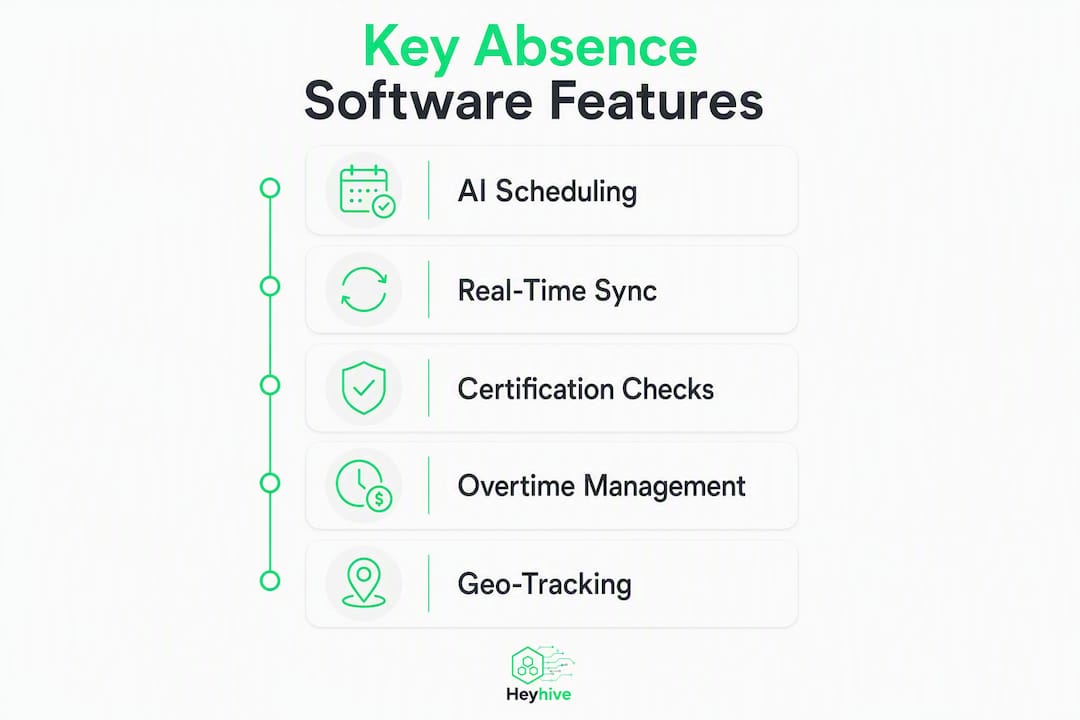
Not every feature on a vendor's spec sheet moves the needle equally. Here is a prioritized checklist for your next demo:
- Open-shift marketplace and auto-matching (Must) — publishes gaps instantly and surfaces qualified, available employees without manual lookup.
- Mobile shift acceptance (Must) — mobile self-service for claiming shifts significantly speeds time-to-fill and improves participation rates.
- GPS-verified clock-ins (Must) — confirms employees arrive at the right location; critical for field teams and multi-site operations.
- Rules-based matching (Must) — enforces certifications, role requirements, and overtime limits automatically before a shift is offered.
- Automated swap and approval flows (Should) — lets employees initiate swaps while keeping managers in control of final approval.
- Real-time labor forecasts (Should) — demand-based hourly projections so you staff to actual need, not last week's template.
- Payroll-ready export (Must) — hours flow directly to payroll without manual re-entry, reducing errors and prep time.
- Integration with payroll, HRIS, and POS (Must) — without these connections, the platform creates a new silo instead of closing existing ones.
Heyhive's AI scheduling workflows cover every item on this list, including availability, certification checks, and overtime enforcement before a shift is ever published.
How does AI actually improve scheduling for shift-heavy operations?
AI improves match quality and speed when it has access to live operational data. According to Glean's research, the real value from AI scheduling is faster, more reliable access to the facts behind scheduling decisions — it works best when it connects scattered operational context automatically rather than relying on static exports.
Practically, that means the system can auto-prioritize backup employees by overtime exposure, certification status, and recent availability simultaneously. It can generate demand-based hourly forecasts from POS data. It can explain why a specific employee was matched to a shift in plain language, which matters when a manager needs to override a recommendation and document the reason.
BCG's research on GenAI for frontline workers shows that machine learning can incorporate business rules and employee preferences, and that continuous learning improves schedule quality while reducing attrition over time.

Pro Tip: Ask every vendor: "What data does your AI read in real time, and what does it read from a nightly batch export?" A system that only sees yesterday's data cannot fill a 6:00 a.m. callout intelligently. Also ask whether the system logs every override with a reason — that audit trail protects you during a wage-and-hour review.
How to evaluate vendors in 30–60 minutes
Walk into every demo with this task list. If the vendor cannot demonstrate each item live, treat it as a red flag.
- Request a live open-shift fill demo. A callout happens now — watch the system publish the shift, match qualified employees, and show the fill time. Ask for the fill rate metric from a real customer account.
- Trigger a rules conflict. Ask the system to assign an employee who would hit overtime or lacks a required certification. Confirm it blocks the assignment automatically.
- Clock in from a mobile device with GPS. Verify the location stamp appears in the manager dashboard in real time, not on a delayed sync.
- Export a payroll-ready hours report. Check that it maps to your payroll system's format without manual reformatting.
- Review the audit trail. Open a past schedule change and confirm it shows who made the change, when, and why.
Red flags to watch for: batch-only data exports (no real-time sync), no geofencing on the time clock, approval workflows that bypass the manager, and no change history on schedule edits. Key pilot metrics to track from day one: open-shift fill rate, time-to-fill, and override rate.
Implementation checklist and realistic rollout timeline
Start with a staged pilot on one site or one team, not a company-wide rollout. A narrow operational focus — same-day open-shift fills, for example — lets you measure impact quickly and tune the system before scaling.
| Phase | Duration | Key Tasks |
|---|---|---|
| Discovery and setup | Week 1–2 | Connect payroll, HRIS, and time clock integrations; configure role and certification rules |
| Pilot launch | Weeks 3–6 | Run one site or team; track fill rate, override rate, and schedule build time |
| Iterative tuning | Weeks 7–12 | Adjust rules based on outcome data; train managers on override documentation |
| Org-wide rollout | — | Expand site by site; use pilot metrics as the go/no-go benchmark |
Train managers first, then employees. Managers need to understand approval workflows and override documentation. Employees need to know how to claim shifts and clock in via mobile. Keep the initial training under 30 minutes per group — the interface should do the explaining.
For field teams specifically, Heyhive's GPS arrival and departure tracking handles multi-site complexity without requiring separate hardware.
What do absence management platforms cost, and how do you calculate ROI?
ROI comes from three places: reduced overtime, fewer emergency hires, and manager time reclaimed. A simple back-of-envelope calculation: if a manager spends significant time per week on manual scheduling and coverage calls and a platform cuts that by a substantial portion, that time is returned to operations. At a typical loaded manager cost, this results in notable cost savings from one manager alone.
Pricing factors to evaluate:
- Per-employee vs. per-location pricing — per-employee scales predictably; per-location can be cheaper for large sites with many staff.
- Feature gating — GPS time clocks, API access, and advanced forecasting are often locked behind higher tiers.
- Integration costs — some vendors charge separately for payroll or HRIS connectors.
BCG's research on GenAI for frontline workers finds that AI-driven scheduling can reduce reliance on temporary labor and cut attrition when it balances employee preferences with demand-based forecasting — two of the largest cost drivers in hourly operations.
Scheduling software reports — overtime summaries, coverage gap reports, individual hour totals — are how you track whether those savings are materializing. Review them quarterly at minimum.
What compliance and security requirements should you verify?
The platform must provide an accurate, tamper-evident audit trail. For wage-and-hour compliance under the Fair Labor Standards Act, you need precise timestamps, documented rest-period detection, and a record of every schedule change with the approving manager identified.
For licensed or certified roles — food safety certifications, forklift licenses, security credentials — the system must block assignment automatically when a credential is expired, not just flag it after the fact.
Security controls to request during demos: encryption at rest and in transit, role-based access controls so employees cannot view each other's personal data, SSO support for enterprise environments, and a clear data retention policy. Heyhive's attendance tracking guide covers geofencing configuration and payroll reconciliation in detail.
When is a dedicated platform overkill?
Paper and spreadsheets still make sense in specific situations. A team of eight employees with fixed weekly shifts and no same-day callout history does not need an AI-powered platform. Paper and whiteboard scheduling works for teams under 10 but provides no audit trail and is difficult to update quickly. Spreadsheets add flexibility and customization but introduce manual errors and lack real-time updates.
| Method | Update speed | Audit trail | Real-time coverage | Scales well beyond small teams |
|---|---|---|---|---|
| Paper/whiteboard | Slow | None | No | No |
| Spreadsheet | Moderate | Minimal | No | Poorly |
| Dedicated platform | Instant | Full | Yes | Yes |
Upgrade when any of these apply: your team exceeds 15 employees, you experience same-day callouts more than once per week, your no-show rate exceeds 5%, or payroll prep takes more than two hours per pay period. Below those thresholds, a spreadsheet may be sufficient.
What is the recommended next step?
An AI-powered shift-coverage platform is the right choice for any hourly or shift-based operation dealing with frequent callouts, manual coverage scrambles, or payroll prep that eats manager time. Schedule a focused demo, run a 2–4 week pilot on one site, and track three metrics: open-shift fill rate, override rate, and time-to-fill. Those three numbers will tell you within a month whether the platform is delivering.
Next steps:
- Schedule a 30–60 minute demo focused on the open-shift fill flow and GPS clock-in verification.
- Run a 2–4 week pilot on your highest-callout site or team.
- Measure fill rate, override rate, and time-to-fill weekly throughout the pilot.
Key Takeaways
AI-powered shift-coverage platforms reduce no-shows, auto-fill open shifts, and tie GPS-verified attendance to payroll — making them the right choice for any hourly operation with more than 15 employees or frequent same-day callouts.
| Point | Details |
|---|---|
| Choose AI-powered shift-coverage | Platforms that auto-match, auto-publish, and enforce rules outperform spreadsheets at any scale above 15 employees. |
| Insist on real-time GPS attendance | GPS-verified clock-ins protect you during wage-and-hour audits and confirm field employees are on-site. |
| Prioritize payroll and HRIS integration | Without direct integration, the platform creates a new manual step instead of eliminating one. |
| Pilot before full rollout | A 2–4 week single-site pilot lets you measure fill rate, override rate, and time-to-fill before committing org-wide. |
| Heyhive for shift-driven teams | Heyhive combines AI scheduling, GPS time clocks, open-shift marketplace, and payroll-ready exports in one platform. |
The gap between what scheduling software promises and what actually matters
Most vendors lead with feature counts. What actually determines whether a platform reduces your no-shows is simpler: does the AI read live data, or does it read last night's export? Does the mobile app make it genuinely easy for an employee to claim a shift in under 30 seconds? Does the audit trail hold up if a Department of Labor investigator asks for it?
The platforms that fail in practice are the ones that automate the easy parts — generating a base schedule — but leave the hard part, same-day coverage, as a manual process. That is where the real cost lives. A 6:00 a.m. callout that takes 45 minutes to cover manually, multiplied across a year, is a significant labor cost hiding in plain sight.
Heyhive's approach — AI generates the schedule, you approve it, and the open-shift marketplace handles same-day gaps automatically — keeps the manager in control without making the manager the bottleneck. That balance is what separates a tool that gets used from one that gets abandoned after the pilot.
Heyhive is built for the shift-coverage problems that cost you the most
No-shows at 6:00 a.m. are expensive. Manual coverage calls are expensive. Payroll prep that takes three hours every two weeks is expensive. Heyhive addresses all three in one platform: AI-generated schedules that respect availability, certifications, and overtime limits; an open-shift marketplace that fills gaps without manager intervention; GPS-verified clock-ins that feed directly into payroll-ready exports; and a full audit trail for every schedule change.

The fastest way to see the difference is a focused pilot on your highest-callout site. Two to four weeks, three metrics to track, and you will have a clear answer. Start your pilot with Heyhive or request a demo to see the open-shift fill flow and GPS time clock live before you commit.
Further reading and sources
- How to implement AI tools for effective shift scheduling — Glean: supports AI data requirements, pilot methodology, and key operational metrics.
- How GenAI improves the lives of frontline workers — BCG: supports AI scheduling ROI claims and attrition reduction.
- Heyhive blog: workforce scheduling, attendance, and hiring insights — operational templates, guides, and product documentation for deeper implementation support.