
To prevent overtime scheduling this week, do three things: require written pre-authorization before any overtime is worked, set a real-time alert threshold at 38 hours so you can reassign hours before they cross 40, and redistribute open shifts to employees with available capacity instead of defaulting to whoever is already scheduled. This three-step combination addresses the most common cause of runaway overtime: managers finding out too late to act. Heyhive automates all three, enforcing overtime caps, triggering alerts, and blocking unapproved shifts before they publish.
Your immediate actions:
- Pre-authorize overtime. No employee works past 40 hours without a manager's written approval, starting this pay period.
- Set one alert threshold. Configure your scheduling or time-tracking system to notify you when any employee hits 38 hours in a workweek.
- Reassign, don't approve. When an alert fires, check who has remaining capacity and move the hours there before approving overtime.
Key Takeaways
Preventing overtime starts with real-time visibility and pre-authorization, not with a policy document. The fastest path to measurable reduction combines alerts, reassignment, and automated enforcement.
| Point | Details |
|---|---|
| Pre-authorize immediately | Require written approval before any overtime is worked, starting this pay period. |
| Set alert thresholds | Configure notifications at 32, 35, and 38 hours so you can reassign before hours cross 40. |
| FLSA compliance is non-negotiable | Overtime pay cannot be waived; averaging hours across weeks is not permitted under federal law. |
| Forecasting reduces structural OT | Map demand against scheduled hours and pre-staff predictable gaps instead of filling them with overtime. |
| Heyhive enforces policy automatically | Heyhive's AI scheduling blocks overtime-triggering shifts before publication and fires real-time alerts for manager review. |
Table of Contents
- Why does overtime keep creeping into your schedule?
- What U.S. overtime law requires managers to know
- High-impact strategies to prevent overtime in your schedule
- What should your scheduling tools do to stop overtime?
- How to write an overtime policy that managers will actually enforce
- Which KPIs tell you whether your overtime prevention is working?
- Your 30/60/90-day playbook to reduce overtime
- How Heyhive prevents overtime in practice
- What most managers get wrong about overtime prevention
- Stop overtime faster with Heyhive
- Sources
Why does overtime keep creeping into your schedule?
Overtime rarely happens because demand is genuinely unmanageable. According to industry guidance on overtime management, demand exceeding planned staffing is the most common cause, and better forecasting combined with real-time alerts is the most decisive fix. But the operational triggers are more specific than that.
- Reactive scheduling. When managers build schedules without visibility into projected demand, they staff to last week's pattern. A spike on Thursday turns into a scramble, and the fastest fix is asking whoever is already there to stay longer.
- Over-reliance on the same employees. High performers and reliable shift-holders absorb extra hours because managers trust them. Over time, those employees approach 40 hours by Wednesday, and any coverage gap after that triggers overtime automatically.
- Understaffing as a budget workaround. Some operations run intentionally lean and treat overtime as a variable staffing tool. When overtime is structural and recurring, the total cost of continuous overtime often exceeds the cost of hiring one additional part-time employee to cover predictable peaks.
- Last-minute shift changes and handover overlap. A shift that ends at 3:00 PM and a replacement that starts at 2:45 PM creates 15 minutes of paid overlap. Multiply that across five days and five positions, and you have added hours that push employees past 40 without anyone noticing.
- Disconnected systems. When your scheduling tool, time clock, and payroll platform don't talk to each other, overtime often surfaces only at payroll processing, days after the hours were worked. By then, prevention is impossible.
Pro Tip: Convert routine handover overlap into a scheduled 10-minute briefing window that sits within the incoming employee's shift, not the outgoing one's. That single structural change eliminates a common source of unplanned hours without reducing coverage quality.
What U.S. overtime law requires managers to know
The legal foundation is straightforward. Under the Fair Labor Standards Act, nonexempt employees must receive overtime pay at no less than one-and-a-half times their regular rate for every hour worked beyond 40 in a single workweek. The FLSA sets no federal cap on total hours for employees aged 16 or older, so the law does not prohibit long hours; it requires you to pay for them.
Three compliance points managers frequently get wrong:
- Overtime pay cannot be waived. Per FLSA Fact Sheet #23, no agreement between employer and employee can waive the overtime requirement. A signed acknowledgment that an employee "agreed to work extra hours without premium pay" is unenforceable.
- Averaging across weeks is not permitted. The workweek is a fixed 168-hour period. If an employee works 50 hours in week one and 30 hours in week two, you owe overtime for week one regardless of the two-week average.
- Recordkeeping is your responsibility. The FLSA requires employers to maintain accurate records of hours worked. If your time records are inaccurate or missing, the employee's reasonable estimate of hours worked can be used against you in a wage claim.
State rules can be stricter. Several states add daily overtime thresholds, mandatory rest periods, or role-specific protections that go beyond federal minimums. Maine, for example, limits mandatory overtime and provides specific nurse protections, including restrictions on hours in a two-week period. Check DOL's state wage and overtime resources and your state labor department's site before setting your internal thresholds.
Can you legally say no to overtime? For most nonexempt employees, yes. The FLSA requires you to pay for overtime worked, not to offer it. You can set a policy that prohibits unauthorized overtime and discipline employees who work unapproved hours, as long as you still pay for those hours if they were worked. Consult your state labor authority for any role-specific exceptions.
High-impact strategies to prevent overtime in your schedule
These are ranked by how quickly they produce measurable results. Apply the ones that match your operation's specific pattern.
-
Real-time hour alerts with hard caps. Configure alerts at 32, 35, and 38 hours with escalating notifications. At 32 hours, the scheduler sees a flag. At 35, the manager gets a mobile alert. At 38, any new shift assignment requires explicit approval. This is the single fastest lever because it converts a reactive problem into a proactive one. Real-time alerting is the key feature that enables intervention before overtime accumulates; retrospective payroll reports make prevention impractical.
-
Demand-aligned forecasting. Pull your last 8–12 weeks of sales, transaction, or service volume data and map it against scheduled hours. Identify the days and shifts where demand consistently exceeds staffing. Pre-staff those windows rather than relying on overtime to fill the gap. This works best for operations with predictable weekly patterns, such as restaurants, retail, and field service crews.
-
Cross-training for coverage flexibility. When only two employees can run a specific station or role, any absence in that role creates an overtime situation for the remaining person. Cross-training three or four employees to cover critical roles gives you reassignment options before overtime becomes the only answer.
-
Scheduled overlap design. Replace ad hoc handover overlap with a defined, budgeted overlap window built into the incoming shift. A 10-minute overlap at shift change is planned and controlled; a 30-minute overlap because the outgoing employee stayed to finish a task is unplanned and often untracked.
-
Fair shift rotation. Distribute desirable and high-hour shifts across your full team rather than concentrating them on a small group of reliable employees. Rotation prevents any individual from accumulating hours faster than others and reduces the burnout cycle that drives turnover.
-
Controlled shift swapping. Allow shift swaps only when the receiving employee's projected weekly total stays below 38 hours after the swap. Without that guardrail, employees trading shifts can inadvertently push each other into overtime territory.
-
Planned part-time hires for predictable peaks. If your overtime consistently spikes on the same two days each week, a part-time hire covering those days costs less than the premium pay accumulating every pay period. SHRM-cited examples show that pre-authorization and structured approval processes reduce unnecessary overtime by an estimated 15–25% in some cases; pairing that with targeted part-time coverage addresses the structural gap underneath.
-
Temporary staffing for unpredictable peaks. For seasonal surges or project-driven spikes that don't justify a permanent hire, a staffing agency relationship gives you a faster response than approving overtime across your existing team.
What should your scheduling tools do to stop overtime?
The right tool doesn't just track hours after the fact. It prevents overtime before a shift is published. Here is what to require when evaluating scheduling and time-tracking platforms.
Feature checklist for procurement:
- Real-time hour accumulation visible to managers and schedulers at all times
- Configurable overtime alert thresholds (e.g., 32/35/38 hours) with mobile push notifications
- Hard caps that block shift assignments when an employee would exceed a set weekly limit
- Pre-authorization workflow: overtime requires manager approval before the shift is worked, not after
- GPS-verified clock-ins and clock-outs for field and multi-site teams to prevent time inflation
- Labor forecasting tied to demand data so schedules reflect projected volume, not last week's pattern
- Payroll and HRIS integration so hours flow directly to payroll without manual re-entry
- Audit trail: every approval, override, and schedule change is logged with a timestamp and user ID
- Mobile approvals so managers can act on alerts from anywhere, not just a desktop
Why integration matters. Integrated scheduling, payroll, and attendance systems reduce data delays and errors that cause unexpected overtime payouts. When these systems are disconnected, overtime is discovered at payroll processing, not at the moment it could have been prevented. A scheduling platform that exports hours to payroll manually introduces a gap of days where unauthorized overtime goes undetected.
Alert threshold example:
Pro Tip: When setting up your alert thresholds, account for any paid break time your system counts toward weekly hours. A threshold set at 38 hours of clock time may effectively be 36.5 hours of productive time in operations with mandatory paid breaks. Calibrate accordingly.
How to write an overtime policy that managers will actually enforce
A policy that lives in a handbook but never surfaces in daily operations is not a policy. It is a liability document. An effective overtime policy has five components.
What to include:
- Definitions. Clarify which employees are nonexempt (eligible for overtime pay) and which are exempt. Misclassification is one of the most common FLSA violations.
- Approval authority. Name the specific role that can authorize overtime (e.g., shift supervisor for up to 2 hours; operations manager for anything beyond that). Ambiguity here is where unauthorized overtime hides.
- Thresholds. State the weekly hour limit that triggers the authorization requirement (e.g., any hours beyond 38 in a workweek require pre-approval).
- Emergency exceptions. Define what qualifies as an emergency (e.g., equipment failure, unexpected absence with no available replacement) and who can invoke the exception. Without this, every overtime request becomes an "emergency."
- Documentation requirements. Every approved overtime instance should generate a record: who approved it, why, which employee worked it, and how many hours. This record supports payroll accuracy and protects you in a wage dispute.
- Consequences for circumvention. Managers who approve overtime outside the policy or who fail to document approvals should face a defined consequence. Without accountability at the manager level, policies erode quickly.
Authorization workflow in practice:
An employee or scheduler identifies a coverage gap. The system flags that filling it with an available employee would push that person past 38 hours. The manager receives a mobile alert with the employee's current hour total and the proposed shift. The manager approves or reassigns. If approved, the record is logged automatically. If reassigned, the system surfaces the next available employee below the threshold.
Pro Tip: When rolling out a new overtime policy, hold a 20-minute briefing for schedulers and shift supervisors before the policy goes live. The most common failure point is not employee resistance — it is schedulers who don't know the thresholds or don't realize the system will block certain assignments. A short walkthrough prevents the first week of "why can't I add this shift?" confusion.
Which KPIs tell you whether your overtime prevention is working?
Tracking the right metrics turns overtime management from a gut-feel exercise into a measurable program. Weekly dashboard reviews produce faster corrective action than monthly reviews because overtime spikes are visible in weekly patterns. Here are the metrics that matter.
Core KPIs:
- OT hours per pay period. Total overtime hours worked across all employees. Your baseline and primary trend line.
- OT % of total labor hours. Overtime hours divided by total hours scheduled. A figure above 6% in a given week is a signal to investigate root causes.
- OT incidence rate. The percentage of employees who worked any overtime in a pay period. A high incidence rate points to a scheduling distribution problem; a low incidence rate with high total OT hours points to a concentration problem (a few employees absorbing most of the excess).
- Top OT earners. The five employees with the highest overtime hours in the period. Review this list weekly. Recurring names indicate a structural scheduling issue, not a one-time event.
- OT cost as % of total payroll. Connects overtime to financial impact in terms finance teams understand.
- Hours saved vs. baseline. Once you implement prevention measures, track the reduction in overtime hours against your pre-intervention average. This is the metric that justifies the investment in tools and process changes.
Reporting cadence:
- Daily: Automated alerts for any employee approaching the 38-hour threshold.
- Weekly: Operational dashboard review covering OT hours, incidence rate, and top earners. Any individual exceeding 12 overtime hours in a week should trigger a reassignment review for the following week.
- Monthly: Executive summary showing OT % of payroll, trend vs. prior month, and cost impact. One slide, three numbers, one action item.
Your 30/60/90-day playbook to reduce overtime
This is the execution sequence. Follow it in order; the early steps create the visibility that makes the later steps possible.
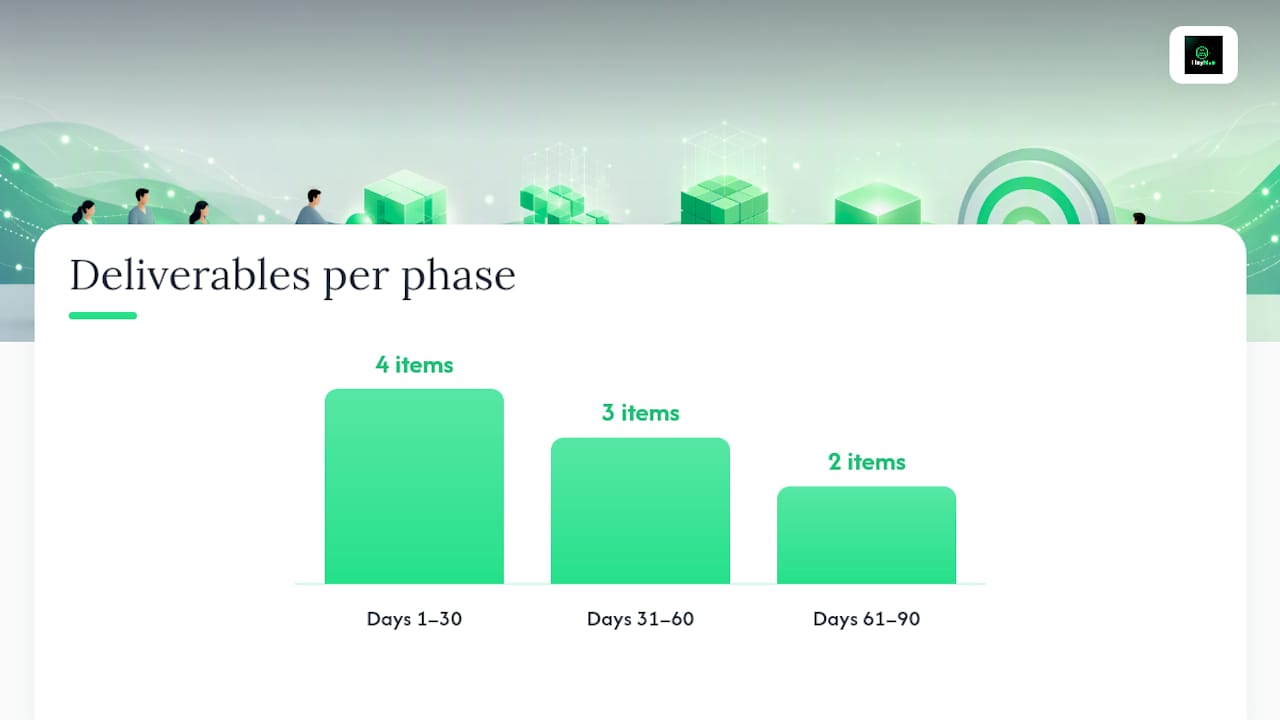
Days 1–30: Establish visibility and stop the bleeding
- Pull your last 90 days of payroll data and identify your top 10 overtime earners and the three shifts or days where overtime consistently spikes.
- Implement pre-authorization: no overtime worked without a manager's written approval, effective immediately.
- Configure your scheduling system's alert thresholds at 32, 35, and 38 hours.
- Redistribute the current week's open shifts away from employees already above 35 hours.
- Identify two or three employees who can be cross-trained for your highest-overtime roles within 30 days.
- Brief all schedulers and shift supervisors on the new thresholds and approval workflow.
Days 31–60: Build the structural fixes
- Complete cross-training for the roles identified in the first 30 days.
- Roll out your written overtime policy with defined approval authority, thresholds, and documentation requirements.
- Connect your scheduling, time-tracking, and payroll systems if they are currently separate. Integrated systems prevent the late discovery of overtime that makes retroactive correction the only option.
- Run your first demand-forecasting exercise: map projected volume for the next four weeks against scheduled hours and identify gaps before they become overtime events.
- Review your first month's KPIs: OT hours, incidence rate, top earners, and cost as % of payroll.
Days 61–90: Automate enforcement and address structural gaps
- Evaluate whether recurring overtime on specific days justifies a part-time hire. If overtime has been consistent for 8+ weeks on the same shifts, the math almost always favors hiring.
- Activate automated scheduling enforcement: hard caps that block shift assignments exceeding weekly limits without manager approval.
- Present your 90-day results to finance and operations: hours saved vs. baseline, OT cost reduction, and incidence rate trend.
- Set your ongoing KPI targets for the next quarter.
Roles and responsibilities:
| Deliverable | Owner | Timeline |
|---|---|---|
| Pre-authorization policy | HR / Operations Manager | Days 1–7 |
| Alert threshold configuration | Scheduler / IT | Days 1–7 |
| Shift redistribution | Scheduler | Days 1–12 |
| Cross-training plan | Operations Manager | Days 1–30 |
| Written overtime policy | HR | Days 31–45 |
| Demand forecasting setup | Operations Manager | Days 31–60 |
| System integration | IT / Payroll | Days 31–60 |
| Hiring decision | HR / Finance | Days 61–72 |
| 90-day results report | Operations Manager | Day 90 |
How Heyhive prevents overtime in practice
Heyhive's AI scheduling engine maps every shift against each employee's availability, certifications, and weekly hour total before publishing. The system won't assign a shift that would push an employee past your configured overtime threshold without explicit manager approval. That single enforcement mechanism closes the gap between "we have a policy" and "the policy is actually followed."
Here is how Heyhive's features map to the root causes covered earlier:
- Reactive scheduling → Heyhive generates a full week of shifts in seconds, using demand data and availability to pre-staff gaps before they become overtime events.
- Over-reliance on the same employees → The AI distributes hours across your full team based on availability and hour totals, not manager habit.
- Disconnected systems → Heyhive exports payroll-ready hours directly, eliminating the manual re-entry step where overtime often goes undetected.
- Inaccurate time records → GPS-verified clock-ins confirm that field employees are where they are supposed to be, preventing time inflation that inflates weekly totals.
- Late discovery → Real-time alerts fire before overtime is worked, not after payroll closes.
Pilot template for a 30-day Heyhive trial:
- Scope: One department or location with your highest overtime incidence.
- Duration: 30 days (one full month of pay periods).
- Success metrics: OT hours vs. prior 30-day baseline, OT incidence rate, manager time spent on scheduling.
- Roles: One operations manager owns the pilot; one scheduler configures thresholds and reviews alerts daily.
- Data to collect: Weekly OT hours, number of alerts fired, number of shifts reassigned vs. approved as OT, payroll export accuracy.
Pro Tip: Run your pilot on the shift or department with the worst overtime history, not the easiest one. A clean result in a low-OT department proves nothing. A measurable reduction in your highest-OT area is the evidence that gets budget approved for a full rollout.
What most managers get wrong about overtime prevention
The standard advice is: write a policy, buy a tool, train your team. That sequence is backwards. Visibility comes first. Until you can see in real time which employees are approaching 40 hours and which shifts are creating the problem, a policy is just a document and a tool is just an expense.

The second mistake is treating overtime as an employee behavior problem. Most overtime is a scheduling design problem. When the same three employees hit overtime every week, the question isn't why they're working too much; it's why the schedule keeps putting them in that position. Punishing employees for a structural flaw in how shifts are built destroys morale without fixing anything.
The third mistake is over-automating before managers understand the system. Hard caps and auto-blocks are powerful, but if schedulers don't know why a shift assignment is being blocked, they'll find workarounds. The technology enforces the policy; the policy still needs to be explained, owned, and believed in by the people running it.
Get visibility first. Then write the policy around what you can actually see and enforce. Then automate the enforcement. That sequence produces durable results.
Stop overtime faster with Heyhive
Most overtime prevention programs stall because the gap between "we have a policy" and "the system enforces it" is too wide. Heyhive closes that gap from day one.

With Heyhive, you get automated shift generation that respects overtime limits before a schedule is published, configurable alerts at your chosen thresholds, hard caps that block unapproved assignments, GPS-verified clock-ins for field teams, and payroll-ready hour exports that eliminate manual re-entry. Managers approve before anything goes live. You stay in control; the AI handles the work behind the work.
To start your pilot: Useheyhive, scope it to your highest-OT department, run 30 days, and measure OT hours against your prior-month baseline. Most operations see a measurable reduction within the first two pay periods.
Sources
Use these primary and industry sources to verify compliance requirements and deepen your implementation knowledge.
- Overtime | U.S. Department of Labor
- Smart strategies for overtime management | SHRM
- What Is Overtime Management? Definition and HR Guide
- Title 26, §603: Limits on mandatory overtime
For state-specific compliance, always confirm current rules directly with your state labor department or a qualified employment attorney. Federal and state rules change; the DOL and state agency pages are your primary legal references.