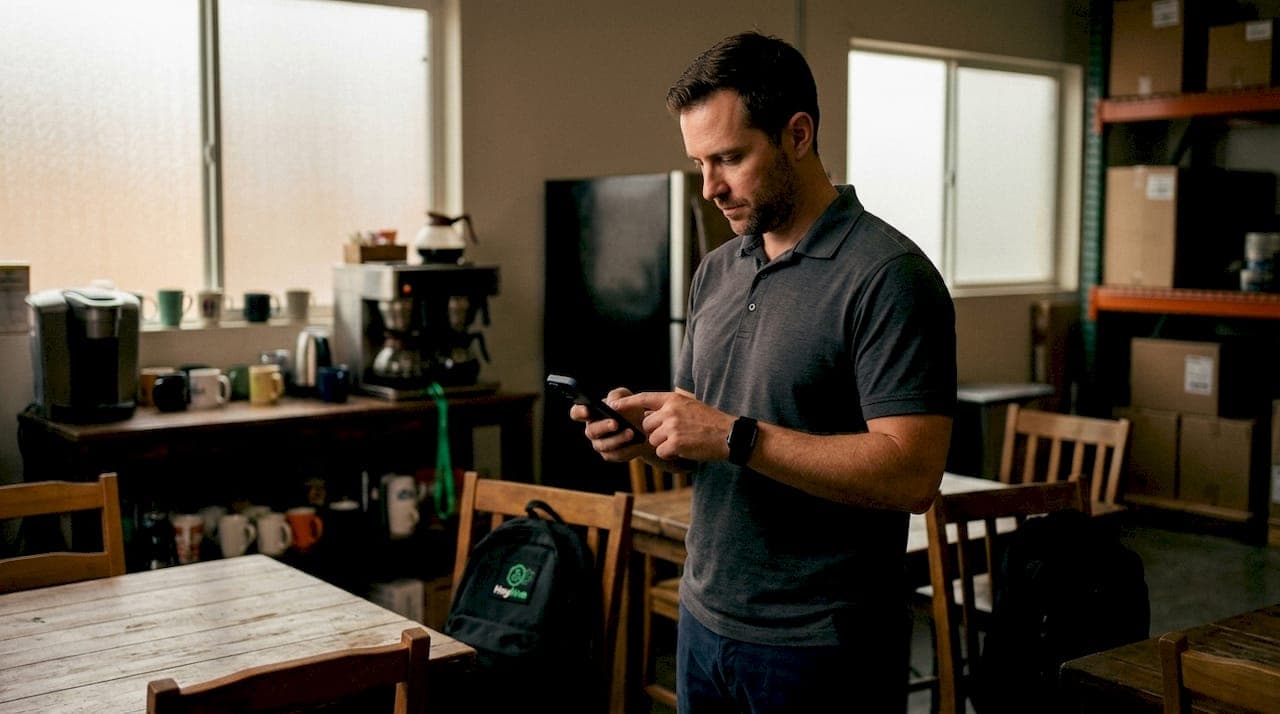
The best employee time clock app for your business in 2026 depends on your workforce type, payroll setup, and how much visibility you need in the field. Here are the top picks, each verified for U.S. availability and strong user ratings:
- Connecteam — Best for deskless teams across construction, healthcare, retail, and transportation; includes scheduling, HR, and internal communication in one platform
- OnTheClock — Best for businesses that need simple, payroll-ready mobile time tracking without a steep learning curve
- ClockShark — Best for field service and construction teams; GPS tracking and integrations with QuickBooks and Sage 100 Contractor
- Apploye Inc. — Best for remote and hybrid teams needing productivity monitoring alongside time tracking; GDPR and HIPAA compliant
- Buddy Punch — Best for small U.S. businesses with hourly workers; GPS, geofencing, PTO tracking, and a free trial included
All five offer free trials, mobile access on iOS and Android, and payroll integrations that reduce manual data entry.
What's the best employee time clock app? A full comparison
Every app below solves a real problem. The right one depends on whether your team is in the field, at a desk, or spread across multiple sites.
| App | Best For | Key Features | Platforms | Trial | Rating |
|---|---|---|---|---|---|
| Connecteam | Deskless teams, multi-industry | Scheduling, HR, time tracking, comms | Mobile + Desktop | free trial | 4.8★ (41,000+ reviews) |
| OnTheClock | Hourly workforces, payroll focus | Mobile clock-in, payroll integrations | Mobile + Desktop | Free trial | 4.8★ (U.S. verified business, local reviews) |
| ClockShark | Field service, construction | GPS tracking, job management, scheduling | Mobile + Desktop | Free, no card | #1 field timesheet app (industry rank) |
| Apploye Inc. | Remote and hybrid teams | Screenshots, video monitoring, GDPR/HIPAA | Mobile + Desktop | Free trial | Focused on team monitoring (GDPR/HIPAA compliance) |
| Buddy Punch | Small U.S. businesses, hourly workers | GPS, geofencing, PTO, payroll reports | Mobile + Desktop | Free trial | 4.8★ (G2 and Capterra) |
Connecteam covers the widest range of industries. Its platform combines employee scheduling, time tracking, HR management, and internal messaging. The App Store rating of 4.8 stars across 41,000+ reviews reflects consistent adoption at scale.
ClockShark positions itself as the #1 timesheet app for field service and construction. GPS tracking lets managers verify job-site arrivals, and integrations with QuickBooks, Xero, ADP, and Paychex mean hours flow directly into payroll without re-entry.
Apploye Inc. goes further than attendance. It adds screenshot monitoring, video capture, and productivity rankings, making it the right fit when you need output visibility alongside clock-in data. Its GDPR and HIPAA compliance matters for healthcare and any team handling sensitive data.
Buddy Punch keeps things direct. GPS and geofencing confirm employees are where they should be, PTO tracking is built in, and the interface is designed for hourly workers who are not tech-heavy. 4.8 out of 5 stars on G2 and Capterra reflects how well it lands with small business owners.
OnTheClock focuses on one thing: getting hourly time data into payroll accurately. Mobile clock-in is fast, and the app connects with major payroll platforms so you spend less time reconciling timesheets.
Pro Tip: If your team works across multiple job sites with spotty cell service, prioritize apps with offline sync. Punches store locally and upload when connectivity returns, so you never lose a record. This is especially critical for construction and logistics firms.
How to choose the best time clock app for your business
The feature list is rarely the deciding factor. What matters is fit.
Start with your workforce type. A retail manager with 20 part-time employees needs something different from a construction company running crews across five job sites. Field teams need GPS and offline time tracking capabilities. Office teams can get by with a simple browser-based clock-in.
Prioritize payroll integration over feature count. The best choice connects directly with your existing payroll or accounting software, cutting admin work rather than adding to it. Apps like ClockShark integrate with QuickBooks and Sage; Buddy Punch and OnTheClock connect with major U.S. payroll providers. Check the payroll integrations your current software supports before committing to any platform.
Evaluate ease of use honestly. An app your employees resist using creates more problems than paper timesheets. Look for clean mobile interfaces, fast clock-in flows, and minimal training requirements. Free trials exist for exactly this reason.
Key selection criteria to verify before you sign up:
- Compliance features: Does it handle overtime rules, break tracking, and labor law requirements for your state?
- Security and data privacy: GDPR and HIPAA compliance matter for healthcare and any team with remote contractors.
- Customer support: Live chat or phone support during U.S. business hours is worth more than a help center alone.
- Scalability: Can the plan grow with your headcount without a painful migration?
- Hardware compatibility: Does it support kiosk mode, badge scanners, or biometric devices if you need them?
FAQ: Common questions about employee time clock apps
What app is best for clocking in employees? Connecteam and Buddy Punch are the most versatile options for U.S. businesses. Connecteam suits larger or multi-industry teams; Buddy Punch is purpose-built for small businesses with hourly workers.
Is Clockify really free? Clockify offers a genuinely free tier with core time tracking for unlimited users. Advanced features like GPS tracking, timesheet approvals, and detailed reporting require a paid plan.
What is the 7-minute rule for employees? The 7-minute rule under U.S. Department of Labor Rule 29 CFR 785.48 allows employers to round clock-in and clock-out times to the nearest quarter hour. A clock-in at 8:07 AM rounds down to 8:00 AM; 8:08 AM rounds up to 8:15 AM. Most modern time clock apps automate this rounding in payroll exports. You can read more about how this applies to attendance tracking automation in practice.
What is the difference between time tracking and employee monitoring? Time tracking records when employees start and stop work. Employee monitoring goes further, capturing screenshots, app usage, and productivity metrics. For high-trust cultures, a simple attendance tool is usually the better fit. Monitoring platforms like Apploye are better suited when output visibility is a business requirement.
What AI and automation are changing in time tracking for 2026
The shift in 2026 is away from manual timers and toward software that handles the work automatically. AI-driven time suggestions and automated accountability features reduce manual errors and move the burden from employees to the platform itself.
Key trends reshaping the category:
- AI-assisted scheduling and attendance: Platforms now generate shift schedules and flag attendance anomalies without manager input at every step.
- GPS geofencing enhancements: Geofencing has moved from a basic radius check to multi-site, role-aware boundaries that trigger automatic clock-ins and alerts.
- Offline sync reliability: Offline sync has become a baseline expectation for field apps, not a premium feature.
- Payroll-ready exports: Direct integrations with QuickBooks, ADP, and Gusto mean hours move to payroll in one click, not a spreadsheet.
- High-trust monitoring design: The cultural shift toward less invasive tracking has pushed vendors to frame GPS as an accuracy tool rather than surveillance.
Does your time clock app work with biometric devices and badge scanners?
Hardware compatibility is often the last thing managers check and the first thing that causes problems at rollout. Most of the apps covered here support kiosk mode on tablets, which turns a shared device into a physical clock-in station. Connecteam and Buddy Punch both support this setup natively.
For biometric devices (fingerprint readers, facial recognition terminals) and badge scanners, compatibility varies by vendor and plan tier. ClockShark and Connecteam have documented integrations with third-party hardware through their API layers. If your operation requires biometric verification for compliance or security, confirm hardware support directly with the vendor before purchasing. Some HR and workforce platforms also support hardware integrations for equipment-heavy environments where badge-based clock-in is standard.
Key takeaways
The right time clock app matches your workforce type, connects to your payroll system, and gets adopted by your team without a fight.
| Point | Details |
|---|---|
| Match app to workforce type | Field teams need GPS and offline sync; office teams can use simpler browser-based tools. |
| Payroll integration drives ROI | Choose an app that connects directly to your payroll software to cut manual reconciliation. |
| Free trials reduce risk | All five featured apps offer free trials, so test with your actual team before committing. |
| The 7-minute rule is automated | Modern apps apply U.S. DOL rounding rules automatically in payroll exports. |
| Heyhive adds AI scheduling | Heyhive pairs GPS-verified clock-ins with AI-generated shift schedules, giving managers approval control before any schedule goes live. |
The app you choose says something about how you manage
Most managers pick a time clock app based on features. The smarter question is: what does this tool communicate to your team?
GPS and geofencing get the most pushback when they are introduced as surveillance. Frame them as accuracy tools that protect employees from disputed hours and time theft claims, and adoption rates improve. The technology is identical. The framing is everything.
There is also a real difference between monitoring and tracking that the feature lists blur. Apploye's screenshot and video monitoring is genuinely useful for remote teams where output is hard to verify. For an in-person retail crew, that same level of monitoring signals distrust and drives turnover. Choosing the right tool means being honest about your culture, not just your headcount.
The apps that win long-term are the ones employees actually use without friction. A clean mobile interface and a fast clock-in flow matter more than a dashboard full of analytics no one opens.
Heyhive gives you GPS-verified time tracking with AI scheduling built in
If you want time tracking that connects directly to how shifts get built, Heyhive is worth a close look. While the five apps above each solve attendance well, none of them generate a full week of shifts in seconds using AI, then hold the schedule for your approval before it goes live.

Heyhive's GPS-verified clock-ins confirm field arrivals and departures in real time. The AI scheduling engine respects employee availability, certifications, and overtime limits automatically. You review, approve, and publish. Payroll-ready hours export with one click. For managers running hourly or field teams who want less admin and more control, Heyhive brings scheduling and time tracking into one place without the back-and-forth.