
Attendance data reporting means collecting, storing, and presenting employee time-and-attendance records so you can run payroll accurately, staff shifts correctly, and pass a federal inspection without scrambling. Under the Fair Labor Standards Act, every covered employer must keep complete and accurate records for each non-exempt worker. The IRS adds its own layer: employment-tax records must be retained for at least four years. Your immediate next action is to confirm you capture all legally required fields every pay period:
- Employee name, address, Social Security number, and date of birth (if under 19)
- Daily start and stop times, total hours each workday, and total hours each workweek
- Regular hourly rate and basis of pay (hourly, salary, piece rate, commission)
- Total daily or weekly straight-time earnings and overtime earnings
- All additions to and deductions from wages
- Dates of employment
Get those fields locked in first. Everything else in this guide builds on that foundation.
Key Takeaways
Accurate attendance data reporting requires the right fields, the right retention timelines, and a reconciliation process that catches errors before payroll closes, not after.
| Point | Details |
|---|---|
| Capture required fields every period | Record daily start/stop times, total weekly hours, pay rate, and all additions/deductions per FLSA and 29 CFR §516.2. |
| Follow the longer retention rule | Keep payroll records 3 years, employment-tax records 4 years, and time cards at least 2 years per DOL and IRS guidance. |
| Reconcile 48 hours before payroll | Resolve every exception report flag and lock manager approvals before the payroll cutoff. |
| Maintain an immutable audit trail | Log every record edit with a timestamp, editor name, and reason to satisfy DOL and IRS inspection standards. |
| Heyhive automates the hardest steps | GPS-verified clock-ins, payroll-ready exports, and approval workflows reduce manual errors and build audit readiness automatically. |
Table of Contents
- What does attendance data reporting require you to record each pay period?
- How long do you need to keep attendance and payroll records?
- Which timekeeping methods are legally acceptable?
- How should you structure attendance reports for payroll and staffing?
- Are your records ready for a DOL or IRS inspection?
- When should you automate attendance reporting?
- Your 30–90 day checklist to set up compliant attendance reporting
- The reconciliation rule that actually protects you
- Heyhive gives you GPS-verified records and payroll-ready exports
- Sources
What does attendance data reporting require you to record each pay period?
Federal law is specific about the fields you must capture. 29 CFR §516.2 requires the regular hourly rate when overtime is due, the basis of pay, and hours worked each workday and each workweek. Employer confirms no specific form is required, but every record must include employee identifying information, hours worked, and wages earned.
| Field | Why it matters | Governing authority |
|---|---|---|
| Employee name, address, SSN | Identifies the worker for tax filing and wage claims | FLSA / IRS |
| Daily start and stop times | Verifies hours worked; required for overtime calculation | 29 CFR §516.2 |
| Total hours each workweek | Triggers overtime threshold at 40 hours | FLSA |
| Regular rate and basis of pay | Determines correct overtime multiplier | 29 CFR §516.2 |
| Additions and deductions | Supports W-2 accuracy and wage-claim defense | IRS / FLSA |
| Dates of employment | Required for tax-credit documentation and termination records | IRS |
Fixed-schedule exception: If an employee always works the same hours, employer.gov allows you to record the schedule once and then document only exceptions when actual hours differ. You still need a written schedule on file and a clear process for logging deviations.
How long do you need to keep attendance and payroll records?
Retention rules come from two separate agencies, and the timelines differ.
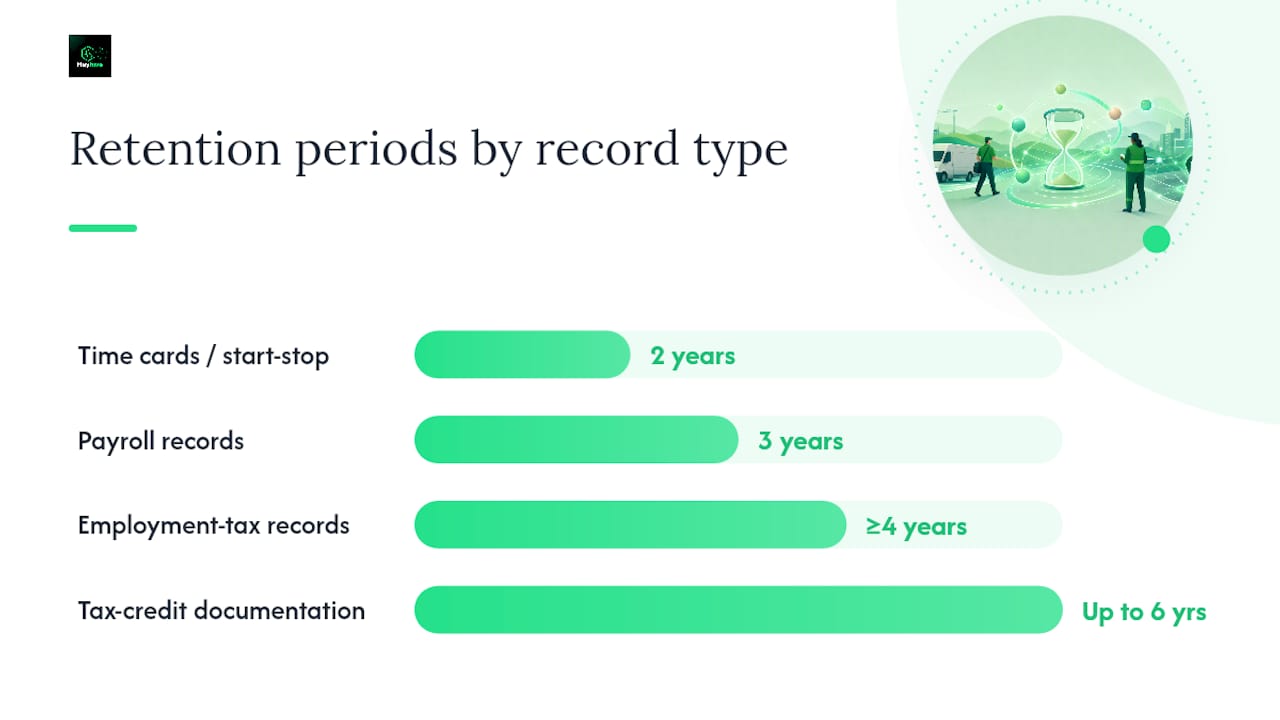
DOL/FLSA timelines per DOL recordkeeping guidance:
- Payroll records, collective bargaining agreements, and sales/purchase records: generally 3 years
- Time cards and wage-computation records: generally 2 years
IRS timelines per IRS employment-tax recordkeeping:
- Employment-tax records (W-4s, tip reports, tax-deposit records): at least 4 years after filing the fourth quarter
- Documentation for certain tax credits: up to 6 years
29 CFR §516.6 specifically requires supplementary basic records, including daily starting and stopping time records, to be preserved for at least 2 years from the last entry.
The practical rule: map each record type to the longer of the DOL and IRS timelines and build a single indexed retention schedule. DOL Wage and Hour Division (WHD) representatives and IRS examiners both have authority to inspect records, and they expect them available on-site or at a central archive within a reasonable timeframe. Store a secure off-site or cloud backup and maintain an access log showing who retrieved records and when.
Which timekeeping methods are legally acceptable?
The FLSA does not mandate a specific timekeeping device. Any method that produces complete and accurate records qualifies, including:
- Time clocks (punch card or biometric)
- Designated timekeepers who record employee hours
- Employee self-reporting via paper timesheets or digital entry
- Mobile or GPS time clocks for field and multi-site teams
Operational controls are what separate a compliant system from a liability. Require manager approval before any time record is finalized. Log every edit with a timestamp, the editor's name, and a reason. Run weekly exception reports to catch missed punches, unapproved overtime, and break deductions that did not apply. Keep a change log that is immutable after sign-off.
Pro Tip: For field teams working remote or multi-site jobs, require GPS-verified clock-ins with a photo or two-factor confirmation. A location stamp plus a photo creates a record that is nearly impossible to dispute and satisfies the "complete and accurate" standard under the FLSA. Heyhive's GPS time clock captures both automatically.
How should you structure attendance reports for payroll and staffing?
A payroll-ready attendance report needs these columns at minimum:
| Report column | Purpose | Format / field name |
|---|---|---|
| Employee ID | Links time record to payroll system | EMP_ID (CSV/Excel) |
| Employee name | Human-readable identifier | LAST_FIRST |
| Pay rate and basis | Calculates straight-time and OT earnings | RATE, PAY_BASIS |
| Date | Anchors record to pay period | YYYY-MM-DD |
| Clock-in / clock-out | Calculates hours worked | TIME_IN, TIME_OUT |
| Total hours | Straight-time hours for the day | HRS_WORKED |
| Overtime hours | Hours above 40 per workweek | OT_HRS |
| Paid/unpaid breaks | Adjusts compensable time | BREAK_PAID, BREAK_UNPAID |
| Adjustments | Approved corrections with reason | ADJUSTMENT, REASON |
| Manager approval | Confirms record is finalized | APPROVED_BY, APPROVED_DATE |
Before you send data to payroll, run this reconciliation checklist:
- Pull the exception report and resolve every flagged item (missing punches, unapproved OT, break deductions).
- Confirm every record carries a manager approval signature or digital sign-off.
- Compare scheduled hours against actual hours for each employee; investigate gaps above a threshold you set.
- Verify overtime hours are calculated on the workweek basis, not the pay-period basis.
- Check that meal and rest break deductions match your policy and state law.
The IRS requires wages and withholdings to be reported on Form 941 (quarterly, for most employers) and W-2s to be furnished to employees by January 31. Your attendance data feeds those filings directly, so errors in time records become errors on federal forms.
Are your records ready for a DOL or IRS inspection?
Most recordkeeping problems that trigger or complicate inspections fall into a short list:
- Missing daily start and stop times (the most common gap)
- Corrections made without a date, signature, or reason
- Inconsistent pay-rate documentation across pay periods
- No audit trail showing who edited a record and when
- W-2 and W-3 totals that do not reconcile to payroll summaries
Immediate fixes:
- Lock historical records so they cannot be edited without a supervisor override that creates a new log entry.
- Write a correction policy: every change requires the employee's initials, the manager's initials, the date, and a one-line reason.
- Generate an audit export that shows every edit in chronological order with timestamps.
- Run a 30-day reconciliation to find and resolve discrepancies before an inspector does.
Pre-inspection checklist:
- All time records present for the retention period
- Every record includes daily start/stop times
- Pay-rate documentation consistent across all pay periods
- Audit trail accessible and exportable
- W-2/W-3 totals reconciled to payroll summaries
- Retention schedule documented and current
Pro Tip: When a WHD inspector arrives, hand them an index sheet listing every record type, the date range covered, the storage location, and a contact name. Inspectors note how organized your records are. A well-indexed package signals compliance before they read a single line.
When should you automate attendance reporting?
Manual processes work at small scale. They break down when any of these signs appear:
- Payroll corrections happen more than once per cycle
- Unapproved overtime shows up regularly on paychecks
- Your field team has grown beyond a handful of workers
- You manage multiple sites and reconcile hours from different sources
When you reach that point, the features that materially reduce payroll risk are:
- GPS-verified clock-ins that eliminate buddy-punching and provide location evidence
- Immutable audit trails that log every edit automatically
- Payroll-ready export mappings in CSV, QuickBooks, or ADP formats
- Overtime alerts that notify managers before the 40-hour threshold is crossed
- Manager approval workflows that prevent unreviewed records from reaching payroll
- Exception reporting that surfaces anomalies before the payroll run
Switching from manual timesheets to an automated GPS time clock with payroll-ready exports typically removes the most error-prone step in the payroll cycle: manual data re-entry. When clock-in data flows directly into a formatted export, the reconciliation step shrinks from hours to minutes, and the audit trail is built automatically rather than reconstructed after the fact.
For a practical overview of attendance tracking workflows that support this kind of migration, Heyhive's operational guides walk through the parallel-run approach step by step.
Your 30–90 day checklist to set up compliant attendance reporting
Days 1–30: build the foundation
- Map every required field against the FLSA/CFR checklist above.
- Choose your timekeeping method and document it in writing.
- Set your retention schedule (3 years for payroll records, 4 years for employment-tax records, 2 years for time cards at minimum).
- Build your standard report template with all required columns.
- Run a parallel tracking phase: collect data both ways for two weeks and compare outputs.
Days 31–60: configure and train
- Configure manager approval workflows so no record reaches payroll without sign-off.
- Set up your payroll export in the format your payroll processor accepts.
- Enable GPS verification and photo confirmation for all field employees.
- Train managers on the correction policy, exception report review, and approval steps.
- Train employees on clock-in procedures and what to do when they miss a punch.
Days 61–90: validate and lock in
- Run two full reconciliation cycles and document the results.
- Finalize off-site or cloud backups and test retrieval.
- Schedule a quarterly internal audit on your calendar.
- Write your recordkeeping procedures into a one-page policy document and get manager sign-off.
The reconciliation rule that actually protects you
The conventional wisdom on attendance reporting focuses on the data collection side: get the right fields, use the right system, keep records long enough. That is all correct. But the step most managers underinvest in is the reconciliation window before payroll closes.
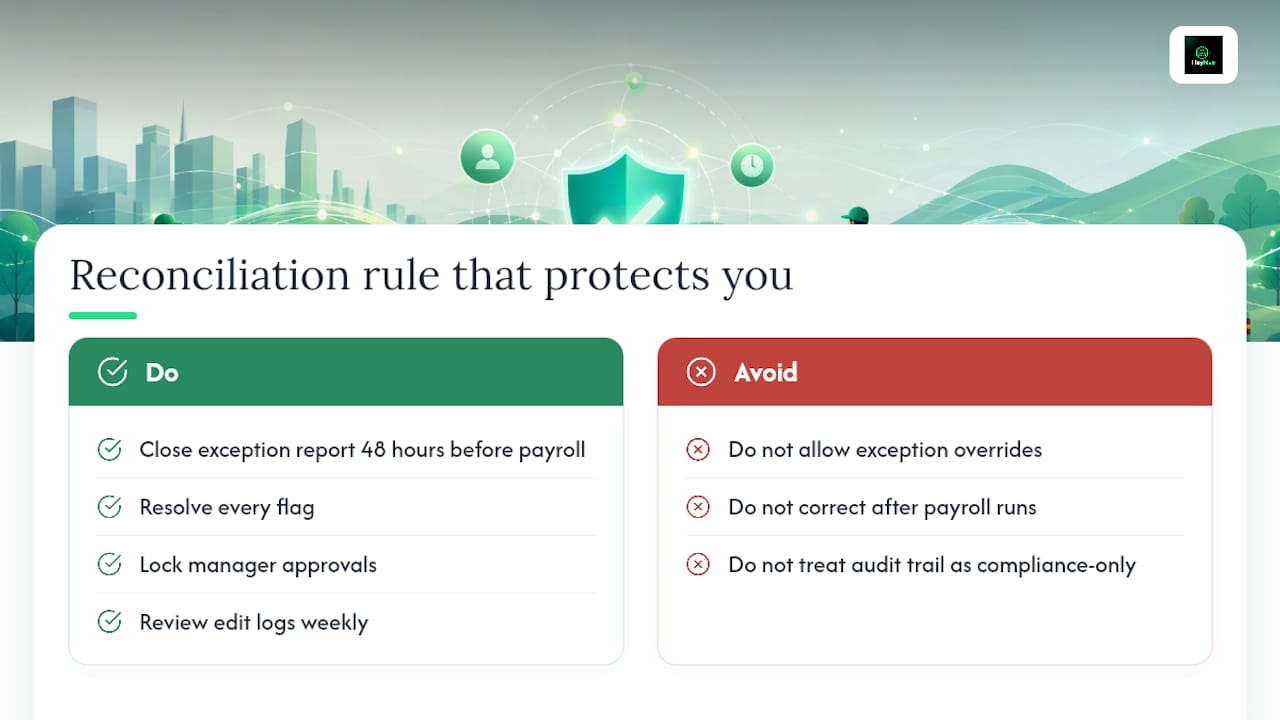
A missed punch caught on Monday costs you two minutes. The same missed punch caught after payroll runs costs you a correction cycle, a potential wage claim, and an entry in your audit log that looks like a pattern if it happens twice. The 48-hour rule is simple: close your exception report 48 hours before payroll cutoff, resolve every flag, and get manager approvals locked. No exceptions to the exception process.
The other underrated move is treating your audit trail as a management tool, not just a compliance artifact. When you review edit logs weekly, you see which managers are making the most corrections and why. That pattern usually points to a training gap or a scheduling problem, not a compliance problem. Fix the root cause and the corrections disappear.
Heyhive gives you GPS-verified records and payroll-ready exports
Payroll errors in hourly and field operations almost always trace back to the same two gaps: unverified clock-in data and manual re-entry into payroll. Heyhive closes both. GPS-verified clock-ins confirm location and timestamp at the moment of punch, so every record arrives in your system with built-in evidence. Payroll-ready exports map directly to CSV, QuickBooks, and ADP formats, so your reconciliation step takes minutes rather than hours. Manager approval workflows prevent any unreviewed record from reaching payroll, and the audit log captures every edit automatically.

If your team is growing, your field operations are expanding, or your payroll corrections are climbing, Heyhive is built for exactly that scale. Useheyhive and run your first automated payroll export free.
Sources
Bookmark these primary sources for audit questions and HR policy drafting:
- Fact Sheet #21: Recordkeeping Requirements under the Fair Labor Standards Act (FLSA) | U.S. Department of Labor
- Recordkeeping | U.S. Department of Labor
- Pay and Benefits
- Employment tax recordkeeping | Internal Revenue Service
- 29 CFR § 516.2 - Records to be kept by employers | Legal Information Institute
This article is general information, not a substitute for advice from a qualified lawyer. Consult a qualified legal professional about your own circumstances before acting on anything here.